

During the initial installation of WordPress, the world-renowned content management system, you likely encountered (or manually configured) a block of Authentication Unique Keys and Salts inside the wp-config.php file. These values encrypt credentials and cookie sessions, making brute-force cracking significantly more difficult and reinforcing your website’s overall cybersecurity posture.
A cryptographic “salt” is a random sequence inserted into a password prior to hashing, ensuring that identical passwords yield completely distinct hash outputs. While salted hashes drastically reduce the risk of credential exposure if user databases are leaked, hash tables and rainbow tables can still pose theoretical risks over time. From an information security perspective, regularly regenerating and updating your security keys and salts is considered an industry best practice.
There are two primary ways to update your keys and salts: through automated WordPress security plugins, or by manually updating wp-config.php. Because plugins consume server overhead and introduce potential attack surfaces, this guide focuses on the manual approach. It is straightforward, though you will need basic file management access (via FTP, SSH, or your hosting control panel) to edit files in your WordPress root directory.
Caution: If you are unfamiliar with file editing, always make a complete backup of your website files and database before making changes.
In your WordPress root directory, open wp-config.php and locate the block shown in the red box below. It consists of 8 lines defining unique keys and salts. Delete the existing 8 lines entirely.
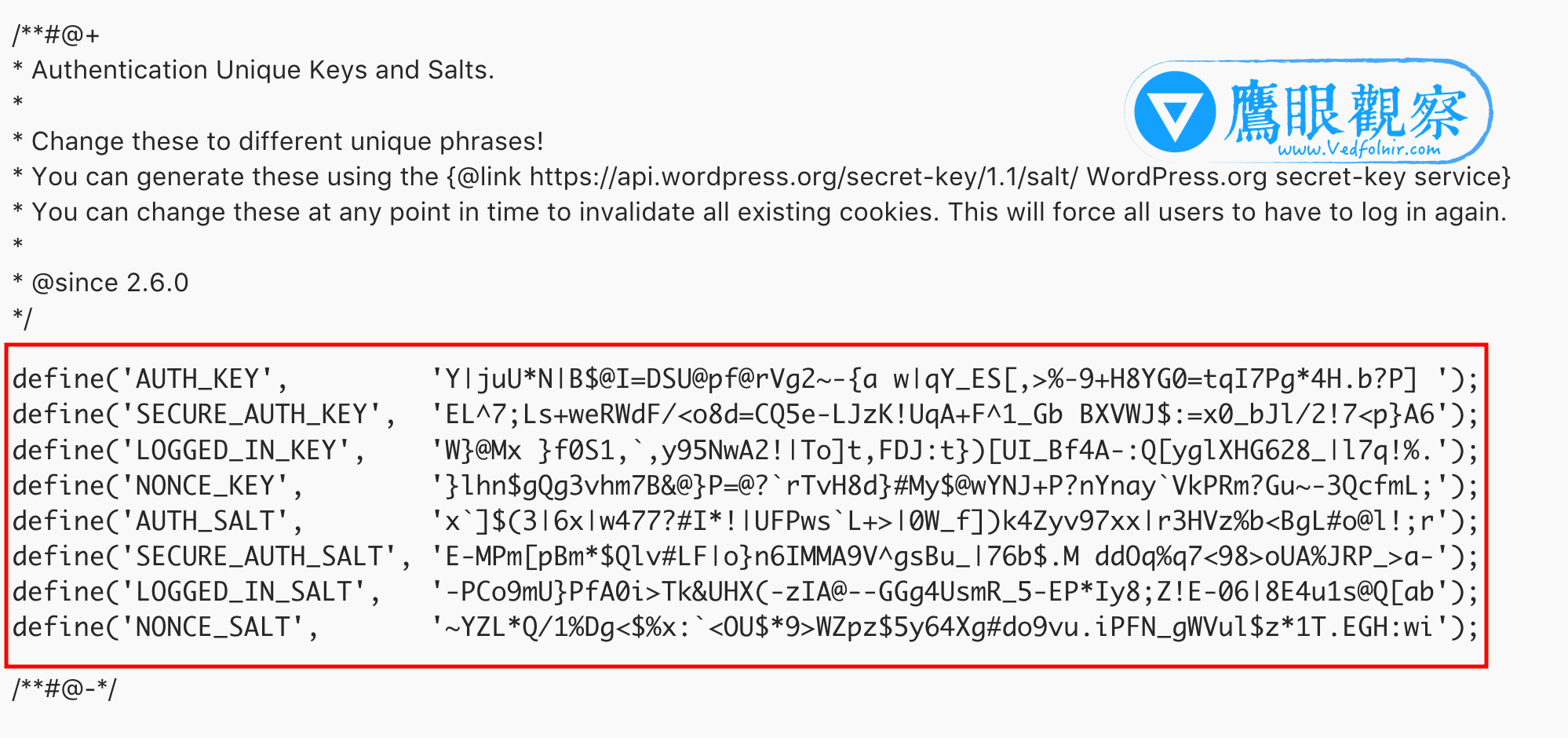
Next, open the official WordPress.org salt generator [1] page, which generates a fresh, cryptographically secure set of keys and salts every time you refresh.
Copy the newly generated block, paste it back into wp-config.php where the old values were removed, and save the file to finalize the update.
Unable to Log In After Updating Keys and Salts? Here is the Fix
After changing your authentication keys and salts, you may find yourself immediately logged out and unable to log back in. Do not panic—updating these keys intentionally invalidates all existing active login cookies across all browsers and users.
Simply clear your browser cache and cookies (specifically cookies for your domain), refresh the page, and log in to WordPress again. You will be able to access the admin dashboard smoothly.
Further Reading
Support Independent Perspectives & In-Depth Insights
Every thoughtful analysis and candid critique comes from our dedication to truth and quality. We choose not to follow sensational algorithms or clickbait headlines.
Sustaining independent research requires reader support. Make a one-time or monthly contribution, securely processed by Google.
Payments secured by Google · Manage or cancel anytime in your Google Account


Comments