

After upgrading WordPress to version 5.8, the widgets that were originally controlled intuitively were once again forced to keep up with the generational change, becoming a visual block-based widget editor (Block-based Widgets Editor) just like the post editor.
Although the same operating logic can make the site system more complete, even back when the post editor was forcibly upgraded to the Gutenberg block editor, it drew a chorus of complaints from webmasters and bloggers worldwide.
At that time, WP officially released the “Classic Editor” plugin, letting users “downgrade” themselves, which even led to an astonishing total download count of 5 million for that program.
From this we can see that this forced upgrade naturally also drew a lot of negative reviews. In particular, many third-party plugins’ old and new version schemes were not updated along with it, causing functions that had been working fine to malfunction, and even damaging the site’s good user experience.
And in fact, this WordPress upgrade also has program bugs, such as the widget display errors, disappearing widgets, poor control, and double add-block buttons introduced below. This is the version conflict case I encountered this time and found a solution for, provided for webmasters who need it.
WordPress 5.8 Block Widget Program Bug Solution
If you find that after upgrading the system to version 5.8, the operation of block widgets becomes uncontrollable, and even two sets of add buttons appear within one block but neither works properly, you can first go to plugins and install and activate the “Classic Widgets” made by WP officially.
https://tw.wordpress.org/plugins/classic-widgets/
Once that plugin is enabled, the widgets area in the backend will return to the old traditional style, and you can then see the “block” and its content as shown in the image below in the widgets interface.
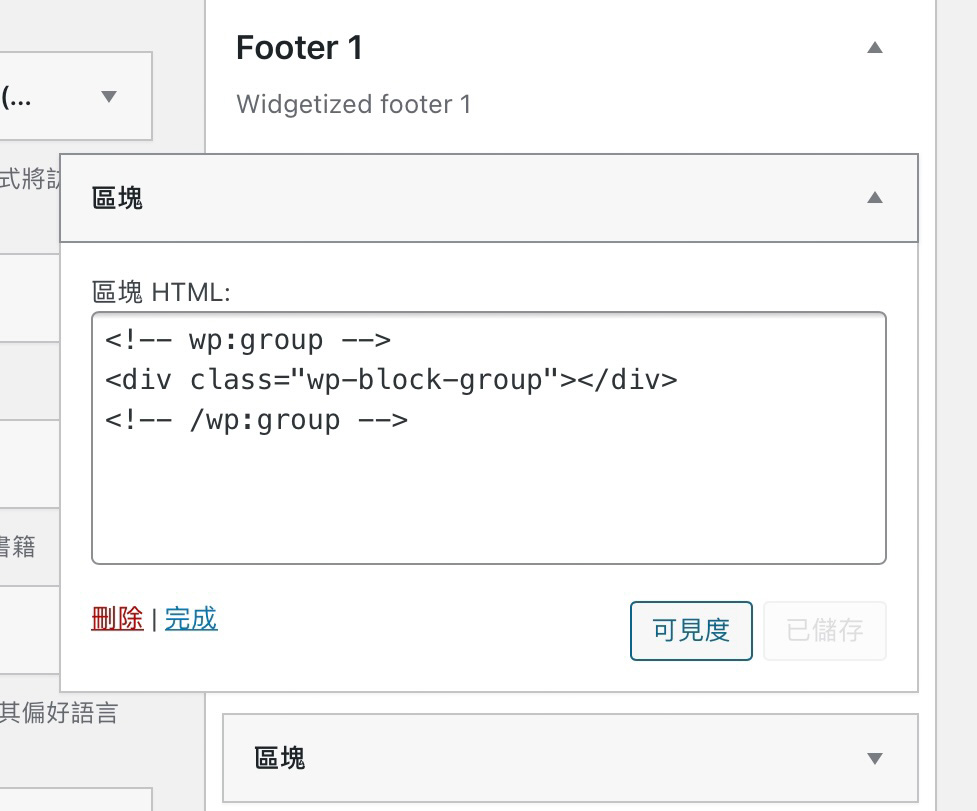
Block widget
If it is a correctly upgraded and normally functioning WP version, this strange block widget will not appear. This widget is also the main cause (or result) of our inability to use it normally.
Interestingly, not all upgrades will necessarily produce this situation; it still depends somewhat on luck. For example, I have two nearly identical sites using similar plugins and widgets, yet one works normally while the other shows a program bug.
In any case, whether or not you encounter this error, just remember to install the Classic Widgets plugin, check for any abnormal widgets (such as the block in the image above) and remove them. After that, remove the plugin, and you can then use the new block widget application functions normally.
Support Independent Perspectives & In-Depth Insights
Every thoughtful analysis and candid critique comes from our dedication to truth and quality. We choose not to follow sensational algorithms or clickbait headlines.
Sustaining independent research requires reader support. Make a one-time or monthly contribution, securely processed by Google.
Payments secured by Google · Manage or cancel anytime in your Google Account

Comments