
Having recently wrapped up a project, I took the opportunity to grab the 64-bit Windows 8 Release Preview (Windows 8 RP) disc that had been burned for a… very… long… time (see our article “Windows 8 Release Preview: Official Download Guide”), and install it to see how the Release version compares to earlier builds (an inner voice whispers: the final RTM is already out and you’re still behind the curve), while checking if 64-bit is more practical than anticipated.
During OS installation, this build introduced a product key verification prompt. Fortunately, that is easy to solve—since RP is still a preview, Microsoft provided a shared test key (TK8TP-9JN6P-7X7WW-RFFTV-B7QPF), valid until January 2013.
True to earlier builds, the installation process of Windows 8 is minimalist. Thanks to meticulous planning by Microsoft engineers, the entire procedure is only slightly more complicated than a one-key recovery wizard. Users simply need to complete initial settings manually, and by the time you wake up, Windows 8 has finished installing.
On initial setup, like Google Android or Apple iPhone, Windows 8 allows logging in with an email account. I used a Hotmail account to seamlessly integrate Windows 8 with traditional Microsoft services. While this convenience is great for personal daily use, it might give enterprise administrators quite a headache.
Additionally, I originally planned to install Microsoft Security Essentials, but Windows 8 comes with the latest version pre-installed. Whether this built-in protection might spark conflicts with third-party antivirus vendors (such as Symantec or Trend Micro) remains to be seen (antivirus vendors, hurry up and petition the EU to penalize Microsoft :twisted:).
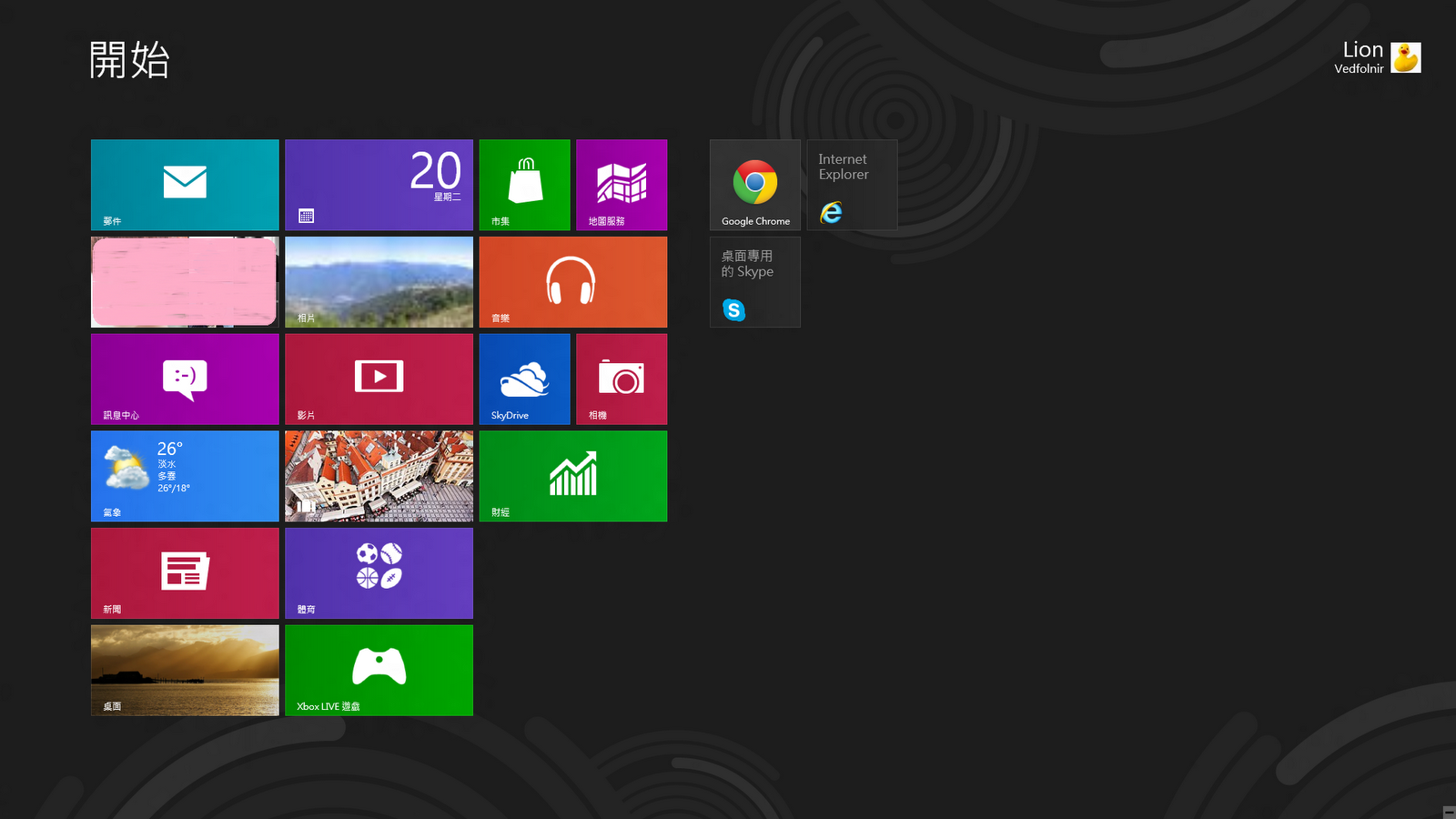
In my previous article “Microsoft Windows 8 Consumer Preview Review”, I noted that Windows 8 Apps lacked complete support and that even the Metro version of Internet Explorer was rather unwieldy to navigate. These issues have seen substantial fixes in the RP build. Microsoft even added a tile shortcut on the Start screen that simply links to the traditional “Desktop”. Microsoft clearly realized this pain point, since not everyone wants to memorize keyboard shortcuts just to switch between apps.
Still, one annoying quirk persists in RP: after opening an app, users cannot easily and directly close it. To close an app, you must switch back to the Metro interface or another app, hover over the top-left app switcher to bring up the app thumbnail, and right-click to select close. While power users can quickly bypass this using the “Alt + F4” shortcut, for less tech-savvy users, apps easily pile up in the background and degrade system performance. There are plenty of better ways to solve this—for example, simply adding a close button on the left edge of the hidden bottom app bar (summoned by right-clicking empty space within an app).
Beyond usability hurdles, the hyper-minimalist facade of each Windows 8 App actually conceals a flood of background data that cannot be overlooked. For example, will real-time live feeds from Metro web browsers, financial apps, and weather widgets accumulate endless cached junk and exhaust system resources over time? Definite answers to these questions are scarce today, yet they are hard to dismiss.
On hardware driver support, Windows 8 is currently impressive. Even a Wi-Fi antenna made in mainland China that I recently purchased was recognized out of the box (for details on that antenna, see “Hardware Recommendation: Budget-Friendly Tenda W311MA Wi-Fi USB Adapter”). Moreover, the audio driver glitch I encountered in the Consumer Preview and addressed in “Troubleshooting: Fix Windows 8 System Audio Playback” has completely disappeared in RP.
As readers might recall, in “A Brief Discussion on Microsoft Windows 8 Metro UI”, I expressed hopes that Microsoft would deeply integrate Skype into Windows 8. Microsoft subsequently announced plans to fold MSN Messenger into Skype. Although a native Skype app hasn’t shown up in the RP Store yet, given Microsoft’s recent design direction, I look forward to a refreshing software paradigm.
By the way, testing revealed that we can now log into Skype using a Microsoft account to merge Skype and MSN accounts. But… when the merge completed, the page greeted me with:
Oops, something went wrong…
We’re having technical problems. We’re sorry for the inconvenience. Please try again after a few minutes.
Thank you.
It seems wiser to wait a bit before merging. Although the error page appeared, the merge did go through (guinea pig confirmed). At least it works, though seeing contacts from the ancient MSN days suddenly pop up in Skype is a slight headache—even contacts I didn’t want to see appeared =_=. The software integration still feels unpolished: contacts originally blocked on MSN appear in Skype under the same blocked state, but with no obvious way to unblock them (having to launch MSN just to unblock someone would be utterly absurd).
Furthermore, as noted in “A Brief Discussion on Microsoft Windows 8 Metro UI”, while Metro offers a clean, uncluttered interface, it disrupts continuous, deep thinking. Thus, easy as Windows 8 is, I immediately installed Google Chrome. After all, my everyday workflow revolves around the Google ecosystem. Google’s flexibility remains unmatched, making Chrome the best pragmatic choice for now—after all, I am merely another loyal subject under the reign of sheer laziness.
Conclusion:
During my time with Windows 8, I came to realize that the rise of the app model may fundamentally reshape business, marketing, the web, and software as a whole. Yet this transition only intensifies the “the bigger get bigger” phenomenon. Recent reports indicate that the Google Android Market alone has exceeded 700,000 apps, yet how many can you name off the top of your head right now? Probably fewer than twenty. Meanwhile, the ROC government recently announced massive resource allocation towards app development, which strikes me as somewhat shortsighted and concerning.
From a visionary standpoint, the app paradigm is undoubtedly suitable for everyone from individuals and families to enterprise conglomerates. Yet winning broad, sustainable adoption is among the steepest hurdles.
Take Google’s foundation—“Search”—as an example: people search out of “need,” ranging from daily necessities to entertainment, yet humans inherently chase established brands and prestigious names. People use Facebook for social networking, Skype for calling, and Garmin for navigation. When dominant market leaders capture every specific need and provide dedicated apps, why would users still open a browser to search? Coupled with the fact that top search results lately are overrun by ads or deceptive link-farms, one cannot help but wonder whether Google’s profit momentum will suffer stagnation. As traditional search loses prominence, Google’s lifeblood—advertising revenue—is increasingly vulnerable to being chipped away by rival platforms.
Extended News Reading:
Free 60-Day Evaluation of Office 2013 Professional Plus
To allow more users to experience the next-generation Office suite, Microsoft has made a fully functional 60-day trial of Office Professional Plus 2013 available on its TechNet portal. Included applications: Word, PowerPoint, Excel, Outlook, OneNote, Access, Publisher, and Lync. Supported languages include Arabic, Simplified Chinese, Traditional Chinese, Dutch, English, French, German, Hebrew, Italian, Japanese, Korean, Portuguese, Russian, and Spanish.
Users simply need to sign in with a Microsoft account to download and install Office 2013 Professional Plus for a 60-day trial. The general release of Office 2013 is scheduled for Q1 2013; starting October 19, customers who purchase Office 2010 from local retailers or resellers are eligible for a free upgrade to Office 2013.
Microsoft TechNet download link: Download Microsoft Office Professional Plus 2013
Support Independent Perspectives & In-Depth Insights
Every thoughtful analysis and candid critique comes from our dedication to truth and quality. We choose not to follow sensational algorithms or clickbait headlines.
Sustaining independent research requires reader support. Make a one-time or monthly contribution, securely processed by Google.
Payments secured by Google · Manage or cancel anytime in your Google Account

Comments