

One of WordPress’s most powerful features is that many plugins provide convenient Shortcodes for use in your content. If you are a WordPress user, learning how to use shortcodes is essential—they dramatically streamline your content creation and editorial efficiency.
Today, we will focus on the popular Jetpack plugin. By activating the “Shortcode Embeds” module in its settings, you can insert compact shortcodes into your posts and pages instead of dealing with lengthy, complex embed code. Jetpack describes the feature as follows:
“Shortcodes allow you to easily and safely embed media from other places into your site. With just a simple snippet of code, WordPress can embed YouTube, Flickr, and other media directly into your posts or pages using the editor.”
For instance, standard YouTube embed code originally looks like this:
<iframe width="560" height="315" src="https://www.youtube.com/embed/0xsYg9PRC4E" frameborder="0" allowfullscreen></iframe>Using a shortcode, you can simply wrap the URL in [youtube= ... ]:
[youtube=https://www.youtube.com/watch?v=0xsYg9PRC4E]Doesn’t utilizing shortcodes make writing and publishing so much easier?
Of course, this is just a basic example of WordPress shortcode capability; plugins frequently create custom shortcodes tailored to their specific functionality.
However, by default, Jetpack shortcodes come with a scope limitation: they are only evaluated within post and page content, or when hardcoded into theme templates like single.php. By default, shortcodes will not render properly inside a standard Text Widget in your sidebar or footer.

Shortcodes in a Text Widget display as unparsed plain text by default.
Fortunately, WordPress provides an elegant built-in solution for this limitation.
How to Enable Shortcodes in WordPress Text Widgets
Tip: Additions to
functions.phpmust be placed after opening<?phptags and outside of any enclosing{and}function blocks.
Navigate to Appearance → Theme File Editor, locate your active theme’s Theme Functions (functions.php), and append the following line of code:
add_filter('widget_text', 'do_shortcode');Save your changes. Shortcodes placed inside any Text Widget will now be parsed and rendered normally just like in posts.
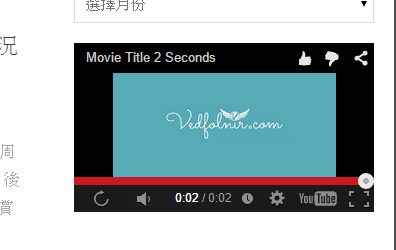
A YouTube video rendered seamlessly in a sidebar text widget via shortcode.
Further Reading
- WordPress Support: Shortcode Embeds.
Support Independent Perspectives & In-Depth Insights
Every thoughtful analysis and candid critique comes from our dedication to truth and quality. We choose not to follow sensational algorithms or clickbait headlines.
Sustaining independent research requires reader support. Make a one-time or monthly contribution, securely processed by Google.
Payments secured by Google · Manage or cancel anytime in your Google Account

Comments