

It has been quite a while since I last used Microsoft’s instant messaging client, MSN Messenger. Back in the day, what a wonderful era that was—my chat logs were brimming with the passionate, tearful youthful memories of flirting with crushes.
Skype, as an up-and-coming contender, was actually rather clunky in its early days (and hasn’t improved drastically even now). However, it featured more “open and resilient” communication protocols. Following a certain major event, it gradually became my primary messaging software for chatting with friends.
This was precisely what Microsoft lacked. MSN not only failed to encrypt network transmissions effectively, but it also utilized rigid messaging channels easily inspected and throttled by network administrators across tech enterprises. At one point, it even sparked serious concerns over legal privacy protections on the internet.
Some friends of mine were involved in a hilarious incident. Friend J at Company A and Friend H at Company B were having an utterly absurd, childish exchange on MSN. Unbeknownst to them, Company A’s network administrator recorded the entire chat session and pinned it right on the office bulletin board. (That was the moment I switched to Skype… barely holding back my laughter).
Under the Personal Data Protection Act of the Republic of China (ROC), I cannot disclose the actual transcript details or even specific vocabulary, as certain keywords would instantly expose their identities. But the gist of the conversation went something like this:
J: You are a pig.
H: No, you are the pig.
J: You’re definitely the pig.
H: You are a stupid pig.
(Repeat the above lines one hundred times…)
…And that was the exact dialogue pinned to the bulletin board of a top-tier domestic tech enterprise.
When Microsoft acquired Skype, I had a hunch that MSN and Skype would eventually be merged into a single platform.
What came as a surprise was Microsoft’s decision to phase out MSN—once a cultural phenomenon—and turn it into “MSN on Skype.”
One wonders how PChome felt watching Microsoft acquire Skype. Microsoft already possessed vast international distribution channels; when the distributor contract expires, Microsoft will likely reclaim operations themselves, though that is an aside.
Currently, while using MSN on Skype, I’ve noted several issues worth keeping in mind—essentially minor bugs arising from merging the two platforms:
MSN Contacts Not Visible in Contact List
After integrating your MSN account via the Skype website, your MSN contacts might still fail to display in Skype.
If this happens, try logging out of Skype first. In the Skype login window, to the right of the standard username and password fields, you will see a “Microsoft account” sign-in option (as shown in Figure 1 below). After signing into Skype with that option, your integrated contact list will appear properly (as shown in Figure 2).
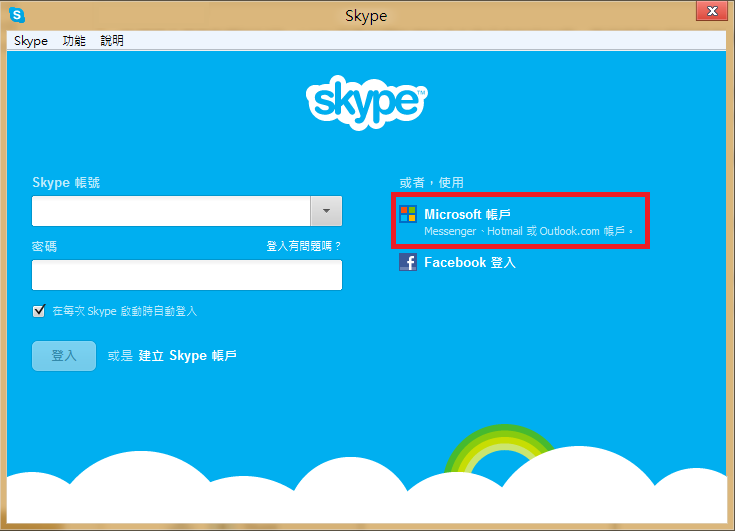
Figure 1: Skype login window
Display Filtering Options
This feature allows you to quickly filter which provider’s contact list to view.
Refer to the contact list in Figure 2 below. There is a display filter dropdown at the top, allowing you to choose which network’s contacts to show. I generally select “Online” to keep the list from becoming overwhelmingly long.
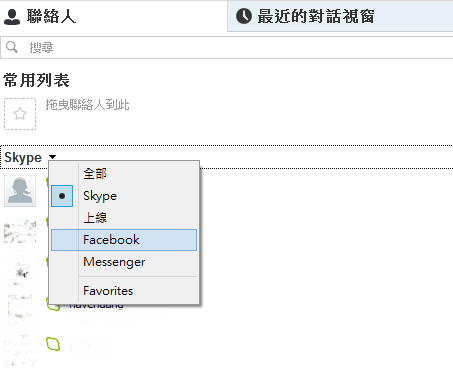
Figure 2: Skype contacts window
Unblocking MSN Contacts
In Skype’s settings, there is a privacy panel where you can find a list of contacts previously blocked in MSN.
The frustrating part is that currently, you can only view the list; you cannot modify their blocked status. In other words, you cannot re-add a blocked person back into your active contact list directly from Skype.
The current workaround is to open the legacy MSN Messenger client and unblock them there—provided MSN Messenger is still functional on your machine! (Microsoft’s official web-based messenger is temporarily unreachable).
(Update on Feb 5: For an effective solution, please see Related Reading 2 below.)
The latest desktop build of Skype still suffers from the two issues mentioned above. Hopefully Microsoft addresses them in an upcoming update. If more bugs surface, I will document them here.
Update (2013.01.23): In the freshly installed tablet version of Skype, users can now unblock contacts directly from the contact list (though I haven’t tested two-way messaging). However, the latest desktop version still shows them as blocked, suggesting it may be a dummy toggle.
Further Reading
- Skype Free 30-Minute Calling Credit Promotion – New Users Only
- Next Steps: How to Unblock MSN Contacts in Skype
- Analysis and Prevention of Skype Account Hijacking Incidents
Support Independent Perspectives & In-Depth Insights
Every thoughtful analysis and candid critique comes from our dedication to truth and quality. We choose not to follow sensational algorithms or clickbait headlines.
Sustaining independent research requires reader support. Make a one-time or monthly contribution, securely processed by Google.
Payments secured by Google · Manage or cancel anytime in your Google Account



Comments