

Recently, Xuite, the well-known blogging platform operated by Chunghwa Telecom, issued a somber announcement stating that it will terminate its services and delete all website data on August 31 of this year.
This announcement feels like a milestone witnessing the dawn of the ChatGPT era of AI-generated content—and a signal that traditional text bloggers are gradually fading into the dust of tech history.
Chunghwa Telecom Is Pulling the Plug
While Xuite may not occupy a monumental place in Taiwan’s technological history, countless low-profile writers chose it as a quiet personal sanctuary for journaling their daily thoughts.
With Xuite nearing its final shutdown, users do not have many options left. Either abandon the content and let it go, download your journal entries to your local computer for backup, or find a brand-new blogging platform to keep writing.
To state the conclusion up front: finding a replacement blogging platform is easy. Options like blogger.com or WordPress.com provide vastly superior services compared to Xuite, whose decade-old architecture has grown thoroughly obsolete (and given the risk that Google might one day pull the plug on Blogger, WordPress remains the safer long-term recommendation).
However, migrating your historical articles out of Xuite and onto a modern platform is considerably harder than most people anticipate.
Backup and Site Migration Tutorial
As mentioned earlier, Xuite runs on a system architecture designed more than a decade ago, leaving a massive generation gap between its operations and modern platforms.
Currently, what users can do on the Xuite platform is download separate archive archives for journal entries, photos, and videos. Put simply, if you want a complete archive of your blog, you will end up with three separate files.
Xuite Journal and Media Backup Options
- Export Journal (plain-text content)
- Export Photo Albums
- Export Video/Audio
Migration Methods
If your blogging style consists predominantly of written text, you simply need to download the standard MT (Movable Type) text export file provided by the system. Then, by using WordPress’s built-in import tool “Movable Type and Typepad”, you can transfer the entire document collection directly into your new site.
The procedure is straightforward. First, set up a blog on “WordPress.com” or create a self-hosted WordPress site (see our guide: WordPress Officially Recommended Top 3 Managed Web Hosting Providers). Next, navigate to your admin dashboard under “Tools > Import > Movable Type and Typepad” and install the importer plugin.
Once installed, use this tool to load your MT text file, and your new site will regenerate corresponding posts from the original content.
Note that because original image and video files are not embedded inside the text file, they may temporarily appear on your new site initially (since they link back to Xuite’s live servers), but once Xuite officially shuts down in August, those media files will disappear entirely.
This brings us to the biggest headache during migration: the bizarre way Xuite manages images.
Refer to the comparison below. On the left is the file naming convention used when journal posts reference images; on the right is the actual filename stored inside the downloaded album backup archive. As you can see, the filenames differ in completely erratic and inexplicable ways.
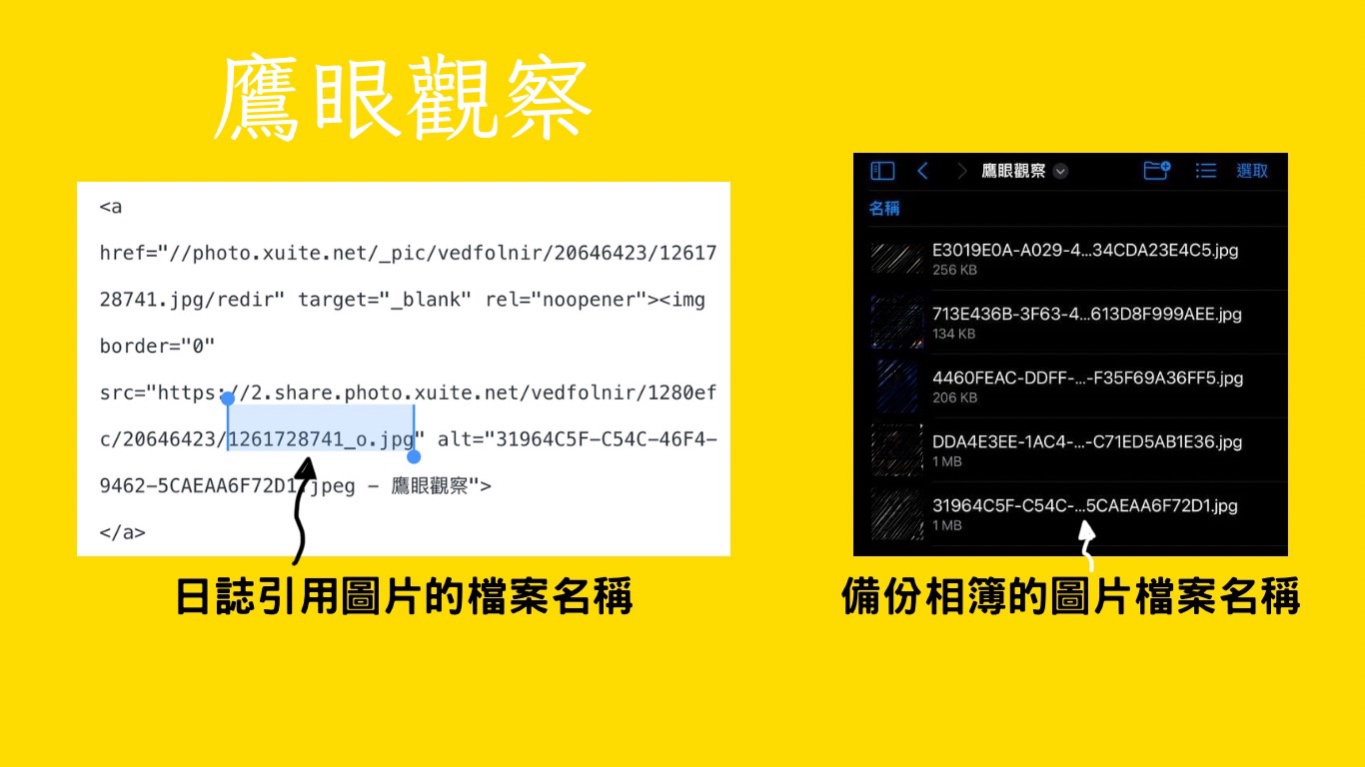 Filename discrepancies between Xuite journal image references and photo album backups
This creates a serious dilemma: while importing article text into a new site is relatively painless, resolving image links becomes a massive chore. You have to hunt down every single corresponding image manually and reinsert it into each post.
Naturally, if you only have a handful of articles, doing this by hand is manageable. But if you have thousands of posts and tens of thousands of images, the sheer volume of work is daunting.
In theory, one could write an automated scraper script to pull entries from the old Xuite pages and transfer both text and imagery simultaneously to a new platform. However, likely due to Xuite’s dwindling user base, no such turnkey tool has been made publicly available.
Shutdown Timeline
Xuite management has published a three-stage shutdown schedule to help members handle data backups and file downloads:
The first phase began on April 6. Users can still publish new posts and photos—serving as a transition preparation window.
The second phase begins on May 1, when the entire site enters read-only mode. Members can browse public pages normally, but cannot log into the admin dashboard to add, edit, or delete content.
The third phase takes place on August 31 at 2:00 PM, when the website will be permanently shut down and all data deleted. Therefore, all members are strongly advised to complete data backups and blog relocation procedures as early as possible.
For creators who invested years of time and heart into Xuite, this transition represents a significant hurdle. They must adapt to a new platform while dedicating considerable effort to relocating and reformatting their archives.
Reaching this juncture, you should carefully contemplate whether you wish to continue writing online.
What If You Don’t Want to Continue, but Can’t Bear to Lose Your Writing?
If you do not plan to look for a new platform to keep writing, and worry that downloaded backup files will end up gathering digital dust on your hard drive, you can hand your exported MT text files over to us.
We will curate valuable articles and publish them under your name on suitable websites in our network, ensuring your hard-earned literary creations remain accessible to readers across the web.
Brief announcement: Need dedicated consulting or hands-on assistance setting up a new website from scratch? Feel free to contact the team at “mountos : net lab”.
Support Independent Perspectives & In-Depth Insights
Every thoughtful analysis and candid critique comes from our dedication to truth and quality. We choose not to follow sensational algorithms or clickbait headlines.
Sustaining independent research requires reader support. Make a one-time or monthly contribution, securely processed by Google.
Payments secured by Google · Manage or cancel anytime in your Google Account




Comments