
For all the hardworking virtual farmers out there, nothing is quite as thrilling as the daily tug-of-war between harvesting your crops and defending them from friends in Happy Farm.
As the saying goes, stealing crops alone is a pastime; competing with friends keeps one eye open; but waking up to find your entire field harvested by neighbors is enough to test anyone’s patience.
Every virtual vegetable and fruit grows at a different rate, and forgetting harvest times leaves crops completely exposed to opportunistic pals.
Constantly managing harvest timetables ends up wasting valuable hours (whispers: though playing the game itself probably already did that!

).
More seriously, constantly checking crops distracts from actual priorities and drains workplace productivity—which is why so many tech companies blocked social gaming in office networks.
Beyond casual games, everyday life and modern work routines constantly call for timely reminders and countdowns: tracking how long a task takes, timing how long coffee grounds should steep, or pacing out focus blocks.
To handle these impromptu timing and countdown needs, finding a lightweight timer tool is essential.
My Criteria for a Good Timer Utility
- Simple, responsive, and fast to launch;
- Negligible system resource usage and minimal footprint;
- Clean, attractive interface with intuitive controls;
- Reliable and unobtrusive alerts.
After looking through different options, searching for an extension within Google Chrome seemed like the most natural choice.
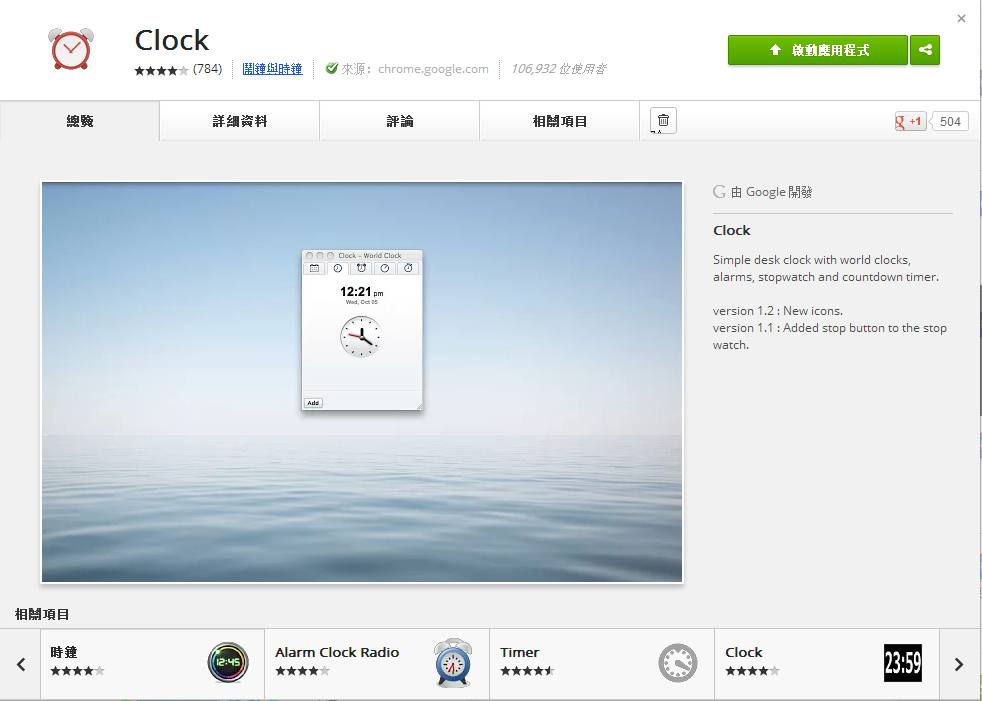
Browsing the Chrome Web Store led to a pleasant surprise: Google had released its own productivity-focused timer extension: “Google Clock”.
Finding an official Google release was fantastic news. Whenever Google offers a first-party tool for a task, I almost always prefer it over third-party utilities for reasons of security and trust, unless another app provides irreplaceable features worth the security trade-off.
Another nice design touch: Google Clock launches in a neat standalone pop-out window. When you are done timing, you simply close the window—no worries about forgotten background processes consuming memory.
Support Independent Perspectives & In-Depth Insights
Every thoughtful analysis and candid critique comes from our dedication to truth and quality. We choose not to follow sensational algorithms or clickbait headlines.
Sustaining independent research requires reader support. Make a one-time or monthly contribution, securely processed by Google.
Payments secured by Google · Manage or cancel anytime in your Google Account

Comments