

Today, I used an Apple Mac to compress and package photos from a trip to Hualien and Taitung with three friends years ago, sending them to one of those friends because she had lost her copies.
Digital cameras were already quite common consumer electronics back then. I carried a Canon PowerShot S50 bought by my fifth sister—a classic model with a full-metal shell, compact layout, and substantial heft that I thoroughly enjoyed. It later served as my primary camera during a major backpacking expedition in New Zealand (though it accidentally struck a boulder while visiting an ancient pagoda in mainland China, leaving its outer chassis slightly separated).
The compressed archive was nearly 800 MB. It contained hundreds of photos, though compared to the Nikon D810 our studio photographer recently acquired, just 16 high-res shots today easily exceed the data size of those hundreds of older photos combined. After uploading the archive to our server, I asked Xiao-Hui to download it home (Chunghwa Telecom HiNet Optical Fiber upload speeds are notably more stable and faster than comparable tiers from Taiwan Mobile Broadband).
The following morning, Xiao-Hui messaged me saying she couldn’t extract the archive. She attached a screenshot of the error dialog shown below.
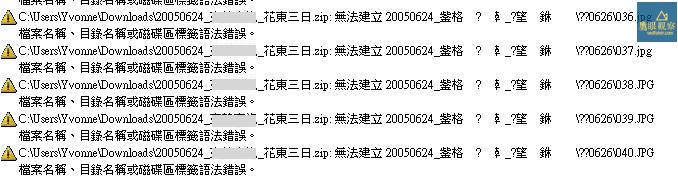 Error dialog when extracting an Apple Mac ZIP file on a Windows PC.
Looking at the warning dialog, it was easy to surmise that Apple macOS X’s Chinese character encoding was causing issues. In truth, this is a well-known compatibility hiccup between macOS and Microsoft Windows, two long-standing operating system rivals.
If the encoding glitch were limited strictly to the “zip archive” filename or the enclosing “folder”, simply renaming them to alphanumeric characters would resolve it (that’s trick number one). Unfortunately, my younger self had an eccentric streak, giving every individual photo a filename packed with Chinese characters. Asking Xiao-Hui to rename every single photo by hand would have earned me a beating; plus, I had no desire to re-upload an 800 MB file all over again.
Fortunately, after asking Xiao-Hui how she attempted the extraction, I found out she was relying on Microsoft Windows’ built-in zip extraction utility. That was immensely encouraging news—because the built-in Windows compression utility is notoriously terrible.
I asked Xiao-Hui to download and install my preferred extraction tool, “7-Zip” [1]. As expected, her problem vanished immediately, and every compressed image unpacked smoothly, restoring a collection of laughter-filled memories.
Next time you encounter file extraction headaches on a Windows system, always double-check whether you’re relying on Microsoft’s built-in default utilities first!
References
Support Independent Perspectives & In-Depth Insights
Every thoughtful analysis and candid critique comes from our dedication to truth and quality. We choose not to follow sensational algorithms or clickbait headlines.
Sustaining independent research requires reader support. Make a one-time or monthly contribution, securely processed by Google.
Payments secured by Google · Manage or cancel anytime in your Google Account


Comments