
Ever since my student unlimited 3.5G/3.75G mobile plan expired, I had to temporarily “borrow” Wi-Fi from my neighbor (you know how it goes).
Unfortunately, my neighbor’s Wi-Fi signal was rather spotty, with frustratingly intermittent connection drops (inner voice: look who’s complaining). I had no choice but to speed up my search for an ISP offering a cost-effective broadband package.
Browsing through recommendation threads online didn’t yield any particularly enticing deals. In the middle of this dizzying search, I fortunately managed to track down a suitable promotional plan.
Speaking of which, I discovered that calling customer service directly is far quicker, and you can even negotiate perks and haggle on rates directly.
Once the telecom technicians finished running the physical line and setting up the wireless router at my place, I initially tethered my smartphone via USB to serve as a makeshift wireless adapter for my desktop to save money.
However, using a phone as a dedicated Wi-Fi adapter is frankly a terrible idea. It might suffice as a brief emergency workaround, but relying on it for studio work or home theater setups is asking for trouble—it proved even more unstable than an old 3.5G modem. Oh, and PPS surprisingly had Resident Evil: Retribution available; though the bootleg camrip quality was as dreadful as ever and hurt my eyes. Make sure to buy tickets and watch movies properly in theaters, folks!
Anyway, back to the point. Since I only had a phone acting as an adapter, I needed a genuine Wi-Fi wireless card for work stability and speed.
When shopping for hardware, always outline your requirements first. My setup required receiving a stable signal from a router placed in the center of the house to the PC in my studio. The transmission path spans roughly five meters across a reinforced concrete floor. This is a fairly straightforward constraint, making it easy to find high-value options.
Therefore, picking a card capable of punching through walls at a budget-friendly price became my primary objective. The real secret isn’t just the adapter’s sensitivity, but the transmitter power of the router itself—if the access point lacks punch, even the greatest receiver won’t save you.
Under this premise, any adapter without a sizable external antenna was disqualified immediately. To me, antennaless dongles are essentially useless in my setup.
The reason is simple: I wanted to plug the USB adapter directly into the back of my desktop chassis. That area suffers from severe electromagnetic interference, meaning antennaless models would require a long USB extension cable to get out of the shadow.
Of course, even with a large antenna, there’s no guarantee the internal circuitry has decent shielding. At the end of the day, no matter how carefully you research, manufacturers can still cut corners.
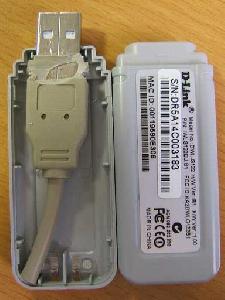
Classic example: USB flash drives.
For minor electronic gadgets like this, going cheap is often fine, since many brands simply mass-produce reference boards provided by chipmakers—they’re virtually identical under the hood, save for minor component differences.
More than the brand or sticker price, what matters most is choosing hardware whose base design aligns with my practical logic. Many products failed right out of the gate and were eliminated in round one.
Willing to be a guinea pig, I ordered the Tenda W311MA online for under four hundred NT dollars (Yahoo has since phased it out in favor of the Tenda W311 11N 150Mbps model). It checked all my boxes: an external high-gain antenna, ultra-low price, and well, not much else. Oh, right—it also has an LED indicator (a very faint one, haha).
The USB Wi-Fi card is currently plugged into the back panel of my PC and running smoothly. As shown below, running a speed test using Chunghwa Telecom HiNet’s official tool (Dr. Speed) delivered downstream and upstream rates of 25.63 Mbps and 2.86 Mbps respectively—a night-and-day difference compared to tethering through my phone.
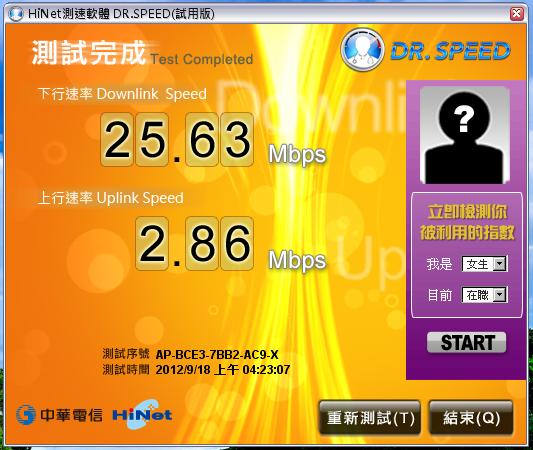
Chunghwa Telecom Speed Test Utility
While this utility doesn’t display the raw PHY link rate between the adapter and router, it confirms that the computer fully saturates the external broadband connection.
One small complaint: my rig was running Windows XP (SP3), which failed to recognize the adapter out of the box, requiring installation from the bundled driver disc (just install the driver, skip the bloated software suite). If you’re still relying on a smartphone as your PC’s Wi-Fi adapter, do yourself a favor and pick up a proper dedicated card.
- Update (Dec 11, 2012): Windows 8 natively supports plug-and-play for this adapter without extra drivers.
Support Independent Perspectives & In-Depth Insights
Every thoughtful analysis and candid critique comes from our dedication to truth and quality. We choose not to follow sensational algorithms or clickbait headlines.
Sustaining independent research requires reader support. Make a one-time or monthly contribution, securely processed by Google.
Payments secured by Google · Manage or cancel anytime in your Google Account


Comments