
There are many useful real-time, online translation websites to choose from on the market, and each has its own differences in translation accuracy and convenience.
Aside from the translation services provided by large corporations in a similar spirit of service, other small translation websites, besides machine translation, actually mainly support corporate translation projects and help refer human translators. As long as you are willing to pay, the translation can be more accurate — but these are not what the author particularly wants to introduce.
Let me first simply list 10, and see whether they include the ones you commonly use:
- Google Translate (https://translate.google.com/)
- Bing Translator (https://www.bing.com/translator)
- Yandex Translate (https://translate.yandex.com/)
- Cambridge Dictionary (https://dictionary.cambridge.org/dictionary/english-chinese-traditional/)
- Translate.com (https://www.translate.com/)
- DeepL Translator (https://www.deepl.com/translator)
- PROMT Translator (https://www.promt.com/)
- SYSTRAN Translator (https://www.systran.com/translation)
- Youdao Translate (https://fanyi.youdao.com/index.html)
- Sogou Translate (https://fanyi.sogou.com/text)
Among them, Google Translate is the most popular translation tool on the market, bar none.
Its biggest advantage is that it supports multiple languages and multiple platforms, allowing users to translate conveniently and quickly. It links with a Google account, supports all platforms, and is free. In addition, it supports translating text, speech, and images, which is very practical.
And Google, which has been deeply engaged in the field of artificial intelligence for many years, has a powerful A.I. training model that also makes translation results more complete and correct than traditional translation technology.
In addition, organizations such as the European Patent Office (EPO) also directly cooperate with Google for their website translation systems. This shows that it is also highly recognized in official systems.
DeepL Translator is also a translation software that has caught up from behind. It uses deep learning technology and performs excellently in translation speed and accuracy. DeepL supports more than 10 languages and offers both free and paid versions.
Sogou Translate’s translation results are also quite accurate, and it has an interesting feature: below the translation result, it provides separate explanations for key words, which can help users understand the meaning of the original text. It is very suitable for students learning English.
In addition, Microsoft Translator is a translation software worth recommending. It supports more than 60 languages and provides text and real-time speech translation. Its simple interface is very suitable for spoken translation during travel (do not waste money buying an interpreter device).
But in any case, the translation results of these tools may not be accurate enough, especially when dealing with complex language structures and cultural differences, requiring more human intervention and modification. So please do not directly throw the translation results of long sentences onto video subtitles, ahhh.
Results and Discussion
There are many translation tools in this world, but based on the author’s choices and experience, you actually only need two.
One is Google Translate, which was discussed more above. The author suggests you download the official app on your phone and tablet for real-time daily translation.
The second is one the author strongly recommends “additionally” installing — simply put, you can have two translation apps in one phone.
This app is Microsoft’s “Microsoft Translator” (Apple Store), and you do not normally need to open it, because what we need is only the real-time translation function it provides.
Especially on Apple iPhone and iPad, after installing Microsoft Translator, in any app within iOS and iPadOS (such as Facebook, Notes, etc.), as long as you select a specific word or sentence, a “Translate” button will be added to the toolbar that pops up (as shown below). Then just tap that button to translate directly!
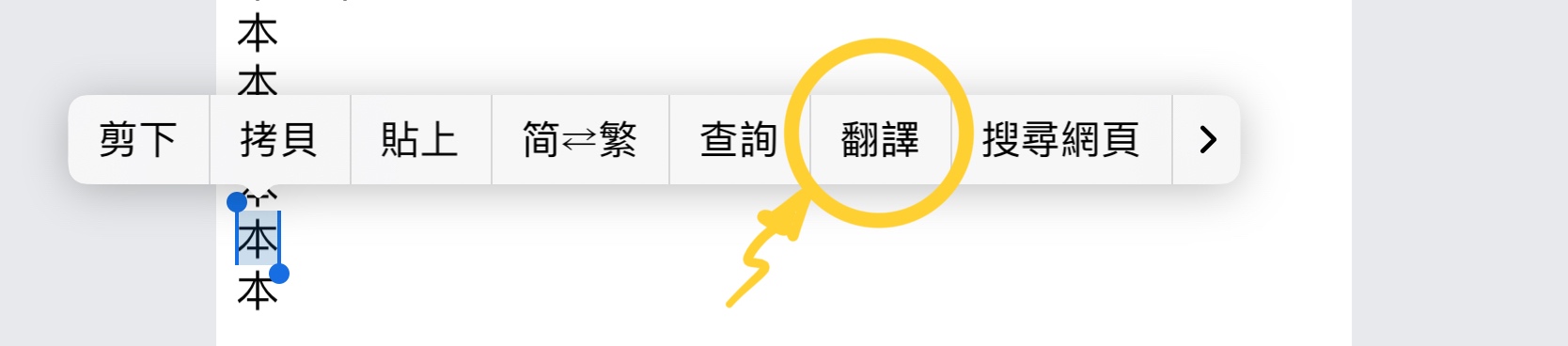
Microsoft Translator supports real-time toolbar
In addition, the translation tool will also add a “Translate” button to the “Share” menu of the Safari browser. When browsing foreign-language pages, using this function allows full-page translation.
More importantly, I think Microsoft’s translation capability is even more powerful and more accurate and correct than Apple’s own developed translation capability.
Support Independent Perspectives & In-Depth Insights
Every thoughtful analysis and candid critique comes from our dedication to truth and quality. We choose not to follow sensational algorithms or clickbait headlines.
Sustaining independent research requires reader support. Make a one-time or monthly contribution, securely processed by Google.
Payments secured by Google · Manage or cancel anytime in your Google Account




Comments