

Late last year, I bought a Xiaomi Xiaofang Smart Camera from mainland China’s Taobao for less than NT$700. With infrared night vision and remote monitoring through the “Mi Home” smartphone app, it seemed like an entertaining little gadget to play with.
Its advertised 1080P resolution turned out to be somewhat underwhelming (though typical for budget cameras in this price range, so no real surprises there).
My primary motivation for purchasing this camera was to observe stray cats feeding outside our studio’s back door. Stray cats are naturally vigilant and skittish; they won’t approach feeding bowls as long as a person stands nearby. I simply wanted the satisfaction of watching them eat undisturbed, with little regard for serious video recording quality. Brand recognition and a rock-bottom price tag were my primary deciding factors.
However, after a string of petty burglaries occurred in the back alleys around my family home in Tamsui, Taiwan over the past month, I looked more closely into the camera’s continuous recording capabilities—and discovered that the stability of the Xiaofang Smart Camera leaves much to be desired.
Reportedly, this camera was not developed in-house by Xiaomi engineers, but originated from a third-party startup acquired to pad Xiaomi’s smart home ecosystem. That background might explain the lack of system polish and software maturity.
After six months of real-world use with the Xiaofang Smart Camera, two major issues stood out:
- System Freezes: The Xiaofang camera crashes frequently. This is not limited to sweltering summer afternoons; it freezes just as often in the dead of winter. It is wise to build a habit of power cycling the camera every morning; otherwise, you might discover after a break-in that the camera stopped recording days ago. Additionally, pulling the base stand slightly away from the body helps facilitate heat dissipation.
- Video Archiving Failures: The Xiaofang’s recording and saving mechanism is remarkably unreliable. Even while live monitoring is functioning, footage is often not written to the micro SD card properly. I have encountered two distinct failure modes.
The first issue is shown in the screenshot below. The daily recording timeline shows spotty, discontinuous segments. On May 27, for example, recording abruptly halted at 10:00 AM, likely crashing until I noticed and rebooted it on May 31. On other days, intermittent gaps occurred at random hours with no discernible pattern, making it impossible to determine what happened.
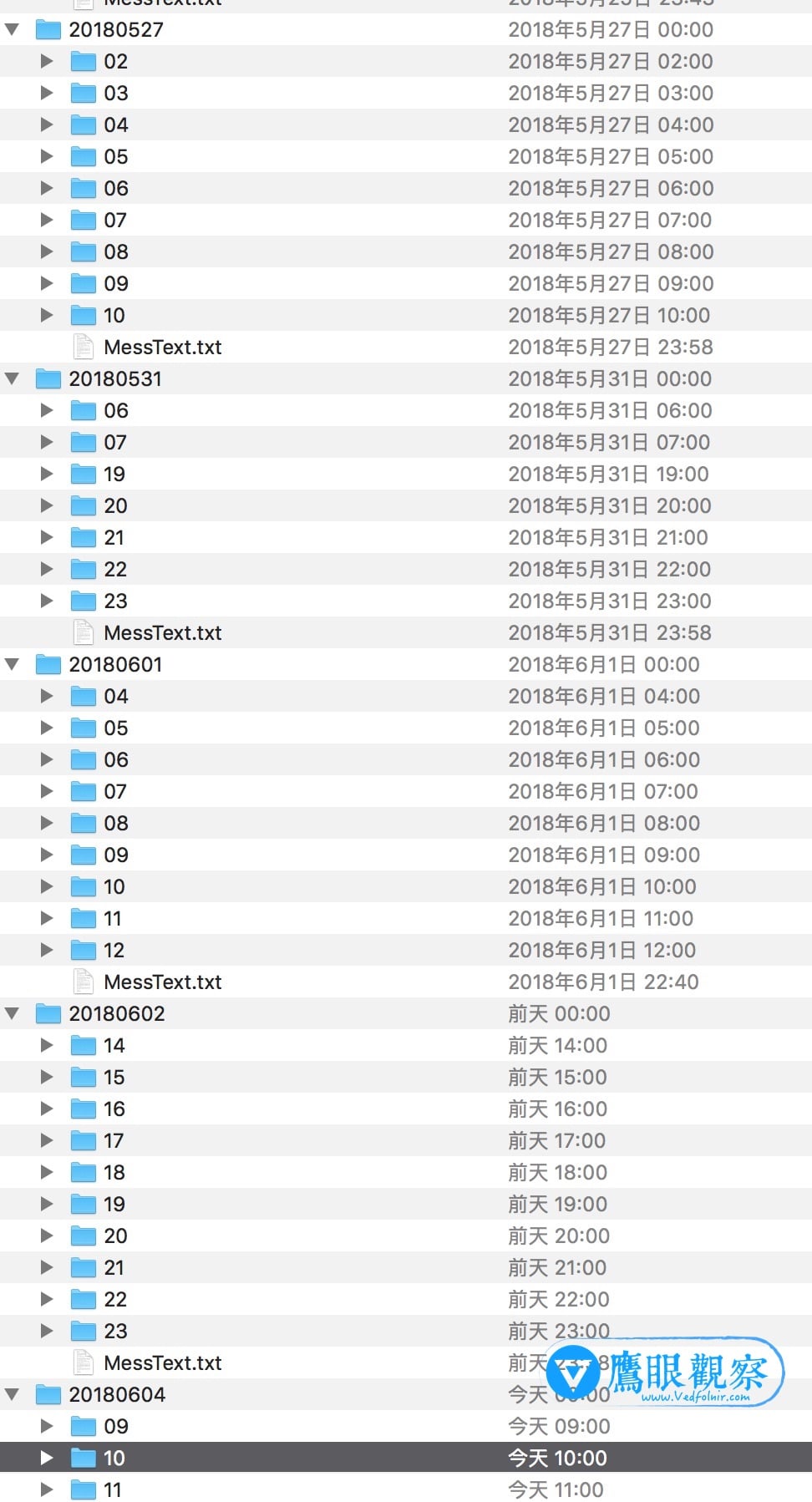 Recording timeline and file archive log of Xiaofang Smart Camera
Furthermore, while the built-in motion alert notification sounds useful in theory, sending push alerts whenever movement occurs, I discovered that this feature directly disrupts video file archiving.
The Xiaofang saves recorded footage in one-minute video clips. I noticed that footage captured immediately before and after an incident was intact, but during the exact moment a thief was caught on camera, the footage inexplicably vanished. The one-minute file for that timestamp was truncated to barely a dozen seconds, completely omitting the crucial 30-second window.
My hypothesis is that triggering motion alerts consumes excessive system resources, preventing video buffers from writing to the memory card in time. After disabling motion detection notifications, the recording truncation has not recurred, and overall camera stability has improved noticeably. If your Xiaofang Smart Camera experiences frequent freezing or corrupted recordings, turning off background alert features might resolve the issue.
Further Reading / Recommended Links
- Taobao: Xiaofang Smart Camera.
- Official Xiaomi App: Mi Home (Apple iOS) / Mi Home (Google Android).
Support Independent Perspectives & In-Depth Insights
Every thoughtful analysis and candid critique comes from our dedication to truth and quality. We choose not to follow sensational algorithms or clickbait headlines.
Sustaining independent research requires reader support. Make a one-time or monthly contribution, securely processed by Google.
Payments secured by Google · Manage or cancel anytime in your Google Account




Comments