

CameraSim is an entertaining camera simulator that is ideal for photography beginners. The simulator features a viewfinder frame alongside a camera control panel. By adjusting parameters on the control panel, users can capture the simulated dynamic scene inside the frame just like using a real camera.
Beyond the free web version[1], CameraSim also offers paid applications for smartphones (Google Android and Apple iOS iPhone & iPad[ii]) and desktop computers (Microsoft Windows & Apple Mac OS X).
CameraSim Simulator Interface
As shown in the image below, users can adjust shooting settings on the CameraSim control panel just as they would on a real camera:
- “Lighting”;
- “Distance”;
- “Focal Length”;
- “ISO”;
- “Aperture”; and
- “Shutter Speed” settings.
You can even decide whether to mount the camera on a “Tripod”! When the tripod is disabled, your eyes will be put to the test: not only is the little girl in the frame fidgeting around restlessly, but the frame itself also shakes, creating a sense of camera shake that feels completely true to the real world.
After fine-tuning each parameter, you can press the silver shutter button in the lower-right corner.
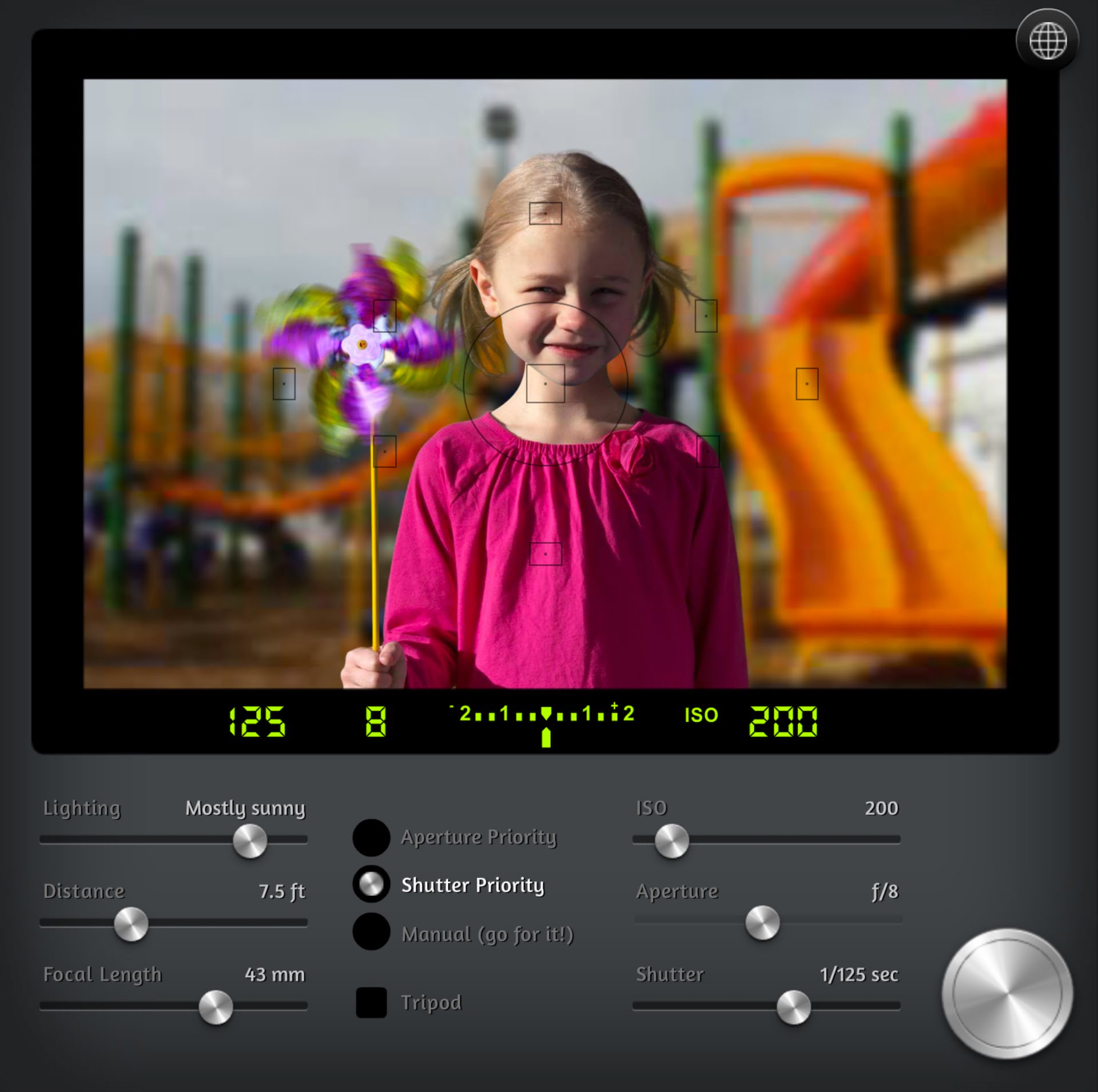 Simulated photo shot.
Based on the aforementioned camera settings and the instantaneous action within the viewfinder frame, the simulator automatically generates a photograph.
In real-world photography, this would represent the full process required to complete a shot.
By examining the visual results of the photograph, we can also spot subtleties and mistakes in our technique that might otherwise be difficult to detect.
Furthermore, by adjusting each setting step by step, you can learn what mood or feel different parameters yield. This is the feature I recommend most to photography beginners!
You don’t need to head outside and shoot dozens of rolls or fill memory cards just to learn how different camera settings alter the emotion and tone of an image.
The developer of CameraSim was very thoughtful: after you take a shot, smiley or sad faces appear to indicate the strengths and weaknesses of your settings!
Of course, these evaluations are based on “normal” conditions. They do not dictate how your creative photography should be shot—just as you are a completely unique individual.
CameraSim is a photography simulator well-suited for beginners to practice with. It is not only convenient and fun, but it also helps newcomers build an intuitive grasp of camera control parameters.
References
- CameraSim camera controller.
- Apple iPhone and iPad dedicated application: CameraSim.
Support Independent Perspectives & In-Depth Insights
Every thoughtful analysis and candid critique comes from our dedication to truth and quality. We choose not to follow sensational algorithms or clickbait headlines.
Sustaining independent research requires reader support. Make a one-time or monthly contribution, securely processed by Google.
Payments secured by Google · Manage or cancel anytime in your Google Account



Comments