

Ever since the old Fuji Xerox monochrome laser printer at home gradually broke down and became harder and harder to print with, I’ve been considering whether to buy a new machine. After all, it was originally just a cheap model bought for two or three thousand dollars, and sending it for repair might cost more than buying a new one.
These days I no longer need to print reports like crazy the way I did as a student; in fact, the number of pages I use in a month might be countable on one hand. The second toner cartridge that came free with the printer when I bought it was only replaced a few months ago, so rationally speaking, there seems to be no need to buy one. Although I also considered buying a continuous-inkjet printer like the Epson L805 or L1800 that can output photos, you have to print at least one page every week to avoid the print head clogging, and I know myself well enough to know I could never manage that.
Buy a New Machine or Find an Alternative?
Faced with a broken printer, there are roughly three paths to take, but for low-volume users, each has its own difficulties:
- Send the old machine for repair: For an entry-level model costing two or three thousand dollars, the repair fee plus round-trip shipping often approaches or even exceeds the price of a new machine, so it’s not cost-effective.
- Buy a new laser printer: The machine is cheap, but the toner cartridges are expensive, and leaving it unused for a long time may also cause moisture damage and malfunction.
- Buy a continuous-inkjet printer: The per-page cost is low and it can print photos, but the print head needs regular printing for maintenance, otherwise it easily clogs. For someone who prints fewer than a few pages a month, this is instead a burden.
In other words, the core of the problem is not “which one to buy,” but “do I even need a printer at all.”
The Reality of Low-Volume Users
When printing needs are so low that there are only single-digit pages a month, the hidden costs of keeping a printer are actually quite high:
- The machine takes up space, and you have to find a place to put it.
- Consumables (toner, ink) have shelf lives, and whatever you don’t use is wasted.
- Long periods of disuse easily cause malfunctions, and repairs are another expense.
- Before each print, you still have to deal with connections, drivers, and other issues.
In this situation, “going out to print when you need to” is actually more practical.
The Alternative I Found
Aside from photos, which are still handed to online image output shops, the main alternative I’ve found for documents is the nationwide 7-Eleven convenience stores, which are the most convenient.
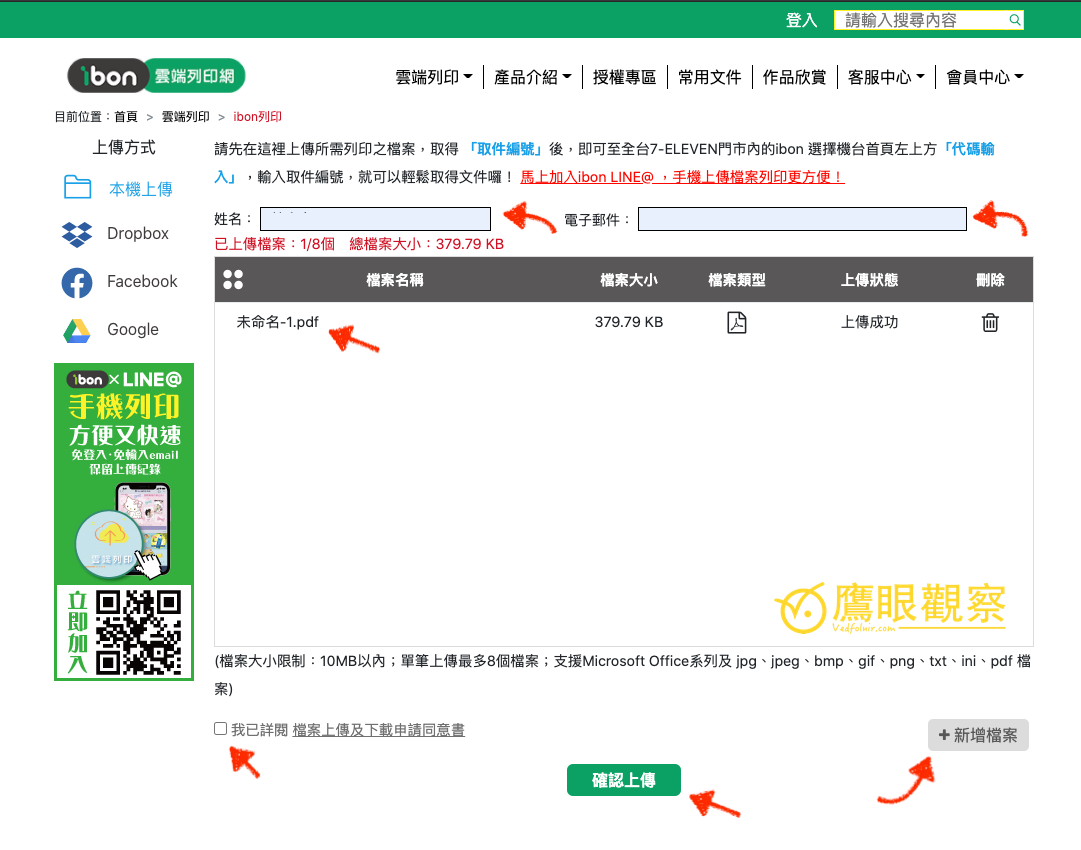
Through ibon cloud printing, you just upload the file first to get a code, enter it at the store, and you can print—no need to maintain a machine of your own at all. For someone like me with low print volume who doesn’t want to be tied down by consumables, this is currently the least troublesome and most money-saving choice.
Conclusion
A printer is not a necessity, but a tool whose “cost-effectiveness depends on frequency of use.”
If your printing needs are not high, rather than spending money on a machine that will sit around until it breaks, it’s better to make good use of convenience store cloud printing services and save both money and space.
Support Independent Perspectives & In-Depth Insights
Every thoughtful analysis and candid critique comes from our dedication to truth and quality. We choose not to follow sensational algorithms or clickbait headlines.
Sustaining independent research requires reader support. Make a one-time or monthly contribution, securely processed by Google.
Payments secured by Google · Manage or cancel anytime in your Google Account



Comments