
Since the old Fuji Xerox monochrome laser printer at home no longer sees as much demand as before, I looked for an alternative output solution. Aside from still sending photos to online image-printing shops, documents are most conveniently handled through the nationwide 7-Eleven convenience stores.
Besides bringing an SD memory card or USB flash drive to the store, 7-11 actually offers a convenient cloud printing feature, which is what I will introduce below.
Why Choose ibon Cloud Printing
For people who only occasionally need to print documents, maintaining a printer at home is not really cost-effective. Ink or toner cartridges dry out or fail easily when left unused, and the machine itself takes up space. In comparison, convenience store cloud printing has several clear advantages:
- Dense locations: Over six thousand stores island-wide, so you can print wherever you are.
- No maintenance: No worries about ink drying out or machine failure.
- Simple operation: Upload a file to get a code, then enter it at the store to print.
- Practical format support: Common Jpeg images and PDF documents are both handled.
7-11 ibon Cloud Printing Website
See Figure 1 below.
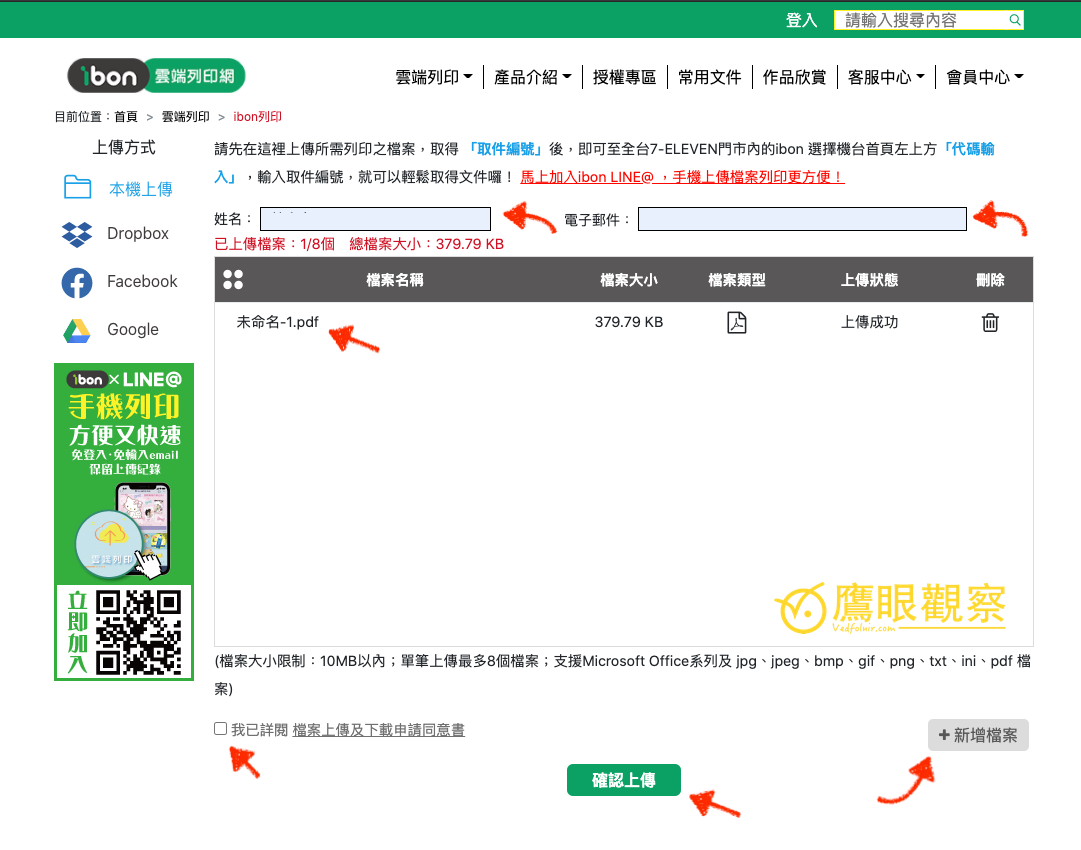
The common accepted file types are Jpeg image files and PDF document files.
Workflow
- Upload the file: Go to the 7-11 ibon cloud printing website, choose “Upload File,” and upload the file you want to print. The system generates a pickup code.
- Note the pickup code: After uploading, you will receive a code. Be sure to write it down or take a photo to save it.
- Operate at the store: Go to any 7-Eleven store, select “Cloud Print” → “ibon Cloud Printing Website” on the ibon kiosk, and enter the pickup code.
- Choose print settings: Confirm paper size (A4), color (black-and-white/color), single- or double-sided, and number of copies.
- Pick up and pay: After printing, pay and collect at the counter.
Precautions
- Uploaded files have an expiration period and are automatically deleted when overdue, so it is best to upload shortly before going to the store.
- Printing fees vary by black-and-white/color and paper size; A4 black-and-white is about a few dollars per page.
- If the file is a PDF, confirm the page size and orientation first to avoid cropping during output.
- Image files should have sufficient resolution, otherwise the printout will be blurry.
- During peak hours the ibon kiosk may require queuing, so it is best to avoid commute and lunch-break times.
References
- Official website: “7-11 ibon Cloud Printing Website”.
Support Independent Perspectives & In-Depth Insights
Every thoughtful analysis and candid critique comes from our dedication to truth and quality. We choose not to follow sensational algorithms or clickbait headlines.
Sustaining independent research requires reader support. Make a one-time or monthly contribution, securely processed by Google.
Payments secured by Google · Manage or cancel anytime in your Google Account



Comments