
In newer versions of the LINE instant messaging app, an upgraded feature known as “Sticker Preview” was introduced. It helps us avoid the awkwardness of sending the wrong sticker or conveying unintended emotions, acting as a clever fail-safe mechanism for crisis prevention.
For example, when chatting happily with Miss Miaobai, I have accidentally tapped the wrong sticker multiple times, prompting her to log off in fury or even block me temporarily. What follows is at least an entire day spent apologizing (grumble). If you make good use of this sticker preview feature, an enlarged sticker preview appears before sending, while disabling accidental clicks on other stickers. Having this second chance to confirm would surely prevent many of Miss Miaobai’s mysterious furious blowups (clenches fist).
Figure 1 below illustrates the “Sticker Preview” feature in the LINE chat interface when preparing to send a sticker.
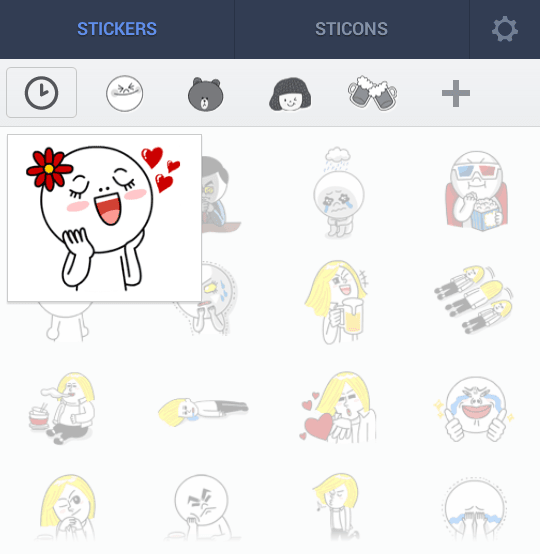 Figure 1: Sticker preview display.
As shown in Figure 1, when you select a sticker, the chosen sticker is displayed enlarged. At this point, you must tap the enlarged sticker a second time to actually send it out.
However, as thoughtful as this preview feature is, it can also become quite annoying.
Aside from having to tap the screen twice just to send a single sticker, the biggest drawback is that you cannot spam stickers consecutively in rapid succession—which means you can no longer playfully bombard your friends!
Consequently, I usually turn this feature off. After all, the thrill of rapid-fire sticker spamming holds far more mischievous appeal than the potential collateral damage of sending the wrong sticker.
If you wish to disable it, refer to Figure 2 below: open the “More” tab in LINE and select “Settings.”
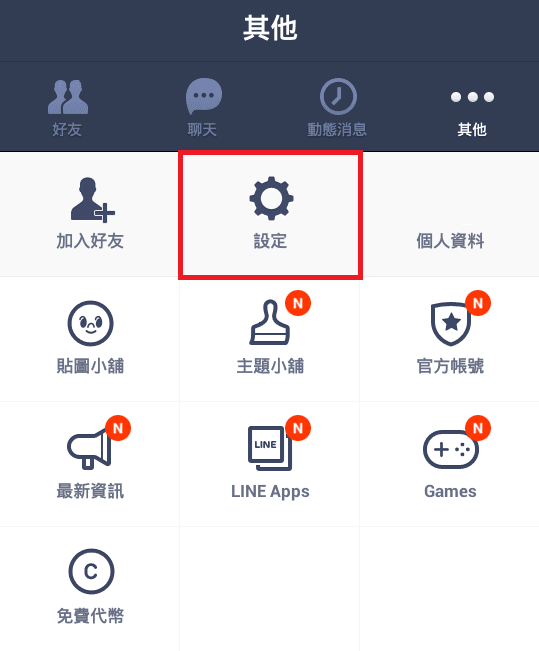 Figure 2: LINE Settings interface.
After following the step above, the “Settings” menu will appear as shown in Figure 3. Next, tap on “Stickers.”
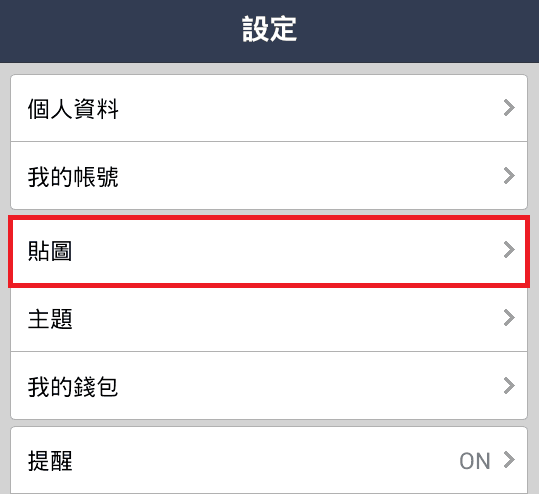 Figure 3: LINE Sticker settings.
Refer to Figure 4 below: in the newly opened “Stickers” menu, you will see an option labeled “Sticker Preview.” Simply uncheck this option to disable the enlarged preview popup!
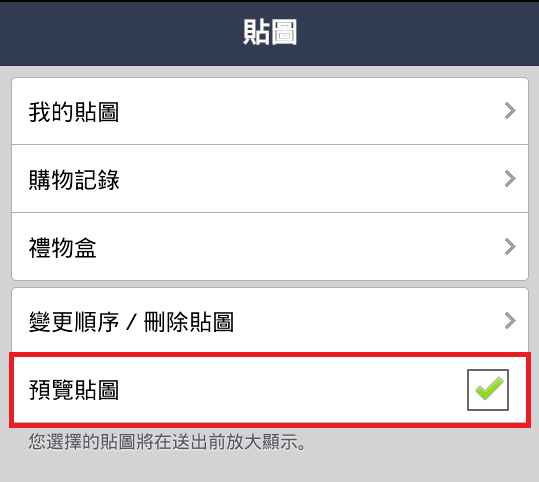 Figure 4: LINE Sticker Preview toggle.
Once you have completed these steps, you can return to crazily spamming endless waves of stickers to tease your annoying lovely friends just like before. Or, alternatively, you can shower your significant other with rapid-fire hearts and sweet sticker expressions without delay.[1]
Further Reading:
Support Independent Perspectives & In-Depth Insights
Every thoughtful analysis and candid critique comes from our dedication to truth and quality. We choose not to follow sensational algorithms or clickbait headlines.
Sustaining independent research requires reader support. Make a one-time or monthly contribution, securely processed by Google.
Payments secured by Google · Manage or cancel anytime in your Google Account

Comments