
Across the evolution of web applications, consuming real-time content through RSS/Atom feeds gradually receded from mainstream attention following the meteoric rise of social networks like Twitter (X) and Facebook.
Even the once-dominant Google FeedBurner platform accumulated bugs over time, with engineering resources seemingly wound down—suggesting it may eventually follow services like Goo.gl into Google’s graveyard.
Yet while syndication may have diminished in popularity, many professionals still rely on feeds to curate and consume high-value knowledge. To help you maximize FeedBurner’s lingering utility, let’s look at its unique domain customization feature: MyBrand.
As the name implies, FeedBurner’s MyBrand feature is not merely a vanity URL redirect; it enables publishers to reinforce their own brand identity.
If you own a custom domain name, you can replace standard feeds.feedburner.com addresses with a subdomain hosted under your personal or organizational domain. A cohesive branded URL enhances domain authority, fosters reader trust, and maintains consistent branding. For example, instead of directing subscribers to http://feeds.feedburner.com/vedfolnir, MyBrand transforms it into http://feeds.vedfolnir.com/vedfolnir—clean, memorable, and professional.
About RSS / Feeds: RSS (Really Simple Syndication, originally RDF Site Summary) is a web feed format standard designed to publish frequently updated works—such as blog posts, news headlines, audio, or video snippets. An RSS document includes full or summarized text along with metadata such as publishing dates and author attribution, delivering updates directly to a subscriber’s feed reader upon request.
Setting Up a Custom Domain Feed via FeedBurner MyBrand
In the top right corner of the Google FeedBurner console, click on My Account to open the account management panel shown below.
Next, locate and click the MyBrand link in the left-hand navigation menu to open configuration settings.
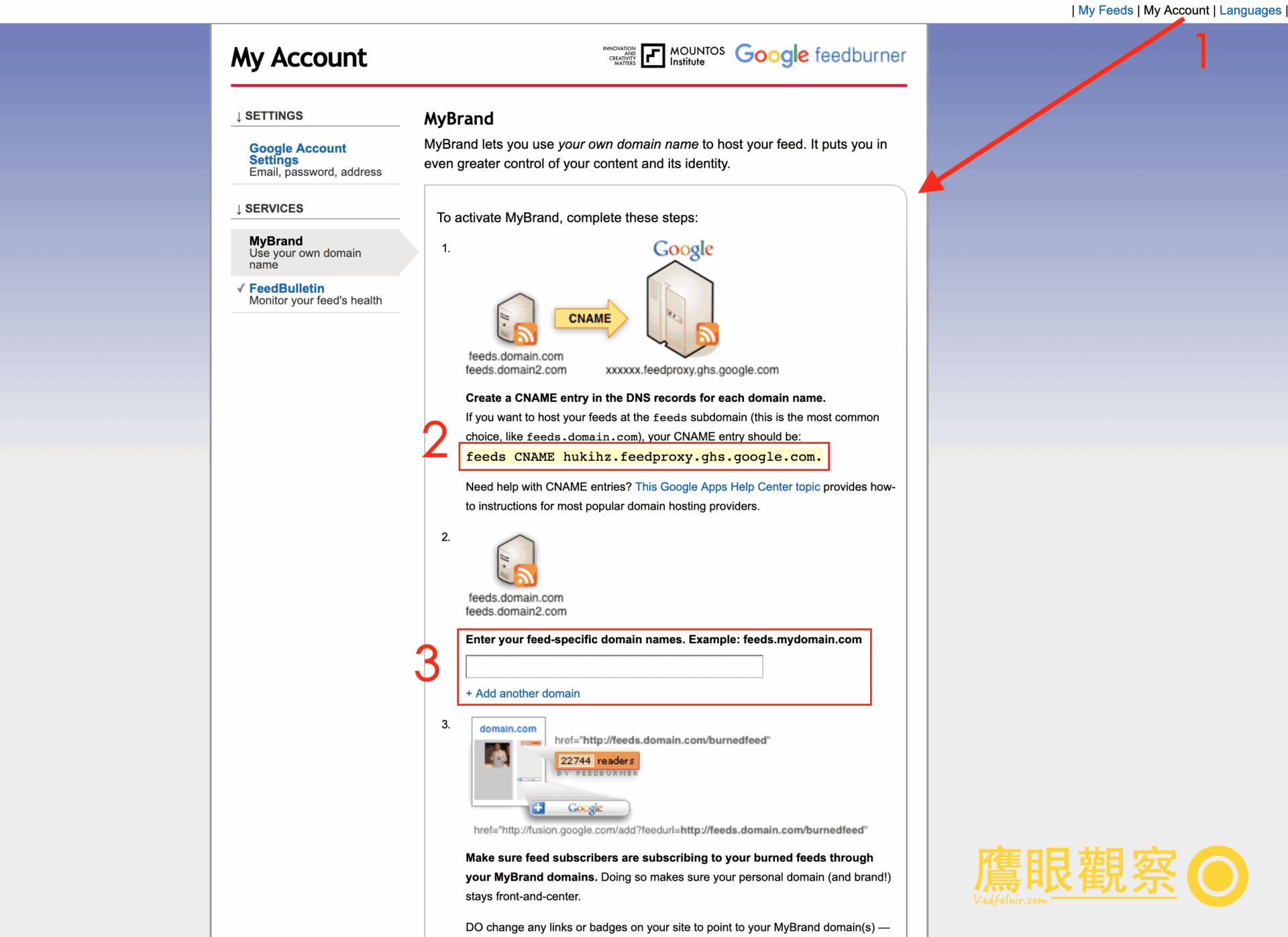
Google FeedBurner MyBrand custom domain configuration interface
Setting up MyBrand involves two primary steps:
- In your external domain DNS management console (such as GoDaddy or Cloudflare), create a new CNAME record pointing your desired subdomain (e.g.,
feeds) tohukihz.feedproxy.ghs.google.com., and allow DNS propagation to take effect. - In box 3 shown above, enter your customized subdomain (e.g.,
feeds.mountos.com). If you operate multiple properties under one account, you can add additional domains. They all map back to your primary FeedBurner account, differentiated by downstream path slugs (e.g.,feeds.mountos.com/vedfolnirfunctioning identically tofeeds.vedfolnir.com/vedfolnir).
⚠️ Note: After creating your CNAME record, allow adequate time for worldwide DNS caches to refresh. Propagation typically completes within ten minutes, though conservative documentation states it may take up to 24 hours. If you attempt to save the domain before DNS propagation resolves, FeedBurner will throw an error: “The domain you provided, ‘feeds.vedfolnir.com,’ is not associated with a valid CNAME record. Its current CNAME record is: (not found).” Once verified, simply wait or follow our guide on how to flush global DNS caches to verify propagation.
After completing both steps, you can immediately begin distributing your branded subdomain URLs in place of standard FeedBurner links. Seeing your own domain front and center adds a distinctly polished look.
While most FeedBurner integrations (like the Headline Animator) support custom domain aliases seamlessly, certain legacy features—such as raw Email Subscription forms—may still rely on hardcoded endpoints, so make sure to test your subscription pipelines thoroughly.
Finally, you are welcome to subscribe to Vedfolnir to keep up with our latest essays and technical analyses!
References
- Official Service: Google FeedBurner.
- For purchasing domain names, reputable registrars include GoDaddy and Namecheap.
Support Independent Perspectives & In-Depth Insights
Every thoughtful analysis and candid critique comes from our dedication to truth and quality. We choose not to follow sensational algorithms or clickbait headlines.
Sustaining independent research requires reader support. Make a one-time or monthly contribution, securely processed by Google.
Payments secured by Google · Manage or cancel anytime in your Google Account

Comments