
OCR, an acronym for Optical Character Recognition, is a technology that leverages character-recognition algorithms to translate images of text into machine-encoded, editable text characters.
Today’s guide does not cover heavyweight installed desktop software, but evaluates free web-based OCR tools available in your browser. Below, we test image samples and examine real-world recognition accuracy so you can evaluate whether these online services can save you tedious manual transcription time.
Back during my student years, OCR software was in heavy demand. Before ubiquitous high-speed internet, transcribing paper research notes required painstakingly typing character by character into a computer.
Later, resourceful students bought flatbed document scanners, scanned paper pages, and utilized early OCR tools to convert document scans into editable text files, significantly speeding up academic workflows.
Today, cloud services offer browser-based optical character recognition for free. Historically, because many of these services were developed overseas, their recognition rates for complex Chinese characters were often underwhelming.
However, after testing two prominent free online OCR portals, their Traditional Chinese recognition proved surprisingly capable under the right conditions.
Online Chinese OCR Web Tools
OnlineOCR.net
As illustrated in Figure 1 below, operating OnlineOCR.net involves three steps:
- Click the “Select File” button to upload your prepared image from your computer;
- Choose your input language and desired output format (e.g., “Chinese Traditional” and “Text Plain (.txt)”);
- Click “CONVERT” to process the file and download the plain-text output.
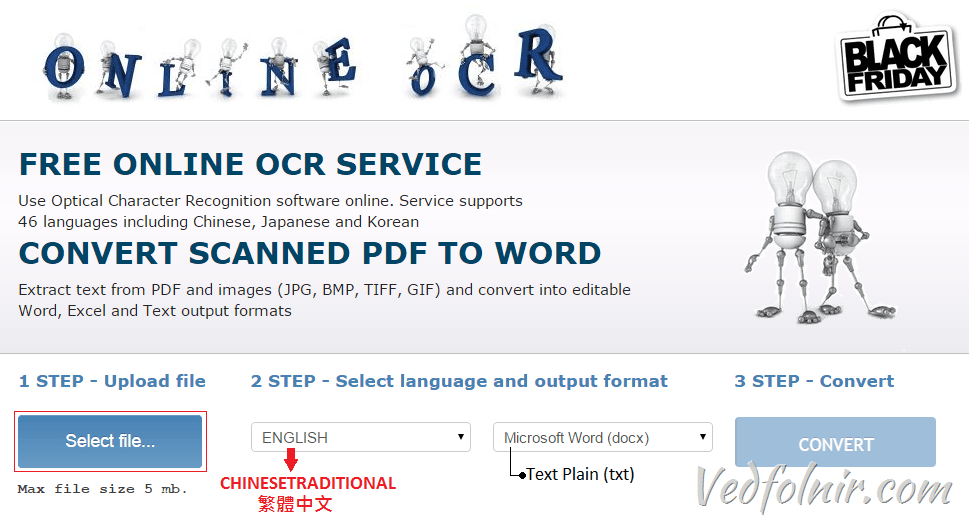 Figure 1: OnlineOCR.net web interface.
NewOCR.com
As shown in Figure 2 below, using NewOCR.com follows a similar procedure:
- Click the “Select File” button to upload an image from your computer (or enter an image URL);
- Click “Upload” to initiate recognition.
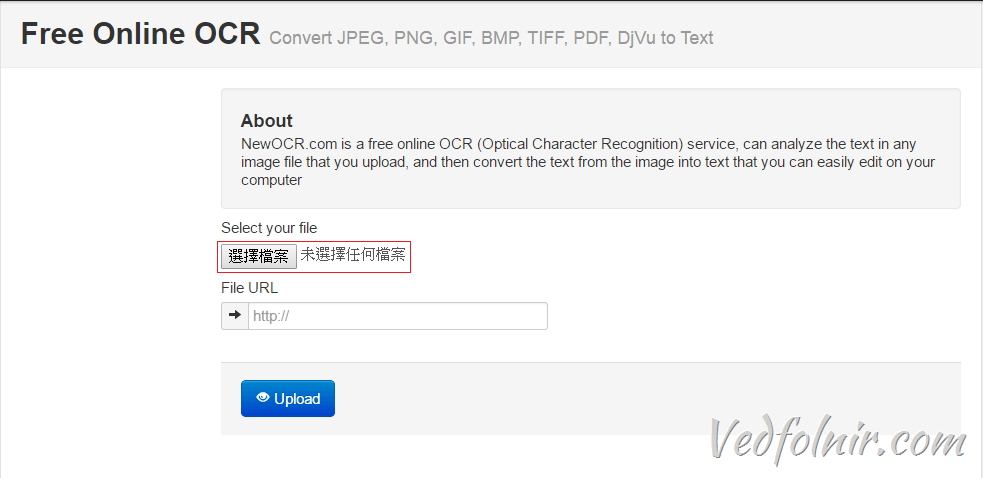 Figure 2: NewOCR.com interface.
Furthermore, Figure 3 highlights that NewOCR provides advanced options, such as selecting multiple concurrent recognition languages (e.g., both “English” and “Chinese Traditional”), manual image rotation adjustments, and automated multi-column layout analysis.
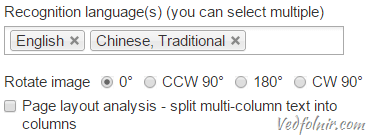 Figure 3: NewOCR configuration settings.
Real-World Sample Recognition and Comparative Analysis
The prompt for this test was a request from family to transcribe a multi-page martial arts manual for the Tai Chi “Asura Fan”. Rather than retyping it manually, I evaluated these online OCR tools.
Figure 4 displays a low-resolution printed handout obtained from a Tai Chi instructor, where multiple generations of photocopying slightly degraded font clarity:
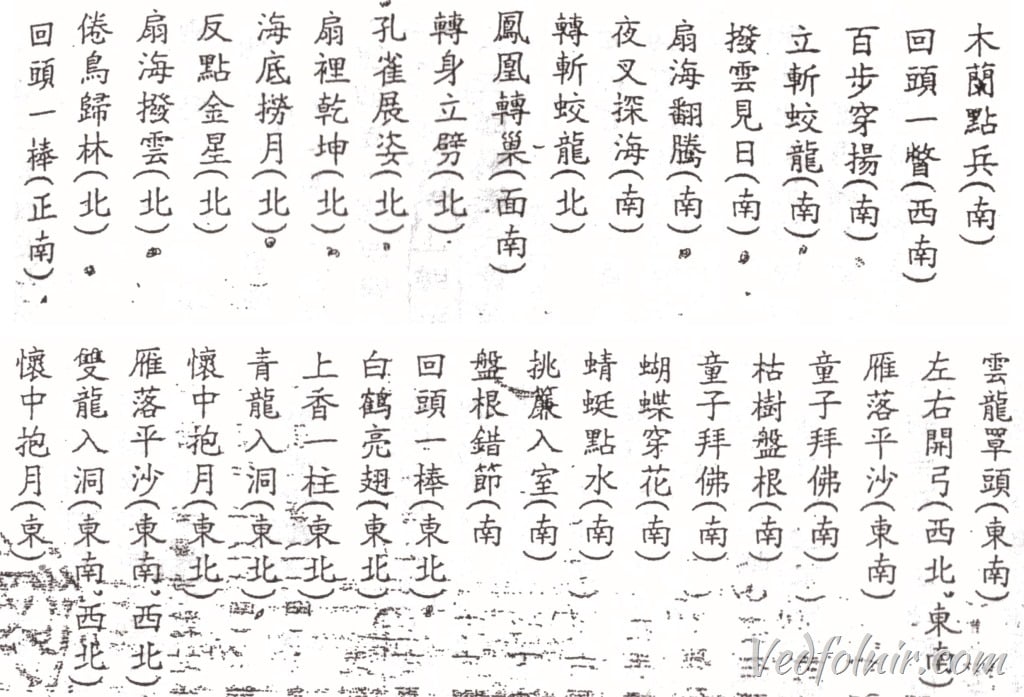 Figure 4: Low-resolution real-world test sample (Tai Chi Asura Fan).
Recognition Performance on Low-Quality Print
- OnlineOCR.net: Correctly recognized the first dozen Chinese terms with decent accuracy, but lower down the page, background artifacting caused it to degenerate into garbled noise. Its background de-noising filters struggled with dirty scan backgrounds.
- NewOCR.com: Successfully parsed text down the page with consistent line formatting, although it occasionally misidentified fine strokes in complex characters (such as confusing 拜 and 量).
To test performance under ideal conditions, I created a high-resolution, crystal-clear digital image featuring classical Chinese text from Zhuge Liang’s Memorial on the Case of the Northern Expedition (Qian Chushi Biao):
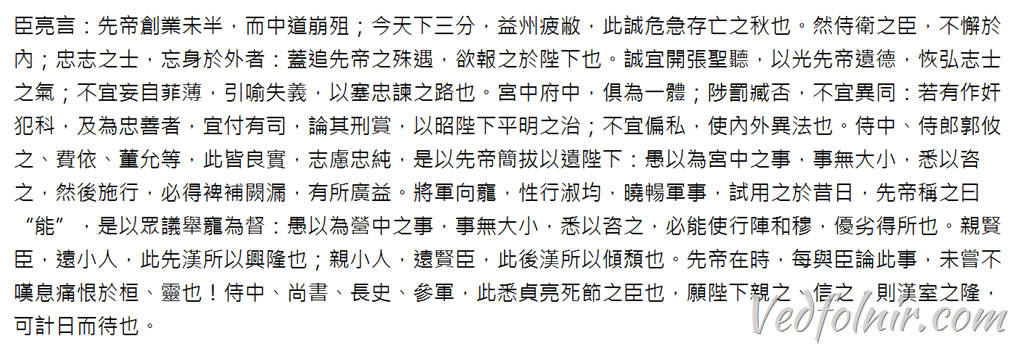 Figure 5: High-resolution clean test sample (Chushi Biao).
Recognition Results on Clean Digital Text
When fed high-resolution digital text with pristine white backgrounds, OnlineOCR’s accuracy jumped to nearly 99%, capturing punctuation and complex archaic characters almost flawlessly. NewOCR also improved, though it still produced minor character substitutions. This proves that image cleanliness and contrast exert a dramatic influence on web OCR engines.
3 Key Tips for Optimizing Online OCR Accuracy:
- High Resolution: The higher the image pixel density, the cleaner the stroke edge detection (critical for intricate Chinese characters with high stroke counts).
- Proper Alignment: Ensure scanned pages are straight; skewed lines and warped margins heavily distort OCR line segmentation.
- Clean Backgrounds: Crop away dark borders and remove color noise or shadows using basic image editors before running OCR.
Summary
While online OCR web tools have progressed substantially, low-contrast photocopies with background noise can still require considerable manual proofreading. For high-contrast digital scans, however, tools like OnlineOCR.net can save hours of tedious manual retyping.
Support Independent Perspectives & In-Depth Insights
Every thoughtful analysis and candid critique comes from our dedication to truth and quality. We choose not to follow sensational algorithms or clickbait headlines.
Sustaining independent research requires reader support. Make a one-time or monthly contribution, securely processed by Google.
Payments secured by Google · Manage or cancel anytime in your Google Account




Comments