

I recently noticed an email in my Gmail inbox with the enticing subject line: “Get dropbox cloud storage 18GB forever!” claiming to grant permanent, free 18GB cloud storage. Sounds hard to resist, doesn’t it?
Even though I no longer actively rely on Dropbox, the prospect of permanent free storage still tempted me to take a closer look (the bargain-hunting instinct kicked right in).
Typically, unless Dropbox runs special promotions (such as their campus cup or puzzle challenges), expanding free space requires either purchasing an upgrade or referring friends.
“Recruiting downlines”—the term sounds a bit MLM-esque (chuckles), but in reality, it simply meant sending referral links for friends to sign up for Dropbox accounts. Each completed referral earned the referrer 500 MB of bonus storage, stackable up to a maximum of 16+2 GB.
So the idea of Dropbox suddenly gifting 18 GB outright without any effort sounded wonderfully generous.
Yet online scams are rampant, leaving one naturally skeptical.
Opening the email to inspect the details, the display name showed Dropbox—so far, so good.
The subject was compelling, the body made no outrageous demands, and the email even provided a Google URL (albeit a shortened link) alongside an official-sounding statement referencing SourceForge.net. Everything seemed outwardly legitimate.
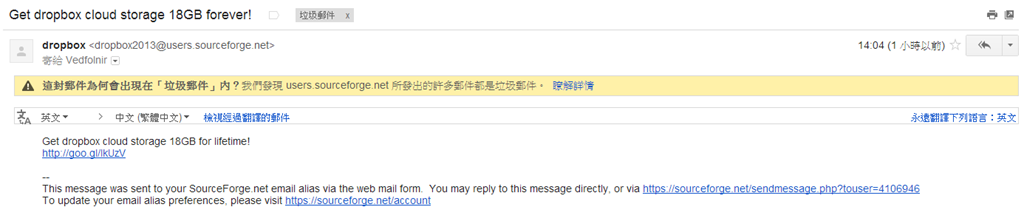
A surprise gift from Dropbox?
Wait a moment: the sender’s actual email address looked completely wrong. Why would a Dropbox promotion originate from a SourceForge address?
Still, having registered a SourceForge account in the past, one might rationalize that it could be a cross-platform promotional partnership aimed at developer productivity.
And that right there is the exact mental trap through which everyday users get snared by phishing schemes.
Even knowing deep down that free lunches rarely exist, the desire for a perk often keeps users clicking forward anyway.
I decided to investigate whether this email was fake, fraudulent, or somehow real (spoiler: “real” was never actually on the table).
A quick warning: I conducted this test inside an isolated sandbox environment designed specifically for malware and phishing analysis. Never click suspicious links found in your inbox on a daily-driver machine—safe browsing habits are your primary line of defense.
Below is the screenshot showing what happened after navigating to that shortened link: the page clearly stated: “http://goo.gl/lkUzV—this URL has been disabled.”
Google’s automated safety filters had already detected and revoked the destination link that our scammer intended for us to visit, shutting down whatever payload was waiting on the other end.
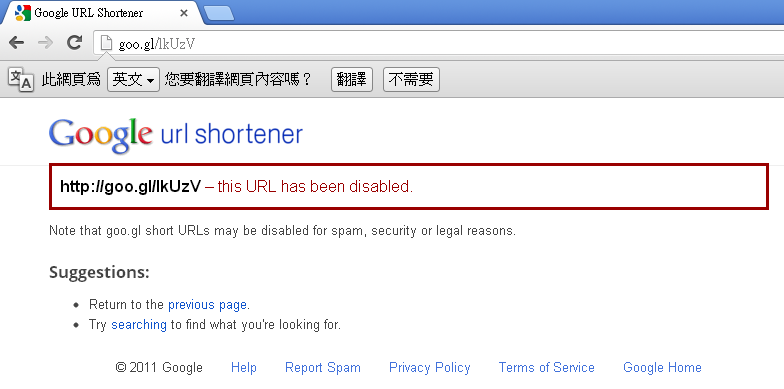
Google URL Shortener: URL disabled due to policy violation
Looking at the email timestamp, barely an hour had elapsed between Gmail receiving the message at 14:04 and my opening it.
In other words, by the time the scammer generated the shortened link, blasted out the phishing campaign, and waited for targets to take the bait, Google’s threat detection had already killed the URL dead in its tracks.
ˊ_>ˋ
One wonders if our opportunistic scammer learned a lesson: if you are going to waste network bandwidth on phishing, perhaps do not rely on an infrastructure provider with world-class automated abuse detection.
When it comes to executing malicious campaigns, Google is decidedly not a cooperative platform for bad actors.
Support Independent Perspectives & In-Depth Insights
Every thoughtful analysis and candid critique comes from our dedication to truth and quality. We choose not to follow sensational algorithms or clickbait headlines.
Sustaining independent research requires reader support. Make a one-time or monthly contribution, securely processed by Google.
Payments secured by Google · Manage or cancel anytime in your Google Account


Comments