

Social media giant Facebook rolled out a thoughtful new feature for users: dedicated Pet Scrapbooks. Users can now tag the actual name of their beloved pets in photos, and Facebook will automatically build a dedicated scrapbook album for them, allowing pet parents to proudly showcase how adorable their fur babies are to family and friends.
In addition to Pet, Facebook also introduced family relationship roles for Son, Daughter, and gender-neutral Child. (In Facebook’s eyes, these four categories are virtually equivalent!)
Netizens once joked that today’s Facebook resembles ancient Egyptian civilization: walls covered with cat photos, much like ancient Egyptian hieroglyphs and murals filled with feline worship, with humans gladly serving as loyal cat servants.
“Facebook isn’t much different than Ancient Egypt. Writing on walls, worshipping cats.”
Introducing this feature makes total sense. Going forward, uploading photos of your cats or toddlers won’t require manually maintaining separate custom albums or setting up rarely used dummy accounts, saving plenty of valuable time. Through this new family member option, you can conveniently build dedicated scrapbooks, chronicle every milestone of their growth, and easily share them with loved ones.
Ready to set it up? Follow this step-by-step tutorial to configure your pet scrapbook on Facebook.
Facebook Pet Scrapbook Setup Tutorial
Step 1: Refer to Figure 1 below. Navigate to your Facebook About page. Among your personal profile sections, select Family and Relationships. On the right, you will see your Relationship Status and Family Members list.
Step 2: Click on Add a family member.
 Figure 1: Family and Relationships.
Step 3: As shown in Figure 2, clicking “Add a family member” opens a setup dialog including Member Name and Relationship.
Tip: The added member must be a virtual profile name. If you enter an existing real account (e.g., an independent Facebook account already created for your pet), the option to add a scrapbook will not appear.
Step 4: Select the relationship type as Pet. An option to Add Scrapbook will appear. Enter your pet’s name, check the “Add Scrapbook” box, and click “Save Changes”.
Please note: the privacy setting in Figure 2 controls whether the pet relationship information itself is public, which is independent of the individual photo privacy settings within the scrapbook. Every photo retains its own privacy settings configured upon upload. In other words, if an uploaded photo was originally public, anyone can see that photo in the pet’s scrapbook. Conversely, even if your pet’s relationship is set to private, others can still see the album itself if individual photo permissions allow it.
 Figure 2: Add a pet.
Step 5: Refer to Figure 3. Once successfully added, the newly registered Pet (or Son, Daughter) will appear under your Family Members list.
Note that a newly added pet profile starts without an avatar (like “Xiao Yu”). The avatar for “V Bear” in Figure 3 was added during earlier testing. We will explain how to set an avatar in the next steps.
 Figure 3: Family members list.
Step 6: As shown in Figure 4, completing steps 1 through 5 automatically generates an empty Pet Scrapbook in your Facebook Albums.
 Figure 4: Newly created pet scrapbook.
Step 7: Refer to Figure 5. Entering the pet scrapbook brings you to its dedicated settings page, where you can customize the pet’s Profile Picture, Cover Photo, review Tagged Photos, and edit Scrapbook Settings.
The profile and cover photo areas let you feature your favorite portrait shots. The dotted tagged area organizes all photos with the pet’s tag, and the Tag Photos button allows you to rapidly batch-tag photos with your pet’s name.
 Figure 5: Initial scrapbook view.
How to Tag Pet (or Child) Photos
Step 8: Continuing from Step 7, clicking the “Tag Photos” button in Figure 5 opens a modal window: “My Photos” (as shown in Figure 6). Browse through past uploaded pictures, select any photo, and add your pet’s tag directly.
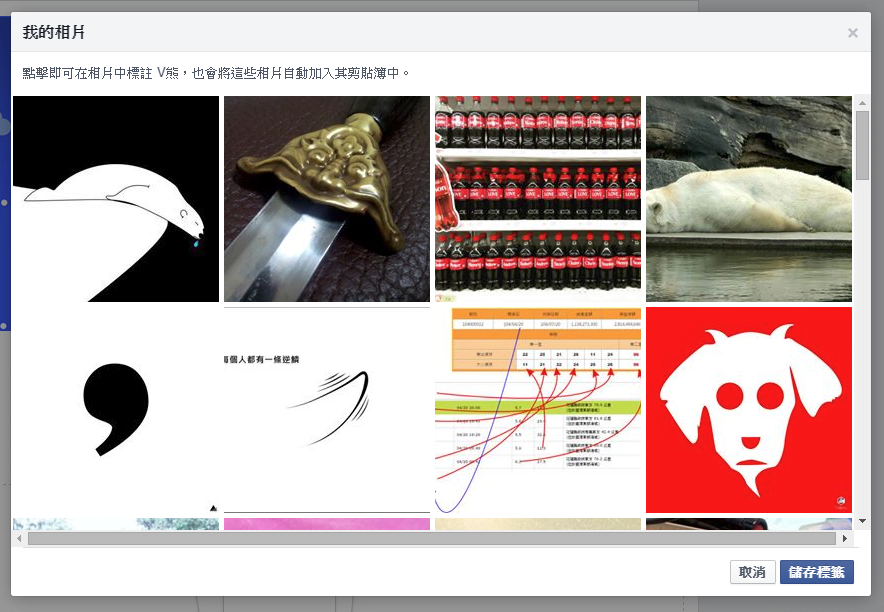 Figure 6: Quick photo tagging.
Additionally, as shown in Figure 7, you can open any individual photo in normal view and tag the pet’s name just like tagging a person, which automatically collects the photo into the pet’s scrapbook.
 Figure 7: Tagging pet name.
Step 9: Once tagged, as shown in Figure 8, the pet’s scrapbook showcases all tagged photos. Family and friends can now browse through all the delightful moments of your adorable companion.
 Figure 8: Tagged photos in scrapbook.
Update (2015.05.14): As shown in Figure 9, when adding a pet, son, or daughter, you can now also specify their Birthday.
 Figure 9: Setting birthday.
Deleting a Scrapbook and Removing Pet Relationships
To delete a scrapbook, go to your Family Relationships, remove the relationship link with the pet, and the associated scrapbook will be deleted along with it (see Figure 10).
 Figure 10: Scrapbook deletion confirmation.
Alternatively, as shown in Figure 11, the scrapbook settings menu provides an option to delete the scrapbook directly, which likewise removes the pet relationship from your profile.
 Figure 11: Delete scrapbook option.
Can Other People Tag My Pet?
Facebook does not currently allow arbitrary third parties to tag your pet directly. However, if you designate a partner under your Relationship Status, your partner can tag your pet directly, and an identical shared scrapbook will be generated for them automatically.
 Figure 12: Relationship status.
As shown in Figure 12, eligible relationship statuses include “In a relationship”, “Engaged”, “Married”, “In a civil union”, “In a domestic partnership”, “In an open relationship”, and “It’s complicated”. Other statuses do not support co-managing scrapbooks!
Support Independent Perspectives & In-Depth Insights
Every thoughtful analysis and candid critique comes from our dedication to truth and quality. We choose not to follow sensational algorithms or clickbait headlines.
Sustaining independent research requires reader support. Make a one-time or monthly contribution, securely processed by Google.
Payments secured by Google · Manage or cancel anytime in your Google Account




Comments