
Capture One is a powerful image editing and management software, ranking alongside Adobe Lightroom as the top two digital darkrooms in the photography world. Although their operating habits and editing concepts differ somewhat, both are excellent professional imaging software capable of handling the complex work of photographers.
Although it can’t retouch images like the professional (plastic surgery) editing software Photoshop, Capture One offers advanced editing functions such as the “Repair Brush” and “Mask,” allowing photographers to still perform minor post-production touch-ups on details and flaws in an image — this is generally the last dividing line between photography and retouching.
While actually operating Capture One, I temporarily couldn’t find the settings interface for adjusting the size, hardness, opacity, and flow parameters of the “Repair Brush” and “Mask Brush.”
Although this seemingly shouldn’t have been a problem troubling me at all, I actually spent half a day looking for a solution. Even searching for support in Capture One’s Help menu, I couldn’t find a way to adjust the relevant parameters.
But in fact, this really isn’t a problem — it’s simpler than you’d imagine, so simple it makes you want to curse. Since it’s been designed to be this simple, at least provide a hint or guide or something.
Please refer to Figure 1 below. To call up the adjustment interface for the Repair Brush settings (including the Mask Brush), you just need to right-click directly on the image in the window to open the floating brush adjustment window!
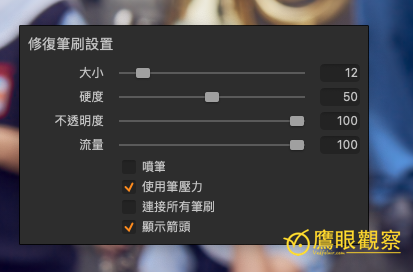
Figure 1, Repair Brush settings interface.
Isn’t it simple yet so mysterious that you want to curse?
References
- Capture One official website
- Adobe Lightroom official website
Support Independent Perspectives & In-Depth Insights
Every thoughtful analysis and candid critique comes from our dedication to truth and quality. We choose not to follow sensational algorithms or clickbait headlines.
Sustaining independent research requires reader support. Make a one-time or monthly contribution, securely processed by Google.
Payments secured by Google · Manage or cancel anytime in your Google Account


Comments