

Capture One is a professional image editing program that professional photographers consider more useful than Adobe Lightroom. However, anything developed by humans is likely to have some minor design flaws (also known as bugs). For example, today we’ll introduce the issue of image noise (color blocks, garbled) that you may encounter when exporting after editing photos.
Please refer to Figure 1 below. After a studio colleague finished editing and exported the images, they ended up with a photo full of noisy color dots. Some works even had large areas of RGB color blocks covering the photo, making the image content almost unrecognizable. If you encountered this problem while rushing to deliver work to a client, you would surely be angry enough to want to smash your computer.

Figure 1, the massive noise output by Capture One.
You might wonder why, given this output quality, the author still dares to call this the favorite image editing software of professional photographers? Well, those are two different matters. Just try it yourself and you’ll understand[1].
Please refer to Figure 2 below. In Capture One’s system settings options, there is a “Hardware Accelerator (Use OpenCL)” option, and that’s where the problem lies. Since the software supports hardware acceleration, but if the third-party components aren’t properly matched, it can easily cause issues.
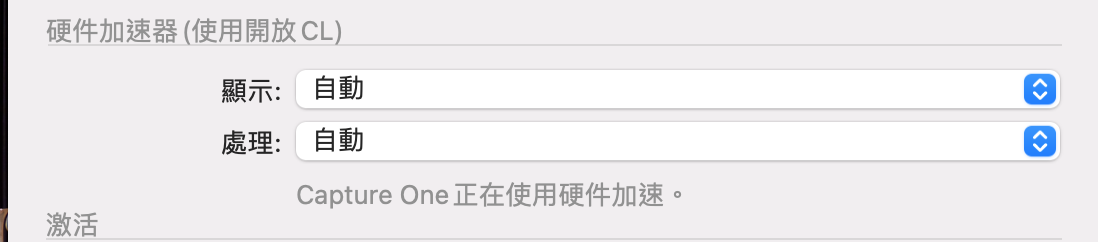
Figure 2, Capture One hardware accelerator settings.
Therefore, to solve the file export noise problem, simply manually switch the “Processing” function from “Auto” to “Off” here, that is, disable the hardware accelerator function. This way, garbled noise or color blocks will no longer appear when exporting photos.
References
Support Independent Perspectives & In-Depth Insights
Every thoughtful analysis and candid critique comes from our dedication to truth and quality. We choose not to follow sensational algorithms or clickbait headlines.
Sustaining independent research requires reader support. Make a one-time or monthly contribution, securely processed by Google.
Payments secured by Google · Manage or cancel anytime in your Google Account




Comments