
Vedfolnir actually got its start on Google’s Blogger (Blogspot) platform. Later, as open-source content management systems (CMS) became all the rage, and in pursuit of greater layout freedom and plugin extensibility, we followed the trend and migrated to a self-rented VPS host running WordPress.
But after going through all that, I must honestly admit: the tricks and pitfalls of self-hosting and operating a server run far too deep!
Late at night, more than once, I couldn’t help but reflect: I clearly just wanted to simply write about overseas travel experiences, digital technology, and photography gear reviews, yet I was forced to spend most of my time and energy on tedious matters like Linux package updates, MySQL databases freezing up, plugin security vulnerability defense, and preventing hackers from planting trojans — it was putting the cart before the horse.
In the past, however, a big part of the reason everyone left Blogger one after another was the stagnation of the veteran Blogger’s features. Especially after Google officially made “HTTPS / SSL secure encryption certificates” a core SEO ranking factor for search engines, a large number of commercial websites and independent blogs switched to the green security padlock — but the early Blogger system imposed layer upon layer of restrictions on SSL support for custom domains.
What is gratifying is that Google, as a leading driver of global internet security standards, has shown tremendous sincerity with Blogger in recent years: the company has officially rolled out “one-click, free activation of HTTPS and SSL security certificates for custom independent domains (Custom Domain)”!
Whether it’s applying for an SSL digital certificate, automatic renewal, or the massive cloud host bandwidth and space behind it — it’s all free for life! With this feature in place, Google Blogger has once again become the god-tier, worry-free first choice in the minds of many bloggers who just want to create content with peace of mind.
1. Why Is HTTPS So Crucial for Modern Blogs?
In the past, an HTTP website without an SSL certificate installed merely lacked a small padlock icon in the address bar; but under modern browser standards, lacking HTTPS brings extremely severe penalties:
- Browsers forcibly mark it as “Not Secure”: Chrome, Firefox, and Safari will directly display a red warning label in the address bar, or even pop up a full-screen “Your connection is not private” warning, scaring off more than half of potential visitors.
- SEO search ranking penalty: Google’s search algorithm explicitly lists site-wide HTTPS encryption as a ranking signal. Websites using HTTPS have a significant advantage in keyword competition.
- Preventing man-in-the-middle eavesdropping and malicious ad injection on public networks: When visitors browse your article using public Wi-Fi in a café or airport, unencrypted HTTP traffic is highly susceptible to malicious routers injecting pop-up gambling ads or stealing cookies.
2. Illustrated Walkthrough: Three Steps to Enable HTTPS and Automatic Redirection for a Custom Domain
If your blog is already bound to a custom domain name (for example, Vedfolnir.com), you can complete the encrypted deployment within minutes by following the official steps below:
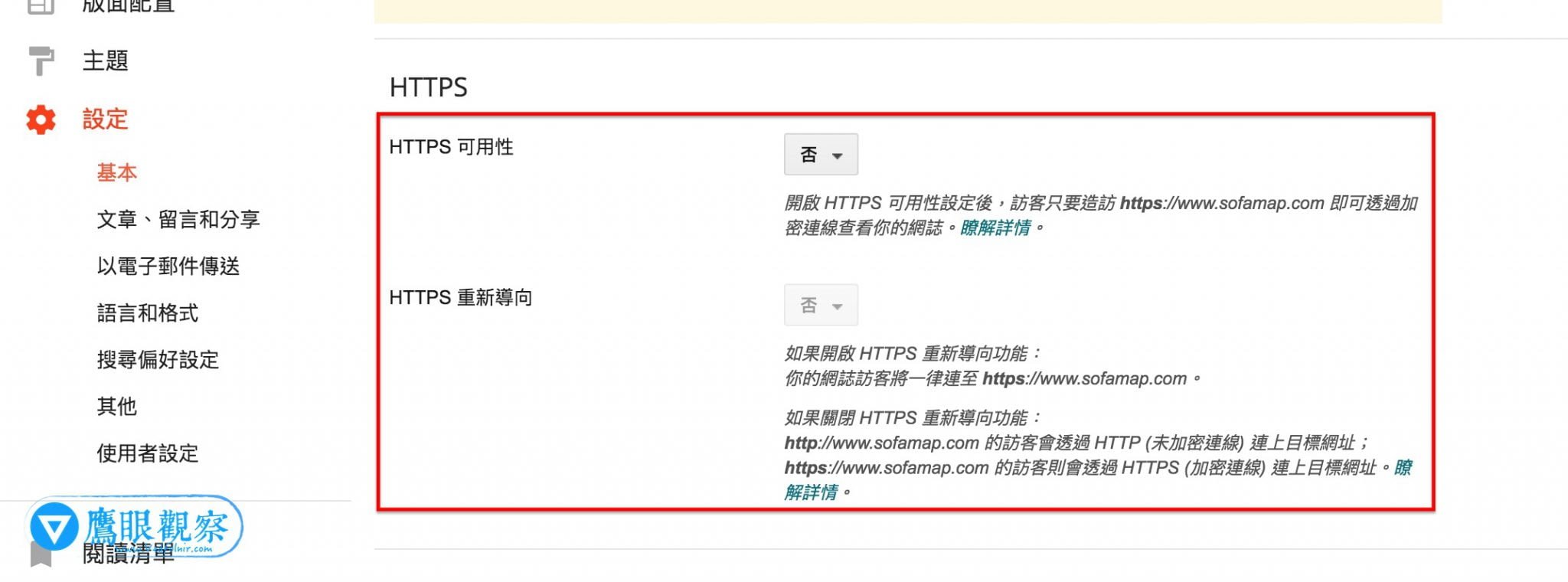
Step 1: Enable HTTPS Availability
- Log in to the Google Blogger control panel.
- In the left menu, click “Settings” to enter the “Basic” settings area.
- Scroll down to find the “HTTPS” settings section.
- To the right of the “HTTPS Availability” item, toggle the switch to “Yes”.
System processing note: After clicking, Google’s servers will automatically apply to a certificate authority for a dedicated SSL certificate for your custom domain. This process usually takes 15 minutes to several hours, during which the status will show as “Processing” — please wait patiently for the certificate to take effect.
Step 2: Enable HTTPS Redirect (301 Redirect)
Once the certificate application succeeds and “HTTPS Availability” turns to normal operation:
- Also check and toggle the “HTTPS Redirect” below to “Yes”.
- This setting is extremely critical! It ensures that whether a visitor types the old
http://address in the browser or clicks in from an old external link, the system will automatically and seamlessly jump to the encryptedhttps://secure address via a 301 permanent redirect, perfectly inheriting the existing SEO weight.
3. Google Blogger vs. Self-Hosted WordPress: A Soul-Searching Question and Positioning Trade-Off
This update lets Blogger close the most critical security gap with professional CMS platforms. We might as well re-examine the essential positioning of the two:
| Evaluation Aspect | Google Blogger Platform | Self-Hosted WordPre…
Support Independent Perspectives & In-Depth Insights
Every thoughtful analysis and candid critique comes from our dedication to truth and quality. We choose not to follow sensational algorithms or clickbait headlines.
Sustaining independent research requires reader support. Make a one-time or monthly contribution, securely processed by Google.
Payments secured by Google · Manage or cancel anytime in your Google Account




Comments