
Ever since Google began favoring websites with SSL security certificates in its Search Engine Optimization (SEO) ranking algorithms, website operators worldwide have eagerly adopted the familiar green padlock. While configuring SSL certificates traditionally demands server-side system administration experience, WordPress content management system users can streamline the entire process through convenient plugins!
When installing SSL certificates on WordPress websites, we previously introduced two common methods: purchasing commercial certificates directly from certified certificate authorities, or installing the Certbot package on a Linux server to acquire free Let’s Encrypt certificates.
Today, we look at another user-friendly WordPress plugin: “WP Encrypt”, which enables you to request and generate SSL certificate files directly from the WordPress administration dashboard.
As illustrated below, after installing and activating this plugin, a new “WP Encrypt” menu item appears under “Settings”, presenting a single-page configuration screen.
Next, fill in the “Organization Name”, “Country Name”, and “Country Code” fields. Save changes first, then click the “Register Account” button to register your details with the remote certificate authority server.
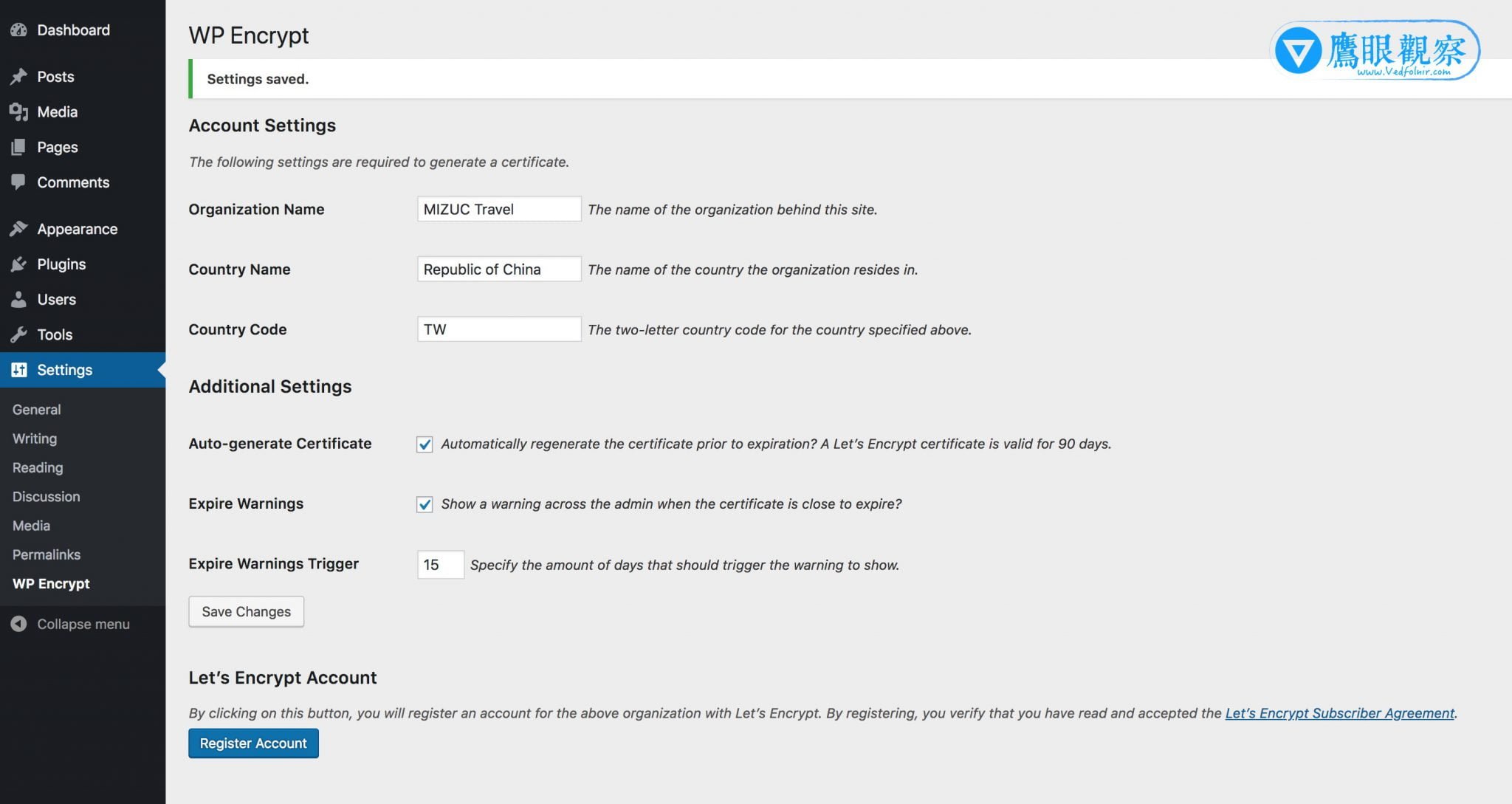 WordPress Plugins: WP Encrypt.
Under normal circumstances, if your hosting server permissions meet WP Encrypt’s operational requirements, you can obtain an SSL certificate in just a few clicks. However, because hosting environments differ significantly, troubleshooting occasional hiccups requires flexibility.
 WP Encrypt SSL registration error notice.
For instance, the warning displayed in the image above is a common scenario during account registration.
Upon inspecting the error message, you can see that the WordPress root directory lacks the write permissions WP Encrypt needs to create new subdirectories (letsencrypt and live).
To resolve this issue, grant temporary write permissions to the WordPress installation folder (for example, using the Linux chmod command). In fact, we recommend adjusting folder write permissions before initiating account registration to avoid interrupted setup workflows!
Related Reading & Recommended Guides:
- Purchasing SSL Certificates Guide: Enhancing Security and SEO Rankings for Websites and Blogs.
- Installing Free Let’s Encrypt SSL Certificates and Keys on Web Servers Using Certbot (with WordPress Support).
Support Independent Perspectives & In-Depth Insights
Every thoughtful analysis and candid critique comes from our dedication to truth and quality. We choose not to follow sensational algorithms or clickbait headlines.
Sustaining independent research requires reader support. Make a one-time or monthly contribution, securely processed by Google.
Payments secured by Google · Manage or cancel anytime in your Google Account


Comments