
At Apple’s late-night special event broadcast just two days ago, tech enthusiasts undoubtedly caught the news about the major redesign of the Apple MacBook Pro.
Replacing the traditional top row of function keys (ESC, F1 through F12), the newly introduced dynamic OLED touch strip, the “Touch Bar”, was undeniably the headline feature of the keynote. Apple promoted it as a versatile touch interface capable of automatically switching toolbars according to the active app, supposedly boosting efficiency across video editing, photo retouching, and typing.
BUT—and in life, that “BUT” makes all the difference!
While the new MacBook Pro seems to add a touch of novelty with its dynamic strip, the accompanying hardware “improvements” feel more like unnecessary regressions that leave professionals gasping in dismay. For serious photographers, video editors, and software developers who rely on this machine to make a living, these changes aren’t upgrades—they outright strip away essential productivity tools!

The Touch Bar: Flashy Gimmick or Reheated Concept?
Let’s take a calm look at the heavily hyped Touch Bar.
Swapping the top row of keyboard keys for a dynamic secondary display isn’t unprecedented in laptop history. Years ago, Razer rolled out a multifunction LCD touch strip dubbed the “Switchblade UI” on its flagship Razer Blade Pro gaming laptop, similarly boasting dynamic application keys and macro shortcuts.
Yet in a real-world professional workflow, the Touch Bar introduces notable friction for power users:
- Destroys blind touch typing tactile feedback: Programmers and writers rarely need to look down at their keyboards while typing. Now, just to hit ESC or adjust volume and brightness, fingers must land on a piece of smooth glass completely devoid of key travel or physical positioning anchors, frequently disrupting their working rhythm.
- The loss of a physical ESC key is a disaster: For developers living inside the Terminal or Vim, a physical ESC key is as vital as breathing. Replacing it with a virtual touch key invites endless accidental taps and frustrating uncertainty.
If the Touch Bar is merely a quirky new gadget that takes time getting used to, the wholesale purge of peripheral ports is the fatal flaw driving pros away.
Two Crippling Cuts That Drive Photographers and Creators Crazy
Apple’s laptop lineup used to be crystal clear: casual document work and web browsing belonged to the MacBook Air or the 12-inch New MacBook. Only users handling video editing, RAW photo processing, 3D rendering, or heavy code compilation shelled out top dollar for a machine carrying the “Pro” moniker.
Because it targets high-end professionals, hardware design ought to prioritize peak productivity and workflow efficiency above all else. Yet the new MacBook Pro consecutively stripped out two irreplaceable core features:
1. Removing the Photographer’s Lifeline: Built-in SD Card Slot!
For commercial photographers, wedding videographers, or outdoor expedition shooters returning to a hotel or tent after a long shoot, the smoothest workflow was simple: “Pop out the camera’s SD card, slide it directly into the laptop’s side slot, and import into Lightroom with one click.”
Now, the SD card reader is completely gone! This means photographers working on location must worry constantly about packing an external card reader. Forget this little dongle just once, and thousands of dollars worth of newly captured photos remain trapped inside the memory card—an unforgivable setback in high-pressure environments demanding immediate deliverables!
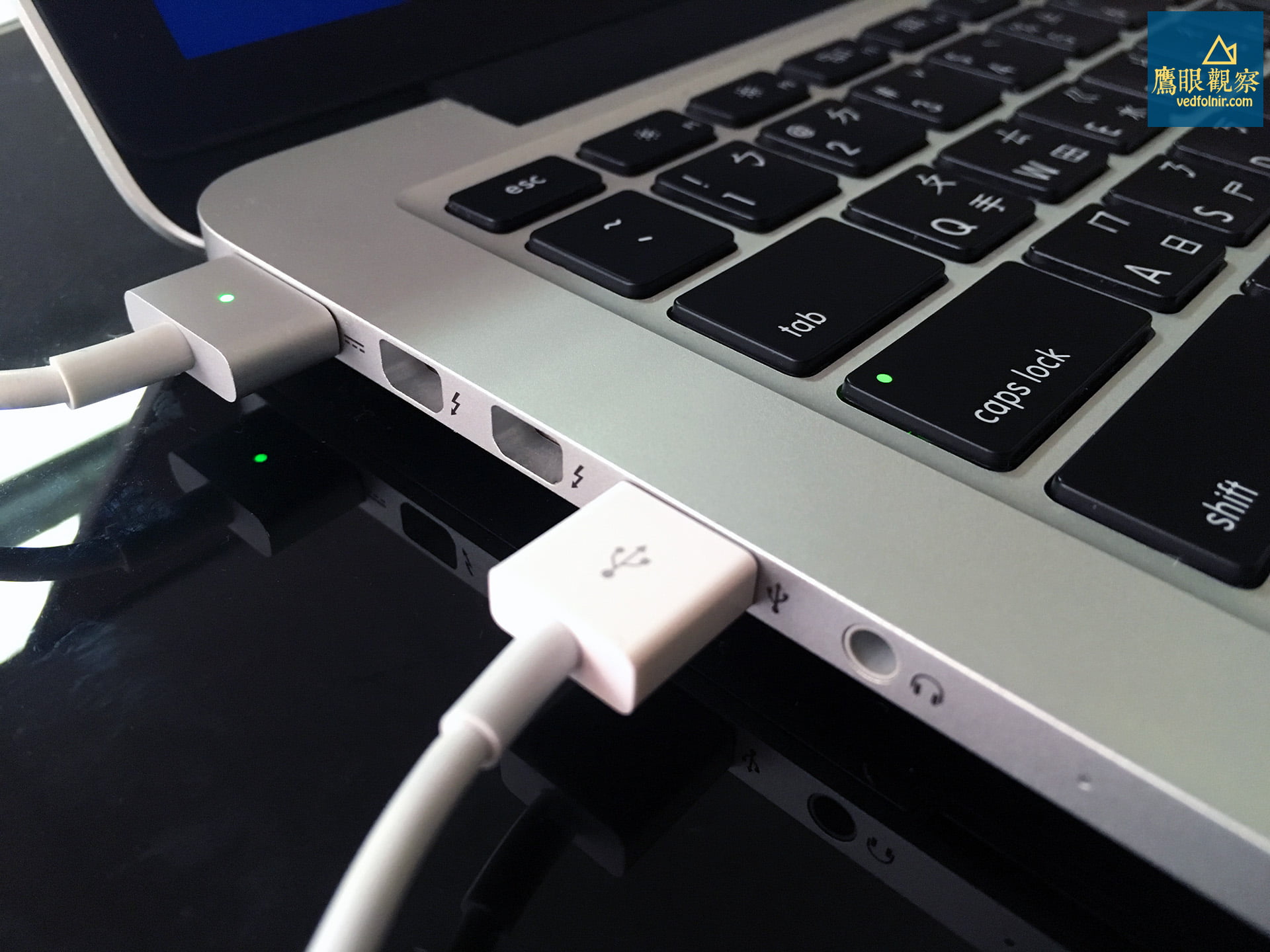
2. Killing the Genius Invention That Saved Countless Laptops: MagSafe!
Every longtime Mac user has experienced the heart-stopping moment of a passerby, pet, or their own careless foot tripping over the power cord. In the past, Apple’s beloved patented invention, the “MagSafe magnetic power connector”, would cleanly detach whenever yanked. The cable popped off, yet the laptop remained securely planted on the desk, saving countless machines from catastrophic drops.
On the new MacBook Pro, this brilliant design has been completely eliminated in favor of firmly gripping USB Type-C ports with zero breakaway protection. Imagine sitting in a crowded café, conference room, or studio when someone snags your charging cable: your brand-new MacBook Pro—worth NT$60,000 to NT$100,000—instantly gets yanked off the desk and crashes hard onto the floor.
Losing the “SD card slot” and the “MagSafe magnetic connector” alone is reason enough to give this generation a pass!

Leaving Only USB Type-C: Falling into Endless “Dongle Hell”
Worse still, Apple went to extremes on the new MacBook Pro: aside from a 3.5mm headphone jack, the chassis features only two to four Thunderbolt 3 (USB Type-C) ports.
While USB Type-C unites data transfer, power delivery, and video output into one interface—and truly represents the future—“the future” is not “today”:
- Your everyday USB-A thumb drives and external hard drives? Cannot plug in—please buy an adapter!
- The ubiquitous HDMI projector or external monitor in meeting rooms? Cannot plug in—please buy an adapter!
- Even the Lightning cable bundled with the newly purchased iPhone 7? Incredibly, it cannot plug directly into the new MacBook Pro either, because the cable still terminates in traditional USB-A!
Consequently, while the new MacBook Pro is a couple of millimeters thinner, users are forced to haul a tangle of heavy, messy adapters—a literal “dongle hell.” Desks cluttered with dongle chains look unsightly and dramatically increase the risk of loose connections and signal degradation.
Conclusion: Grab a 2015 MacBook Pro Now to Avoid Regrets!
A truly great tool should quietly fade into the background of your workflow, providing rock-solid reliability rather than constantly throwing obstacles in your way.
If your daily routine depends on photo post-processing, on-site publishing, frequent USB drive exchanges, or if you simply loathe carrying a bag of adapters:
While retail channels, Apple official refurbished stores, or second-hand markets still have inventory, picking up this ultimate classic MacBook Pro not only saves your wallet substantial money on hardware and adapters, but also spares you the agony of becoming a paying beta tester for an unproven architecture!
Further Reading
Support Independent Perspectives & In-Depth Insights
Every thoughtful analysis and candid critique comes from our dedication to truth and quality. We choose not to follow sensational algorithms or clickbait headlines.
Sustaining independent research requires reader support. Make a one-time or monthly contribution, securely processed by Google.
Payments secured by Google · Manage or cancel anytime in your Google Account



Comments