
Although the traditionally defined telephone has now been replaced by messaging apps like Line and Facebook, the phenomenon of everyone having one or even multiple numbers has reached its peak, also bringing more diverse advertising methods and scam channels.
Most of us experience the problem of unknown or harassing calls, whether scam calls, credit card and insurance sales, etc., all making our daily lives unbearable.
In fact, for Apple iPhone users, we don’t need to install any additional third-party apps at all; we can simply use iOS’s built-in security design to filter out calls we don’t want to know about.
For example, silence all unknown caller numbers and add annoying contacts to the blacklist, thereby avoiding unnecessary interruptions.
Setting Up iPhone Call Filtering
Apple iPhone provides a total of 3 security designs for filtering calls, including directly silencing all unknown phone numbers, blocking contact calls, and blocking this caller. The following will introduce these 3 methods separately.
Silence Unknown Callers
When these numbers call your phone, iPhone will automatically silence these calls, forward them directly to voicemail, and display them in the “Recents” list, so we don’t need to be disturbed by sound or vibration.
The benefit of this feature is that we can still see the caller number, so we have control to decide whether to call back. Moreover, calls from people we’ve recently called can automatically have the silence lifted. This ensures we don’t miss important calls, making it very suitable for dealing with a large number of scam and harassing calls.
Setting it up is very simple. Just search for the “Settings” icon on the iPhone screen, tap to open the Settings app, then look for the “Phone” option. Tap that option, enter the Phone section, find “Silence Unknown Callers”, and then tap to enable the feature.
This way, as long as the caller number is not recorded in the phone contacts, the phone will not emit a call alert sound or vibration.
Block Contacts
Also in the Phone section, we can see another option, “Blocked Contacts”. Tap that option to enter, and you can manually add contacts you intend to block, such as ex-boyfriends, estranged friends, annoying relatives, etc., throwing them all into the blacklist.
Once a contact is blocked in the blacklist, you will no longer receive their calls, SMS messages, emails (iCloud), or FaceTime calls, keeping them out of sight and out of mind.
Block Harassing and Scam Calls
The above “Block Contacts” can only block targets that already have contact information created. If you want to manually block an unknown caller number, we can follow the steps below, including:
Step one, open the “Phone 📞” app on the phone’s home screen;
Step two, please refer to image one below, open “Recents 🕘”;
Step three, tap the “Info ℹ️” icon after the number you intend to block;
Step four, find the “Block this Caller” option below the contact information;
Step five, tap “Block this Caller” and confirm blocking the contact.
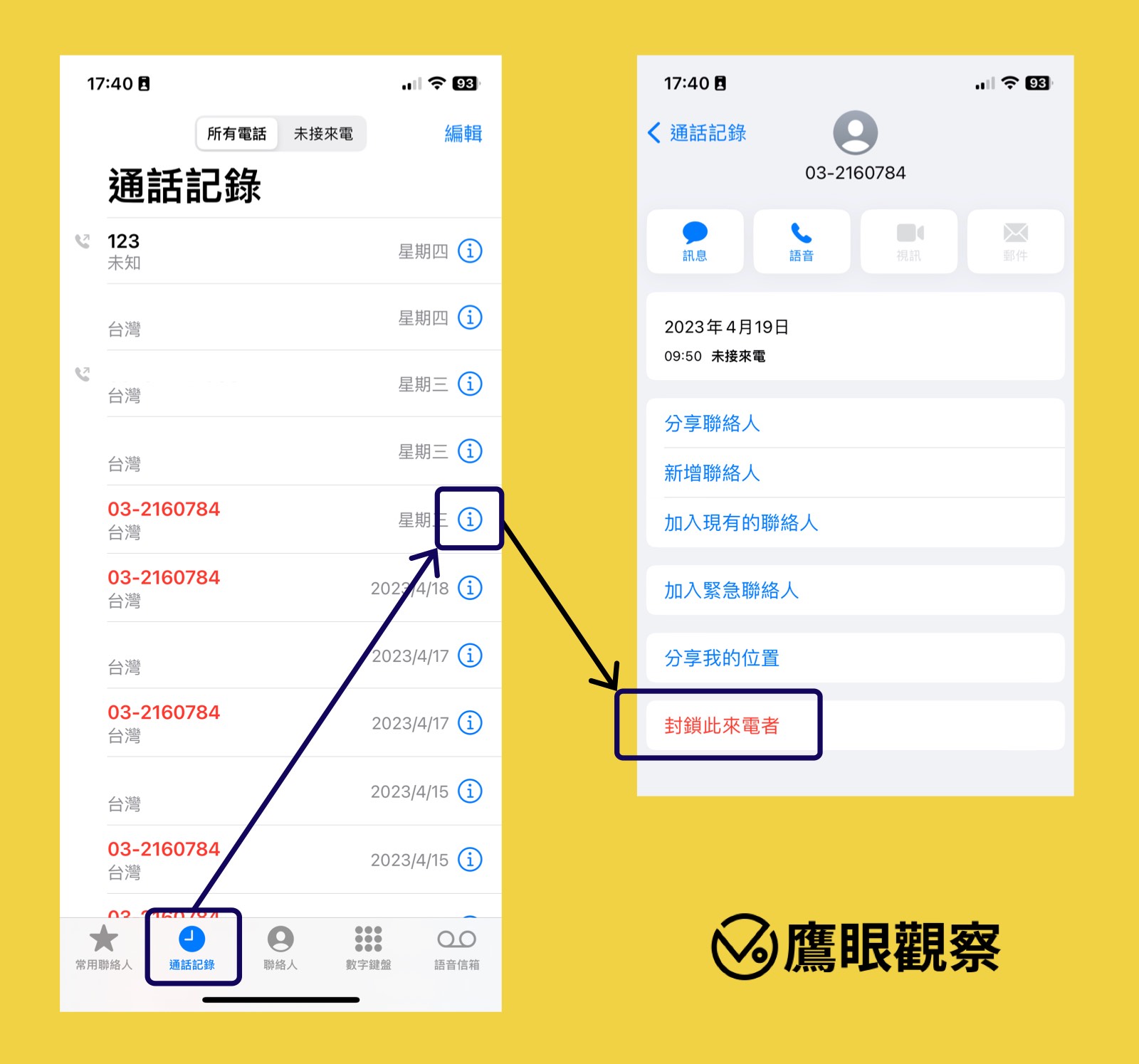 Image one, blocking an unknown caller number.
Results and Discussion
The author believes that in terms of call management features, the most useful one on Apple iPhone is still the feature to silence all unknown calls, which can avoid being overly disturbed to the greatest extent. And compared to the “Silent Mode” enabled via the switch on the left side of the phone, it achieves a good balance between maximum notification and concealment.
In addition, blocking specific contacts is also a quite useful feature for avoiding the troubles of this world.
As for the third method mentioned above, manually blocking unknown caller numbers, the author thinks it’s actually not very necessary. First, it wastes our management time; second, after enabling the unknown call filtering feature, there’s actually no need to specifically block numbers, since many numbers used by scam groups are fake anyway, and in the end it will only make our block list become a super long string.
Reference Appendix
- Unknown caller, one-ring hang-up, answer-and-hang-up, scam calls, harassing call number blacklist
- Is 009 a scam call or a Chunghwa Telecom overdue payment call?
Support Independent Perspectives & In-Depth Insights
Every thoughtful analysis and candid critique comes from our dedication to truth and quality. We choose not to follow sensational algorithms or clickbait headlines.
Sustaining independent research requires reader support. Make a one-time or monthly contribution, securely processed by Google.
Payments secured by Google · Manage or cancel anytime in your Google Account



Comments