

The resource availability of self-hosted WordPress sites has always been a headache for many webmasters. After all, high-speed CPUs and massive memory can speed up a site, but those are all bought with money, which is a big cost for small site users.
If the server’s memory is too small, what improvements can be made?
In fact, one method is to create a memory swap file on the hard drive for the system to use as memory storage, so data originally stored in memory can also be stored on a large-capacity hard drive, thereby avoiding the problem of insufficient memory.
This feature was also popular on personal computers over a decade ago, but memory was expensive back then and is cheap now, so this kind of configuration is used less and less.
In fact, this approach has an obvious drawback: the hard drive’s read/write speed absolutely cannot compare with memory. Personal computers used to be able to trade lower performance for larger memory space, avoiding crashes while still running large programs, but servers cannot do this. For a server, avoiding crashes is only a basic condition; it must also provide sufficient performance so that site users don’t feel impatient during operation.
But looking at it from another angle, the slow read/write speed of old hard drives was due to the inherent physical limitations of mechanical traditional hard drives. But now the mainstream solid-state drive (SSD), although its read/write speed still cannot compare with memory, is several times faster than traditional HDD hard drives. So using an SSD to create swap space actually has quite advantageous conditions.
Below are the operating directives for creating a swap file on a Linux server for the WordPress content management system to use. Just execute them one by one to create up to 1G of swap space, providing more stable operation for the site.
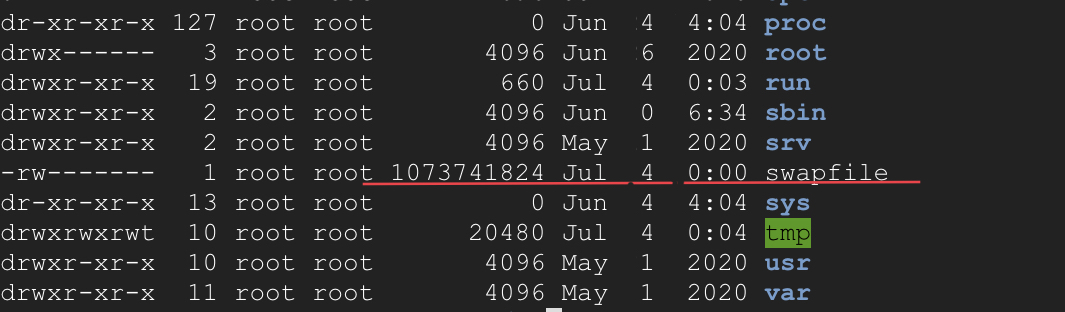
⚠️Note: As the saying goes, back up your site before operating.
Directives for Creating a Memory Swap File
sudo fallocate -l 1G /swapfile sudo chmod 600 /swapfile sudo mkswap /swapfile sudo swapon /swapfile echo ‘/swapfile none swap sw 0 0’ | sudo tee -a /etc/fstab
Introduction to Linux Directive Usage
- fallocate: Used to quickly create large files.
- chmod: Change file permissions.
- mkswap: Create a swap partition.
- swapon: Enable the swap partition.
- echo and tee: Standard screen output and simultaneous output to a file.
Results and Discussion
After expanding a small site that originally had only 0.6GB of memory with a 1GB swap file, although I can’t say the surge in visitors was because of the added swap space, the next day’s traffic did indeed surge from 500 to 1,000 visits, and the smoothness during operation was very noticeable. I will continue to observe for a few more days to judge whether the advantages of adding swap space are obvious.
Support Independent Perspectives & In-Depth Insights
Every thoughtful analysis and candid critique comes from our dedication to truth and quality. We choose not to follow sensational algorithms or clickbait headlines.
Sustaining independent research requires reader support. Make a one-time or monthly contribution, securely processed by Google.
Payments secured by Google · Manage or cancel anytime in your Google Account



Comments