

WordPress rolled out its 5.0 major update in late 2018. For everyday users, the most prominent change is the visual editing system “Gutenberg,” which had been tested as a plugin for quite some time and is now fully integrated into the WordPress core.
Alongside this release, WordPress launched “Twenty Nineteen,” a brand-new default theme following its 2017 predecessor, designed to pair seamlessly with the Gutenberg editor (officially dubbed the Block Editor by WP).
Naturally, like most official default themes in past generations, it works out of the box, but fine-grained customization remains limited compared to mature third-party themes. For advanced site owners or experienced bloggers, it may feel a bit sparse. Third-party developers will likely use its foundation to craft more sophisticated themes soon.
We have already performed the upgrade across several live sites without encountering major glitches, so generally speaking, it is safe to install.
⚠️ Note: If your directory permissions are overly restrictive (e.g., 755), preventing updated files from overwriting older ones cleanly, the system may crash with an HTTP 500 Internal Server Error. If this occurs, simply download a fresh copy of WordPress core files and overwrite your installation manually.
Anyone actively maintaining WordPress sites is likely familiar with Gutenberg, having seen constant prompts to test it over the preceding six months!
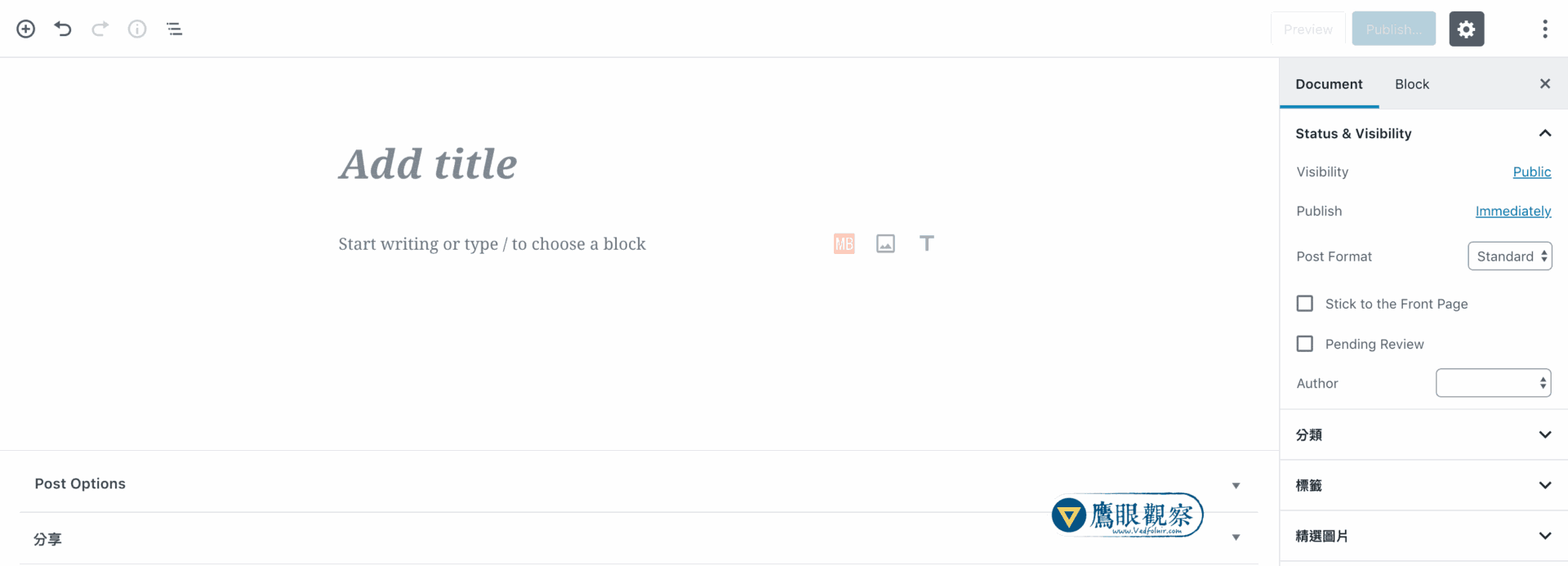 WordPress 5.0 Visual Editor
The biggest advantage of the Gutenberg editor is that every paragraph of text, every image, and every embed is treated as a modular “Block.” Blocks can be reordered up and down effortlessly. Through the settings panel on the right sidebar, you can fine-tune text size, drop caps, background colors, and typography for each individual block, or even write custom CSS classes directly. This is why WordPress officially calls it the Block Editor.
However, I found that many functions feel heavily restricted. Unlike the classic workflow paired with the TinyMCE Advanced plugin—where you could easily change font colors, adjust font sizes on arbitrary selections, or insert tables—flexibility here is reduced. Hopefully, future updates will enhance these content editing capabilities.
User feedback on the official plugin prior to release was rather harsh: out of 1,648 reviews, an astounding 943 gave it a one-star rating.
Truth be told, I also gave the official plugin a low rating. My frustration stems mainly from two issues: First, the visual block editor consumes considerable system resources. During heavy writing and editing, noticeable lag creeps in—for example, clicking a cell in a table could freeze for up to 5 seconds before responding, and my laptop fan started spinning at maximum speed. Second, while the interface looks clean, the actual writing experience for authors feels disrupted.
As shown below, when drafting a second paragraph, Gutenberg’s floating block toolbar automatically pops up, obscuring the ending lines of the previous paragraph. During real-world writing, this breaks cognitive continuity and flow.
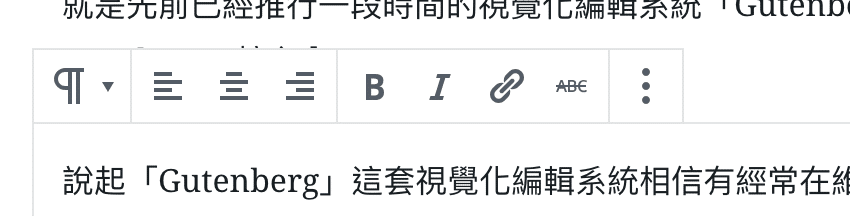 WordPress 5.0 Distracting Editing Experience
In practice, writers do not need to alter formatting every second. More often, we are rereading and reordering text, which feels far clunkier in the new block interface than in traditional plain text editors.
WordPress recognized this issue to some degree: by clicking “Top Toolbar” in the options menu at the top-right corner of the editor, you can pin those intrusive formatting options to the top of the window.
Even so, the new visual editor suffers from numerous minor issues that make it difficult to embrace wholeheartedly. For instance, permalinks previously could be modified freely during drafting, but now cannot be altered until after publishing the post (which is baffling).
The permalink issue seems to be a bug: it didn’t occur on my other sites, nor on standard Pages within this site, but only on Post creation. Still, it highlights that the new editor rolled out with rough edges.
Fortunately, anticipating resistance to abrupt changes, WordPress released the official “Classic Editor” plugin. Those who prefer the traditional workflow can install it and pair it with TinyMCE Advanced (which supports custom text highlight colors and advanced table layouts), creating what remains my preferred writing environment.
However, the WordPress core team has already stated that the Classic Editor plugin will only receive official support until 2021, so users should prepare mentally for the inevitable transition.
Additionally, a word of caution: after installing Classic Editor, avoid directly editing existing posts that were already written and published using the Block Editor, as doing so can scramble raw HTML and block comment markers. Instead, open the post in the Block Editor first, find the block settings menu, and select “Convert to Classic Block” to allow the system to convert the content cleanly.
Interestingly, by making the new block editor mandatory and spinning out the old interface into a standalone plugin, WordPress created an ironic situation: the legacy Classic Editor plugin received overwhelmingly positive reviews. I personally gave it five stars, praising it as one of the best tools around. Meanwhile, the new design—which had received terrible reviews as an opt-in plugin—was forced onto everyone. You have to admire their persistence.
Finally, if you encounter an “Updating failed” error notice whenever saving or publishing posts after upgrading to WordPress 5.0, your web application firewall (WAF) or security plugin may be triggering false positives. Try whitelisting Gutenberg REST API endpoints in your firewall configuration to resolve the issue.
Support Independent Perspectives & In-Depth Insights
Every thoughtful analysis and candid critique comes from our dedication to truth and quality. We choose not to follow sensational algorithms or clickbait headlines.
Sustaining independent research requires reader support. Make a one-time or monthly contribution, securely processed by Google.
Payments secured by Google · Manage or cancel anytime in your Google Account


Comments