
I’m sure everyone still remembers the recent house-number chaos in New Taipei City. The color scheme, self-restricted by political considerations, drew a wave of public criticism — better to just restore the pure blue-and-white scheme used in earlier years. Though I have to say, the green-and-white used in the past decade or so was not any better; green text against a white background under sunlight is equally hard to make out.
But that’s all beside the point. In any case, the New Taipei City Government has followed the public’s wishes and suspended the replacement of the new house numbers, so let’s see whether they can learn the lesson and give us something refreshing afterward. Actually, the New Taipei City Government could well take this opportunity to represent all 29 of its districts with different colors — besides being an interesting talking point, it could also strengthen residents’ emotional attachment to their districts (if the color scheme is too hard, they could even do modular house numbers and let people choose their own; after all, it wouldn’t matter much even if not every house number showed the district and street name).

Which color scheme for house numbers is the most eye-catching?
Since color contrast is so important, and we are now in the screen generation, is there any way to conveniently find the most eye-catching and appropriate color scheme?
Yes, there is. Besides the highest-contrast monotone black-and-white pairing, the international organization “World Wide Web Consortium (W3C),” initiated by the United States’ Massachusetts Institute of Technology (MIT), published a “Web Content Accessibility Guidelines (WCAG)” for web content accessibility (also known as web accessibility) to promote accessible web design, and it already sets out a framework for the readability of color schemes.
But understanding those guidelines is a job for web design experts; we just need the concept. Online tools are now very well developed — for example, today I want to introduce the “Contrast Checker” provided by “WebAIM.” Users simply enter the background color and the foreground (text) color on the website, and the system quickly calculates the “Contrast Ratio” — the higher the score, the easier it is to read!
Official website: “WebAIM: Contrast Checker.”
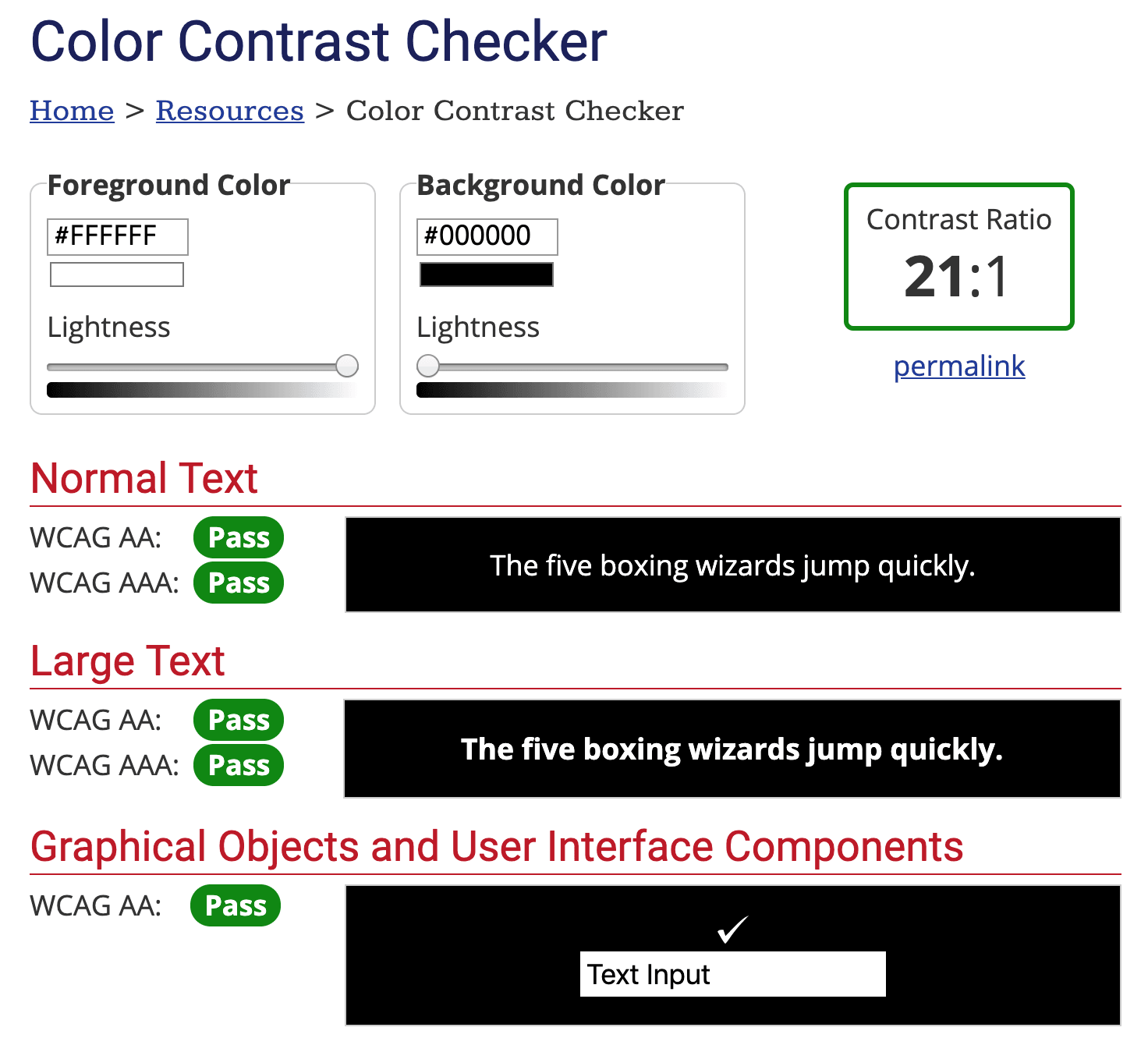
Please refer to the image below. We tested with white text and a black background and got a high score of 21 (testing the reverse gives the same result). 21 also represents the highest rating of this system, so when we later test combinations of our favorite colors, we can use this score as the highest standard.
The website also analyzes “Normal Text,” “Large Text,” and “Graphical Objects and User Interface Components,” setting ratings ranging from “Fail” to “AA” to “AAA.”
As long as you can get all AAA ratings (contrast of 7 or above), it means your color scheme basically has quite high web accessibility.
Next, we tested using the logo colors of the Vedfolnir website: the background is the deep blue “005080,” and the text color is Vedfolnir’s goose-yellow “ffd51c,” giving a contrast score of 6.01 (gazing into the distance). Although it is nearly four times less than the 21 of the black-and-white pairing, it is actually still a fairly good contrast score — from the image below you can see the readability rating reaches four WCAG AAA levels.
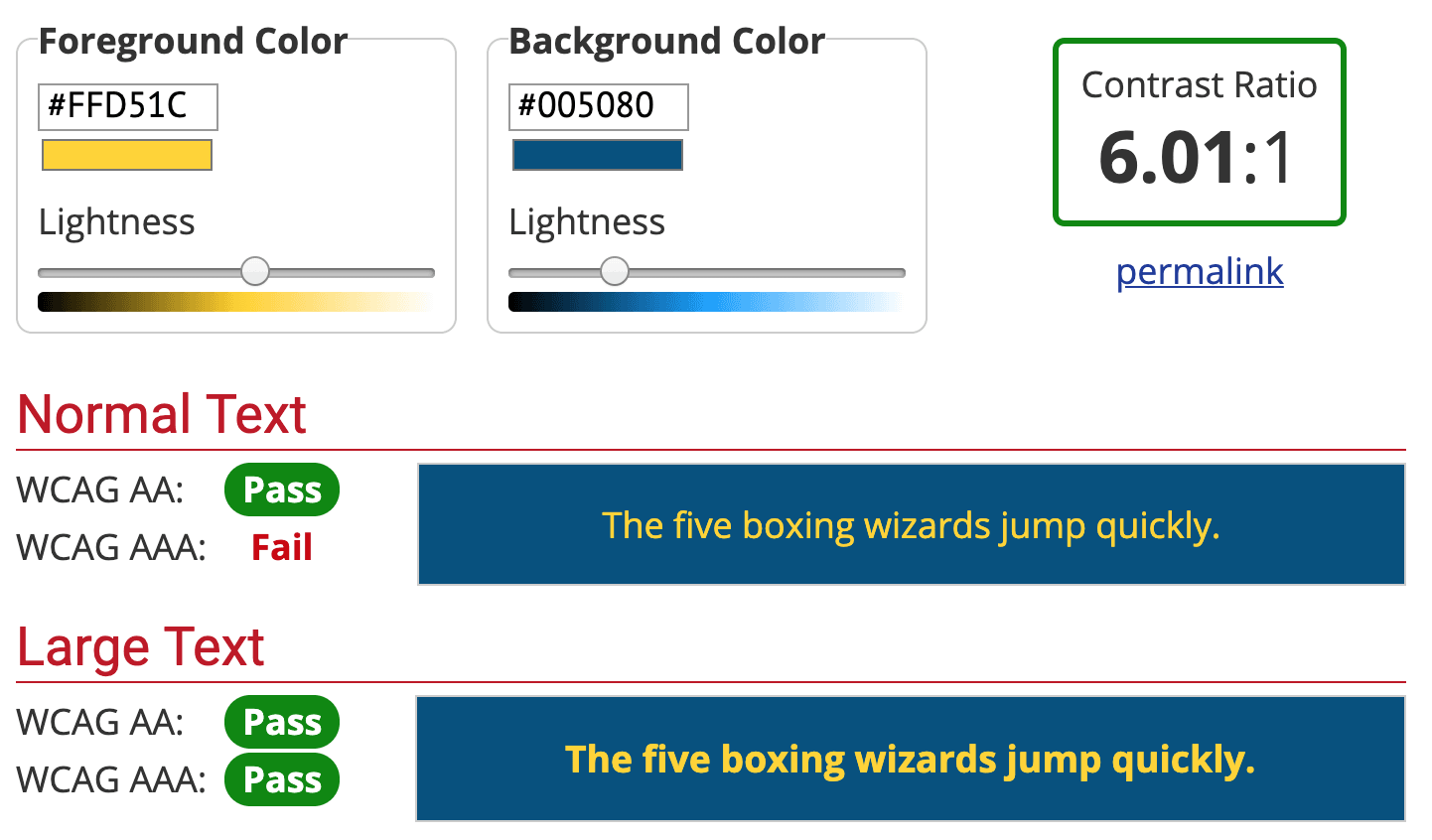
Well, quietly speaking, the logo’s contrast for normal text was actually judged a FAIL at the WCAG AAA level (tears)! After some adjustment, I found that simply deepening the blue background to “004570” yields a high score of 7.09 across all WCAG AAA levels. I’ll change it right away!
Support Independent Perspectives & In-Depth Insights
Every thoughtful analysis and candid critique comes from our dedication to truth and quality. We choose not to follow sensational algorithms or clickbait headlines.
Sustaining independent research requires reader support. Make a one-time or monthly contribution, securely processed by Google.
Payments secured by Google · Manage or cancel anytime in your Google Account



Comments