
A UPS, or Uninterruptible Power Supply, is a front-end power-conditioning device engineered for stability, safety, and energy efficiency. Beyond its indispensable role in front of mission-critical enterprise servers, it is also a highly recommended peripheral for design studios and home computer users.
A well-designed UPS ensures that even during unexpected utility power blackouts, your computer continues receiving stable power from internal batteries. This gives operators (or automated scripts) critical minutes to save active work and safely shut down systems, preventing catastrophic data loss or hardware corruption triggered by instantaneous outages.
Have you ever suffered that heartbreaking moment when a power outage destroyed a research paper you spent all night writing? Or the agonizing agony of having computer internals fried instantly by a severe high-voltage surge? The Fixer has endured both! (Wiping away tears.)
The culprit behind my computer getting blasted by high voltage was none other than the local power utility, Taipower. During maintenance, workers mistakenly routed high-voltage lines into a residential low-voltage grid, instantly blowing out appliances across an entire row of houses in Hsinchu. Fortunately, Taipower handled the crisis promptly (with ample compensation budgets); after the landlord collected our loss reports, Taipower replaced my destroyed rig with an upgraded computer within days, giving me lasting respect for their crisis management (I was naive back then—otherwise I might have tried swapping an Eee PC for a Mac).
Had an Uninterruptible Power Supply (UPS) been installed back then, that disaster would never have happened.
Historically, UPS models were bifurcated between expensive high-end On-Line units and budget entry-level Off-Line (or Standby) models.
Later, manufacturers combined the advantages of both topologies to create “Line-Interactive UPS Technology”. A line-interactive unit was actually my very first UPS, which comes with its own bittersweet backstory.
Back in our biomedical engineering lab, we had a dedicated server crunching experimental data. However, the professor seemed to allocate research grant funds toward “other” priorities, combined with a blind trust in the campus electrical wiring. Consequently, we lacked any hardware power protection, relying instead on manual data backups every few hours—while brownouts did happen occasionally.
Just as we were on the verge of revolting, a junior lab mate rushed in to report that the animal testing lab next door had just tossed several functional UPS units into the recycling bay. A crowd of senior students instantly swarmed out with predatory glints in their eyes to “recycle” the discarded gear (sniff).
After routine battery maintenance, those scavenged UPS units functioned flawlessly (a big thank you to the wealthy professor next door).
After sharing that lengthy anecdote, you can easily guess which essential PC peripheral we are examining today!
Demystifying the UPS (Uninterruptible Power Supply)
A UPS is a peripheral placed between the electrical wall outlet (mains power) and your equipment load (computers, monitors, storage). Its core mission is to instantly supply battery power when the grid fails, buying sufficient time to perform emergency saves, system shutdowns, and data preservation.
I previously touched upon the three dominant topologies: On-Line, Off-Line, and Line-Interactive. While some view Line-Interactive as merely an improved variant of Off-Line, notable technical distinctions exist.
On-Line UPS Systems
Among the three types, the On-Line architecture is conceptually the most straightforward. Utility AC power enters a rectifier to continuously charge the internal DC battery, while an inverter simultaneously converts that DC battery power back into clean AC to drive the computer. The power flow path operates continuously as: AC IN > DC IN > UPS Battery > DC OUT > AC OUT > PC.
The defining hallmark of an On-Line UPS is that it never requires “switching paths.” It continuously delivers an impeccably clean, true sine wave (with electrical noise and surges thoroughly filtered out and absorbed by the battery buffer). When utility power drops or brownouts cross critical thresholds, zero transfer time occurs. The strain on connected electronics is minimal because no mechanical transfer relay is involved.
For research laboratories and enterprises demanding bulletproof system stability, an On-Line UPS is the gold standard, especially in environments plagued by dirty electricity or heavy industrial machinery nearby. However, its sophisticated circuitry and premium component costs make it prohibitively expensive and bulky for average homes and personal studios.
Off-Line (Standby) UPS Systems
An Off-Line UPS features two parallel internal circuits: one routes raw utility power directly to the PC (AC IN > PC), while the second trickle-charges the battery (AC IN > UPS Battery).
When mains power drops significantly or cuts out entirely [1], the UPS triggers an internal transfer switch, shifting the load over to battery power (UPS Battery > PC).
The merits of Off-Line units are their straightforward circuitry, simplicity, and low cost. The downside is the total lack of advanced surge suppression and active voltage conditioning. Furthermore, switching between circuits takes several milliseconds. While modern PC power supplies can bridge transfer latencies under 10 ms without rebooting, this instantaneous disruption can still stress sensitive components.
Line-Interactive UPS Systems
The architecture that often puzzles everyday users is the Line-Interactive UPS, exemplified by units like my APC Back-UPS Pro 1000 [2]. Although the name says “Line,” it fundamentally operates as an advanced hybrid derived from off-line topologies. It strikes a pragmatic balance in price and protection between pure on-line and basic off-line systems.
I typically identify a Line-Interactive unit through three core characteristics:
-
Built-in “Bidirectional Converter (BC)”:
A line-interactive unit can use a single line to feed both the load and charge the battery via a bidirectional converter (AC IN > PC & BC;BC > UPS Battery;UPS Battery > BC > PC). When the power fails, the battery inverts power back along the same path. This lowers transfer times and component stress while enabling direct control through power management software (e.g., APC PowerChute [3])—hence the “interactive” moniker. -
Built-in “Automatic Voltage Regulator (AVR)”:
The AVR actively stabilizes fluctuating grid voltages back to safe thresholds without touching battery reserves.
(A friend living on an islet in Penghu County recently complained about voltage swings. Mains electricity in standard homes usually remains around a steady 110V. On small islands relying on local diesel generators, voltage fluctuates wildly between 105V and 160V, which burned through several unprotected units.)
Without an AVR, a UPS switches directly to battery power every time voltage wobbles, wearing out batteries prematurely. With an AVR, the unit bucks or boosts incoming voltage continuously, preserving battery runtime solely for genuine blackouts. -
Manufacturer specification designation.
How to Choose an Outstanding UPS
Step 1: Define Usage Needs and Environment
Whenever I repair computers in Tamsui, I frequently advise small businesses and creative studios to adopt a UPS. It is not just for enterprises; university and graduate students handling crucial dissertations are prime beneficiaries.
Your environment dictates the ideal topology:
- If you have an ample budget, run high-precision enterprise lab workloads, or share wiring with heavy electrical equipment, choose an On-Line UPS.
- For regular household users, remote workers, and creative freelancers whose primary goal is having 5 to 15 minutes to save files and shut down safely during a blackout, a Line-Interactive UPS is the undisputed sweet spot.
- Basic Off-Line models are rarely worth the marginal savings over modern line-interactive units, unless you live next door to a substation and only browse casually.
Step 2: Calculate Power Specifications
Remember: the goal of a UPS during a blackout is not to let you finish a two-hour movie.
Its primary function is to bridge that critical moment when power cuts out or spikes wildly, keeping your rig stable long enough to save work and safely power down.
When calculating capacity, never connect high-draw resistive heating appliances (electric kettles, rice cookers) or inductive motor loads (electric fans, laser printers). Motor inrush currents and back-EMF will instantly overload and damage the UPS!
Connect only essential hardware: the PC tower and the primary monitor. If you rely on external RAID storage, include its wattage as well. Disregard everything else.
Tip: Quality UPS units provide several “surge-only / bypass” sockets that do not draw on battery reserves. Devices plugged into these bypass outlets do not count against your UPS battery capacity, and they benefit from surge protection—ideal for audio gear.
To calculate total load wattage:
Using my APC Back-UPS Pro 1000 [4] as a benchmark, its capacity rating is 1000VA / 600W (1 kVA / 600W). Sibling models include 550VA/330W, 700VA/420W, and 1500VA/865W.
Check the rating plate on your PC’s internal power supply unit (PSU).
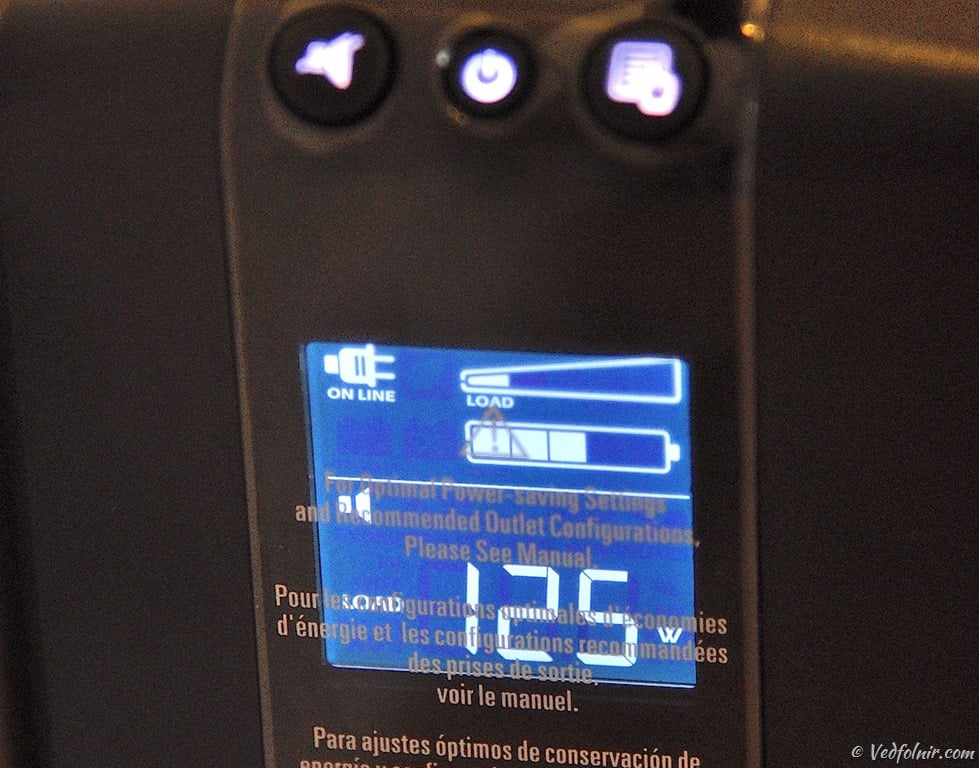
APC UPS displaying real-time power consumption.
As shown below on a typical PC power supply nameplate, the max continuous output rating is clearly stated (e.g., 330W).
Taking into account power supply conversion efficiency and external monitors (modern LCDs draw ~25W, while older CRTs pulled 100W+), selecting a unit rated at 700VA/420W or above provides safe headroom.
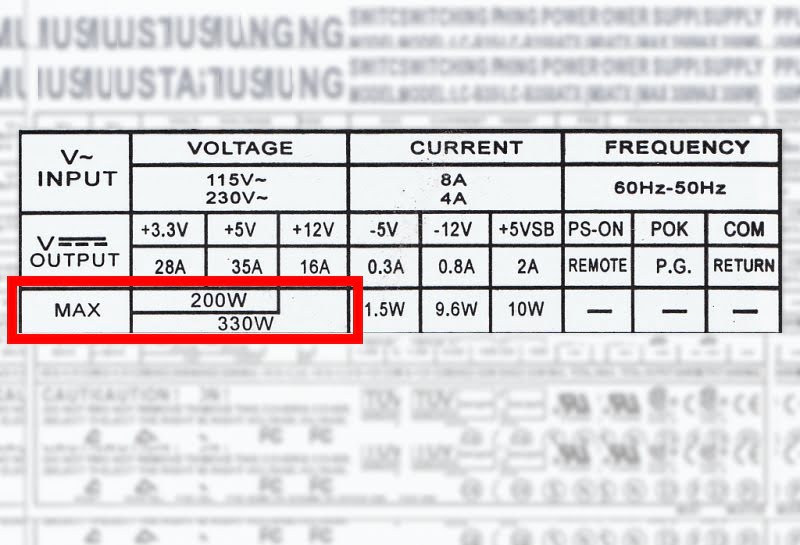
Power supply specifications nameplate.
If you run a typical mid-range PC with a single monitor, four hard drives, a dedicated GPU, and standard USB peripherals, real-world power draw during typical desktop tasks hovers around 160W, staying below 200W even with the display factored in. A 1000VA/600W unit handles this with effortless headroom.
What about battery capacity and runtime? A 1000VA unit generally delivers 15 to 30 minutes of runtime at half load, and 5 to 8 minutes under full load—plenty of time for graceful shutdowns. If you require extended runtimes, reputable manufacturers provide daisy-chainable external battery packs.
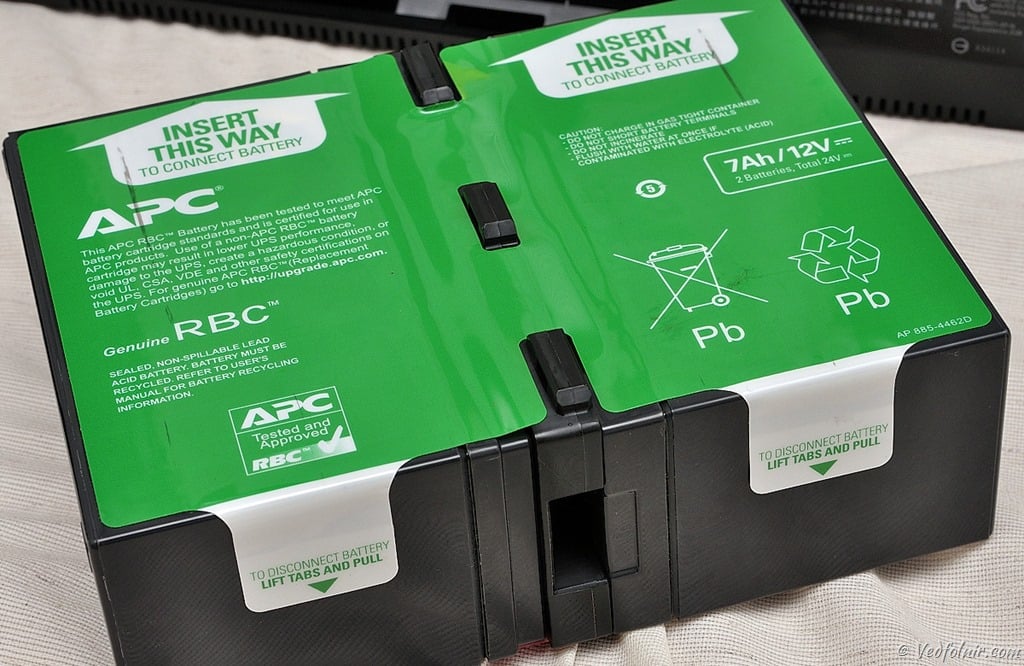
APC UPS dedicated high-capacity battery pack.
Step 3: Prioritize Reputable Brands
Brand pedigree matters when dealing with electrical hardware.
In the global and domestic market, the undisputed leader is APC (American Power Conversion), a subsidiary of France’s Schneider Electric. When searching for UPS systems worldwide, APC consistently ranks at the top.
The comparison chart below evaluates market presence across eleven recognized manufacturers. The leftmost bar represents APC, followed alphabetically by CyberPower, Delta, Eaton, Emerson, FT, Numeric, Opti-UPS, PCM, Tripp Lite, and Weli.

Market popularity comparison among 11 domestic and international UPS manufacturers.
Between 2010 and 2014, APC maintained a commanding global lead, with the nearest rival trailing at nearly half its volume, and all others below 10%.
Summary and Takeaways
If system uptime and data security matter to your workflow—whether you are finishing an academic thesis, designing digital assets, or authoring long manuscripts—an Uninterruptible Power Supply is your highest-ROI insurance policy.
In RPG video games, players eagerly pursue legendary shields and protective amulets. A UPS acts as that magical protective amulet for your digital workstation: warding off lethal instant-death blows (power surges), curing confusion (filtering voltage ripples), and granting second life (battery backup). Why would anyone venture out without one?
Reader Q&A
Praise for In-Depth Hardware Analysis! (Reader Jim)
Jim wrote:
Thanks to The Fixer for this detailed breakdown! Upvoted!
The Fixer replies:
Thank you for your support and kind words!
A UPS sits quietly beneath your desk like an unassuming black box. Yet during summer brownouts, lightning strikes, or grid surges, it is the sole guardian capable of preserving tens of thousands of dollars in delicate silicon and months of irreplaceable creative work within milliseconds. Taking the time to understand your power needs and invest in the right UPS is the best insurance policy you can buy for your workstation!
Further Reading / Appendix
- Essential Travel Guide: Complete Breakdown of 7 Global Power Plugs and Sockets (Includes World Voltage and Plug Charts).
- APC Back-UPS Pro 1000 Line-Interactive UPS (Product Listing).
- APC PowerChute Personal Edition UPS Management Software Tutorial.
- APC Back-UPS Pro 1000 Hands-on Review and Unboxing Experience.
- Exploring 80Plus PSU Energy Efficiency and UPS Capacity Calculation.
Support Independent Perspectives & In-Depth Insights
Every thoughtful analysis and candid critique comes from our dedication to truth and quality. We choose not to follow sensational algorithms or clickbait headlines.
Sustaining independent research requires reader support. Make a one-time or monthly contribution, securely processed by Google.
Payments secured by Google · Manage or cancel anytime in your Google Account


Comments