

Lately, many people’s security measures on Facebook have been challenged time and again, exposing them to dangerous cybersecurity risks.
Out of nowhere, their accounts get compromised by complete strangers. The hijacked accounts are then used to mass-promote scam fan pages or groups to family and friends, or even spam them with fraudulent messages[1]—causing enormous embarrassment and forcing the victim to issue formal apologies to their contacts.
Yet even I still don’t know how most of these accounts get breached. When I ask victims how it happened, the unanimous answer is always: “I have no idea.”
I suppose those who knew wouldn’t have had their accounts compromised in the first place.
Of course, some accounts aren’t technically hacked; rather, their permissions are slyly tricked away, as discussed in Annoying Facebook Hijacker Apps and Games: How to Revoke Application Permissions.
For others, the breach occurs in a depressingly trivial manner: clicking unknown URLs attached to unsolicited text messages, or opening shady links inside mystery emails… With so many red flags everywhere, human curiosity still drives unsuspecting users straight into the trap.
The most effective way to avoid these traps is simply changing your daily browsing habits.
Never trust unverified information. Never download unverified software. When multiple security warnings flag a suspicious website as unsafe, why are you still clicking through? Using ILoveNN as a password is far more secure than ilovenn[2].
One final recommendation: elevate your Facebook security settings.
As shown in the image below, pay close attention to two critical settings: Login Notifications and Login Approvals.
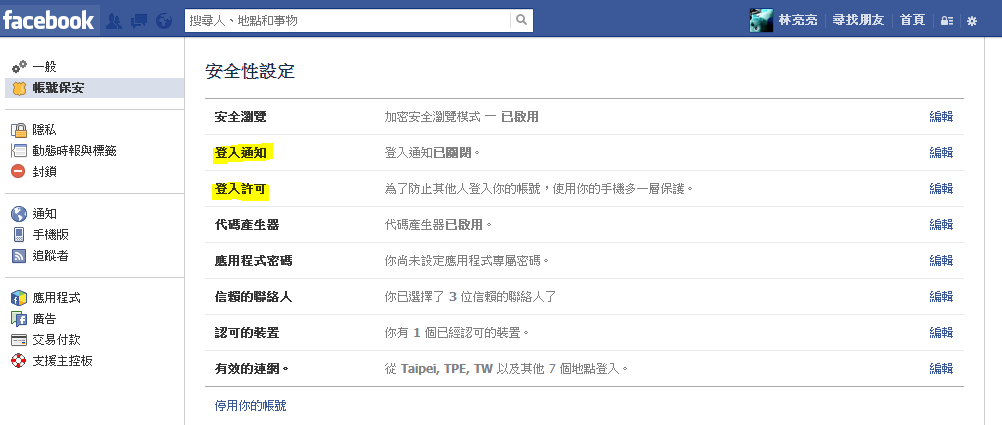
Facebook Account Settings → Security
Login Notifications monitor incoming sessions in real time: whenever someone logs into your Facebook account from an unrecognized mobile device or computer, Facebook instantly alerts you via SMS or email.
Login Approvals (two-factor authentication) require a security verification code: whenever you or anyone else attempts to log into Facebook from an unfamiliar computer, Facebook transmits a one-time code to your mobile phone. Entering this security code verifies that the login attempt is authorized and legitimate.
While this feature substantially boosts your defense, it can occasionally introduce slight friction into daily usage. Personally, I don’t use it constantly, as cell phone reception and battery aren’t always dependable when traveling.
References
- A New Facebook Scam: Using Fake Contests to Steal SMS Verification Codes
- Cybersecurity: Designing a Strong Password to Protect Online Privacy and Security (Expert Rules and Guide)
Support Independent Perspectives & In-Depth Insights
Every thoughtful analysis and candid critique comes from our dedication to truth and quality. We choose not to follow sensational algorithms or clickbait headlines.
Sustaining independent research requires reader support. Make a one-time or monthly contribution, securely processed by Google.
Payments secured by Google · Manage or cancel anytime in your Google Account



Comments