

In our studio, we have a “pseudo” workstation with a dedicated hard disk specifically reserved for backing up photos. My requirement for it was simple: it had to remain independent of other file systems so that whenever necessary, I could quickly mirror a copy of the photos from my active working drive to this backup disk.
Personally, I dislike cluttering my computer with too many software programs—especially real-time sync backup tools, which stay resident in the system background and needlessly waste CPU cycles and RAM.
To squeeze out every bit of remaining performance, I needed a backup tool that doesn’t run permanently in the background, yet provides reliable "**file comparison**" and "**file copying**".
After consulting Google, I discovered an official file and data backup tool released by Microsoft: “Microsoft SyncToy 2.1 Back Up Files”[1], which met my requirements perfectly. Even better—it is completely free.
Microsoft has long had a reputation for building heavyweight software giants, making the compact SyncToy feel like an unexpectedly delightful lightweight tool in their product lineup.
Small as it is, SyncToy delivers remarkably satisfying file comparison speeds[2].
SyncToy Guide and Tutorial
SyncToy is true to its name: just like a toy, its operation concept is exceptionally, wonderfully simple.
When launching it for the first time after installation, a window appears prompting you to set up a pair via “Create New Folder Pair”.
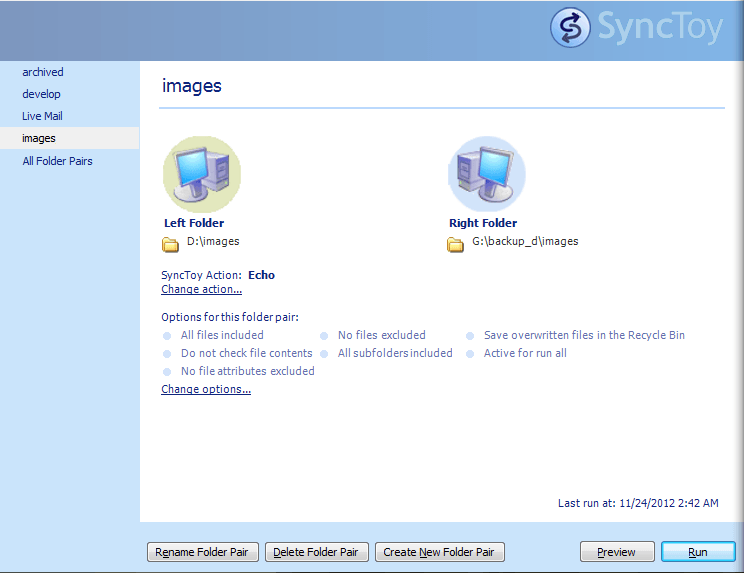 SyncToy User Interface
Next, specify the Left Folder (source directory) and Right Folder (destination directory), then click Next.
Once completed, a window presents three sync mode options:
- Synchronize: Performs two-way synchronization. Files added, modified, or deleted in either folder are mirrored across both sides.
- Echo: One-way synchronization. New and updated files, renames, and deletions in the Left Folder are mirrored to the Right Folder. However, changes made in the Right Folder are not copied back to the Left Folder.
- Contribute: Similar to Echo, but when a file is deleted from the Left Folder, the corresponding file in the Right Folder is preserved. From a file management perspective, Contribute offers more protection against accidental deletions than Echo, though it may accumulate leftover files that require occasional manual cleanup.
Further Reading
- Microsoft Official Download Page: SyncToy Download.
- Rumor had it that version 2.0 occasionally stumbled on file deletions, but version 2.1 appears to have resolved this, as I have encountered no such issues so far.
Support Independent Perspectives & In-Depth Insights
Every thoughtful analysis and candid critique comes from our dedication to truth and quality. We choose not to follow sensational algorithms or clickbait headlines.
Sustaining independent research requires reader support. Make a one-time or monthly contribution, securely processed by Google.
Payments secured by Google · Manage or cancel anytime in your Google Account




Comments