
Although my personal reliance on the messaging app “LINE” is limited to keeping in touch with two or three friends who refuse to join Facebook, it is undeniable that LINE has become an immensely popular instant messaging platform domestically and across Asia.
For this reason, while some tech enterprises restrict employees from discussing company trade secrets on LINE for cybersecurity reasons[1], an overwhelming number of companies routinely use LINE to track project progress, organize group discussions, and enforce on-call remote micro-management. Employees returning home after hours find themselves coerced into continuing work—whether physical toil or the invisible mental pressure of constant availability. I jokingly refer to this dehumanizing tech intrusion as “Track on Cloud.”
Just recently in the news, an appellate court upheld a ruling where a supervisor’s relentless after-hours commands via LINE led directly to an employee’s death from overwork, a tragic and sobering outcome. So let’s stop criticizing younger staff for being discourteous when applying for leave via LINE, when countless managers fire off messages the second a whim strikes them.
This blurring of professional and personal boundaries occurs while management hypocritically moralizes about young workers’ poor work ethic. While I can poke fun here endlessly, don’t say this too bluntly to your own boss! Every industry has its unwritten rules, and reflecting on what you truly seek from a job is something everyone must resolve individually. (In another news piece, a young woman sent endless barrage messages to her boyfriend, eventually causing him mental exhaustion that sent him to a psychiatrist :8-O:).
In truth, LINE as an app often leaves me profoundly irritated. Is it because LINE’s parent company is South Korean[2]? No. Is it because LINE has experienced security breaches? No. Is it because account credentials frequently leak? No. Is it because LINE is deafeningly loud and annoying? Yes, absolutely. Its default notification chime is infuriating: a two-tone, high-amplitude, rapid ringtone that is gratingly sharp to the ear (I despise unnecessary noise).
Compounding this is the texting habit on smartphones, where users split a single thought into multiple short, rapid-fire messages[3]. This results in an unbroken barrage of high-pitched alerts. Lacking any gentle audio curve, this sound certainly grabs attention, but from a psychological standpoint it induces distraction and startle responses, creating a subconscious feeling of being “rushed” to respond—a dynamic profoundly detrimental to mental health.
Smartphones are tools designed to enhance human convenience, not enslave us to an electronic master or serve as a tether for others to control our lives. A phone should discreetly inform you that “You have a message,” rather than screaming “Hey you, look at this message right now!”
To remedy this, my recommendation is either to mute sound notifications entirely, keeping only banner alerts, or follow the steps below to change your notification tone.
Step-by-Step Configuration Guide
LINE currently provides 13 official built-in notification ringtones. Through simple trial and observation, I noticed that certain ringtones handle rapid bursts of incoming messages differently. By default, every incoming message fires off an audible alert. However, with a few select ringtones, when someone sends three consecutive messages in rapid succession, the phone only chimes twice[5]. One fewer ring means one less jarring shock to your nerves.
Even setting that quirk aside, replacing the grating default tone with a soothing chime is highly recommended, especially since LINE supports custom sounds.
Step 1: Open the LINE mobile app, navigate to Settings as shown in Figure 1, and tap “Notifications.”
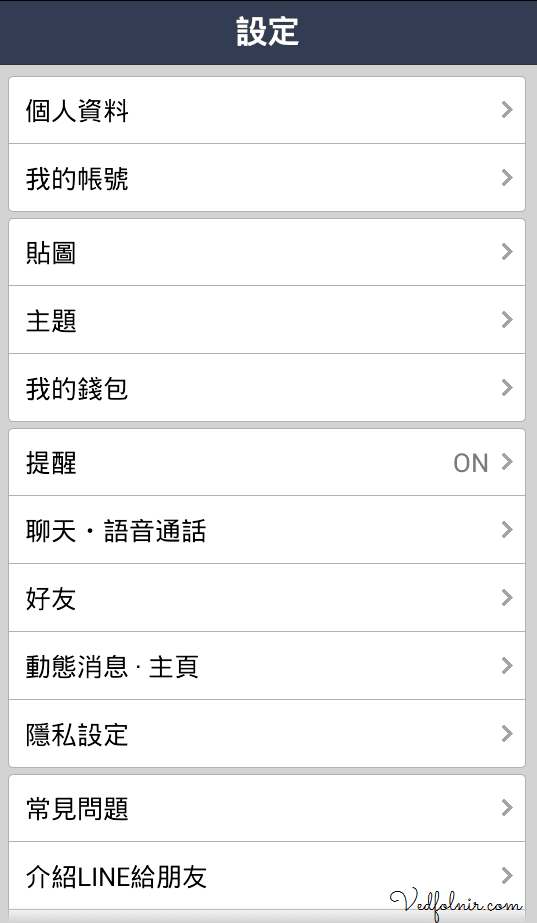 Figure 1: LINE Settings screen.
Step 2: As shown in Figure 2, once inside Notifications, tap the “Notification Tone” option. (If you prefer to silence notifications completely, simply uncheck the main “Tone” toggle at the bottom).
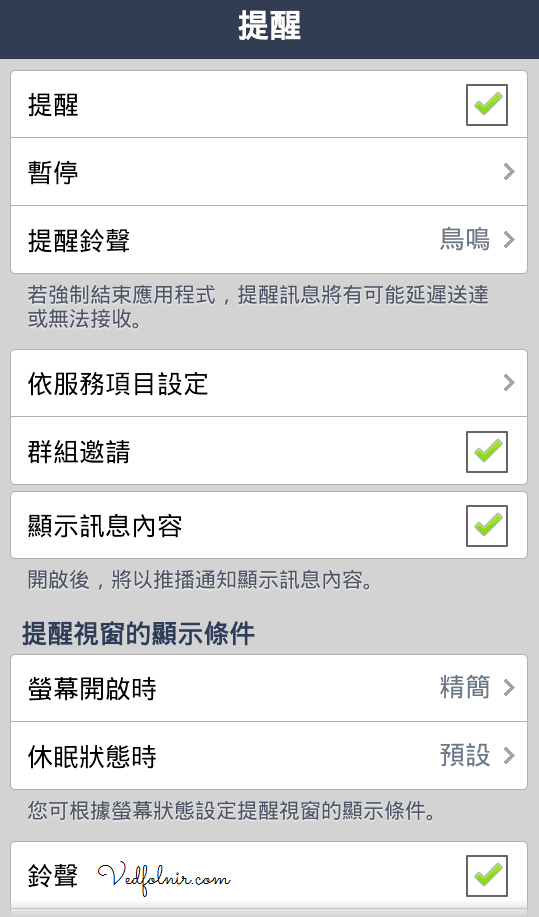 Figure 2: LINE Notification Tone screen.
Step 3: When the ringtone menu opens, as seen in Figure 3, you will find 13 default official ringtones along with an “Other” option for custom tones.
These 13 built-in options include Default, LINE (Joyful), LINE (Whisper), Melody Slow, Melody Fast, Dulcimer 1, Birdsong, Whistle, Playful Bug, Buzzer, Water Drop, Dulcimer 2, and Correct Answer. Among these, “Melody Slow” and “Dulcimer 1” exhibited the aforementioned coalescing effect during testing. Personally, I find “Birdsong” to be the most pleasant tone by far :lol:.
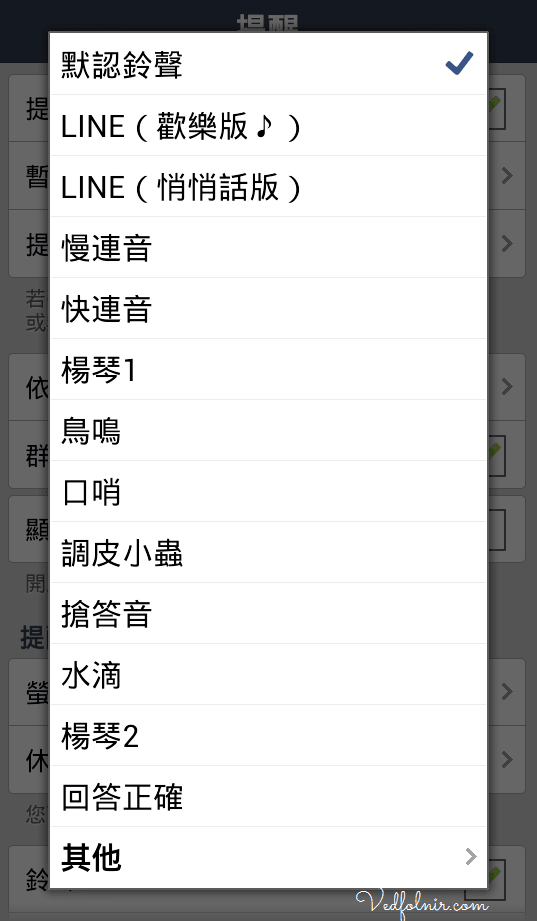 Figure 3: LINE Ringtone selection list.
Hopefully, this simple change of tone helps liberate everyone from LINE’s frantic grip (and stops us from constantly staring at our screens[6]).
After all, most people would far rather see a message marked “Unread” than deal with the social anxiety of “Read and Ignored,” right? (nudges :lol:). In that case, the decision of when to read messages belongs squarely in our own hands—not under LINE’s tyrannical thumb.
Further Reading
- LINE’s communication protocol does not employ a peer-to-peer (P2P) architecture; instead, all text and voice communications route centrally through server clusters, leaving LINE’s privacy safeguards substantially weaker than platforms like Skype. Coupled with past server compromises and credential leaks, security-conscious enterprises and competitive industries often avoid deploying LINE for sensitive business operations.
- Although LINE’s software was developed and spearheaded by its Japanese subsidiary, its corporate parent remains a South Korean corporation, where the app paradoxically enjoys minimal market penetration compared to KakaoTalk.
- This marks a major distinction between email and instant messaging: formal corporate documentation rarely translates well into chat apps. Without disciplined message structure, chats quickly devolve into time-wasting chatter frowned upon in professional settings.
- Product suggestion: Allow users to throttle audio alerts to at most once every few minutes or once per continuous burst.
- This test was conducted on my specific smartphone model; whether hardware resources or operating system thread scheduling influenced this behavior remains unverified.
- Tech & Health: Medical Warnings on Excessive Smartphone Screentime for the Phubbing Generation.
Support Independent Perspectives & In-Depth Insights
Every thoughtful analysis and candid critique comes from our dedication to truth and quality. We choose not to follow sensational algorithms or clickbait headlines.
Sustaining independent research requires reader support. Make a one-time or monthly contribution, securely processed by Google.
Payments secured by Google · Manage or cancel anytime in your Google Account


Comments