
When managing an Apache web server, "**php.ini**" and the "**conf.d**" directory are essential configuration files governing how scripts and extensions run. For example, installing SSL certificates or configuring memory limits often requires editing these files. However, their exact file paths vary noticeably across operating systems—whether Microsoft Windows or Linux distributions such as Ubuntu, Debian, and Red Hat.
Unless you are deeply familiar with command-line search tools, the simplest and most foolproof method to locate your server’s "**php.ini**" and "**conf.d**" paths is shown below.
Finding the Exact Directory Path for php.ini and conf.d
Navigate to your web root directory (for example, /var/www/html/) and create a new .php file using your terminal:
sudo nano phptest.phpIn the editor, enter the following snippet:
<?php phpinfo(); ?>Save the file and exit (in Nano, press Ctrl + X, then Y, then Enter). Next, open your web browser and visit the URL pointing to that file (e.g., http://www.yourdomain.com/phptest.php). A detailed PHP configuration page will appear, as shown below:
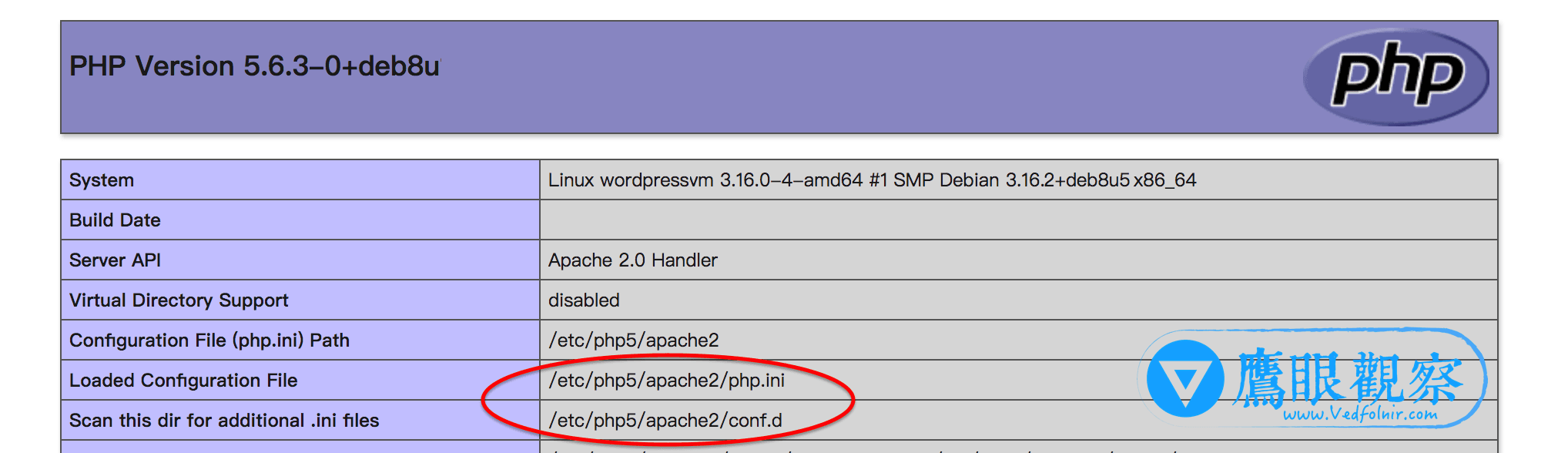
In the top summary table, you can clearly identify the exact locations under "**Configuration File (php.ini) Path**" and "**Scan this dir for additional .ini files**"—in this example, located under /etc/php5/apache2/.
Support Independent Perspectives & In-Depth Insights
Every thoughtful analysis and candid critique comes from our dedication to truth and quality. We choose not to follow sensational algorithms or clickbait headlines.
Sustaining independent research requires reader support. Make a one-time or monthly contribution, securely processed by Google.
Payments secured by Google · Manage or cancel anytime in your Google Account



Comments