
Our team was among the early adopters of Google Apps (now rebranded as G Suite [1]). While we are intimately familiar with its administrative backend, having a small internal team made us overlook one fundamental risk. Services like Google Mail and Drive have always possessed an enormous structural loophole: the “Administrator”!
A recent incident at a national university brought this sharply into focus: a campus network administrator abused internal privileges to pilfer confidential data, leaking sensitive files belonging to students and faculty through the Google G Suite Education Edition. It served as a stark reminder that even though the backend infrastructure is engineered by Google, operational security remains vulnerable to human malice.
Ever since Google discontinued the free tier of standard G Suite, the Education Edition—available to educational institutions—has remained one of the few free options. Coupled with the boom in cloud computing over recent years, schools ranging from kindergartens to graduate research universities have adopted Google G Suite for Education. It saved academic institutions millions in server infrastructure and maintenance costs, while offering alumni free, lifetime, unlimited-capacity inboxes and Google Drive storage.
Yet many users forget a crucial reality: despite running on Google’s world-class cloud infrastructure, this environment is far from private for the end user. Just as the national university administrator succumbed to personal curiosity and greed, wherever human administrators exist, human vulnerabilities follow.
For users accustomed to relying on free school-provided accounts, the natural next step has often been uploading highly sensitive personal files to the cloud: scanned copies of national ID cards, passport scans, password managers or plaintext lists, personal love letters, and even private photos or videos—all under the belief that they can access them anywhere, anytime, even when traveling abroad.
In reality, however, a campus network administrator needs less than five seconds to take all of your data.
As shown below, an administrator can simply click a single button to reset any user’s password, hijack the account’s full permissions, and assume control:
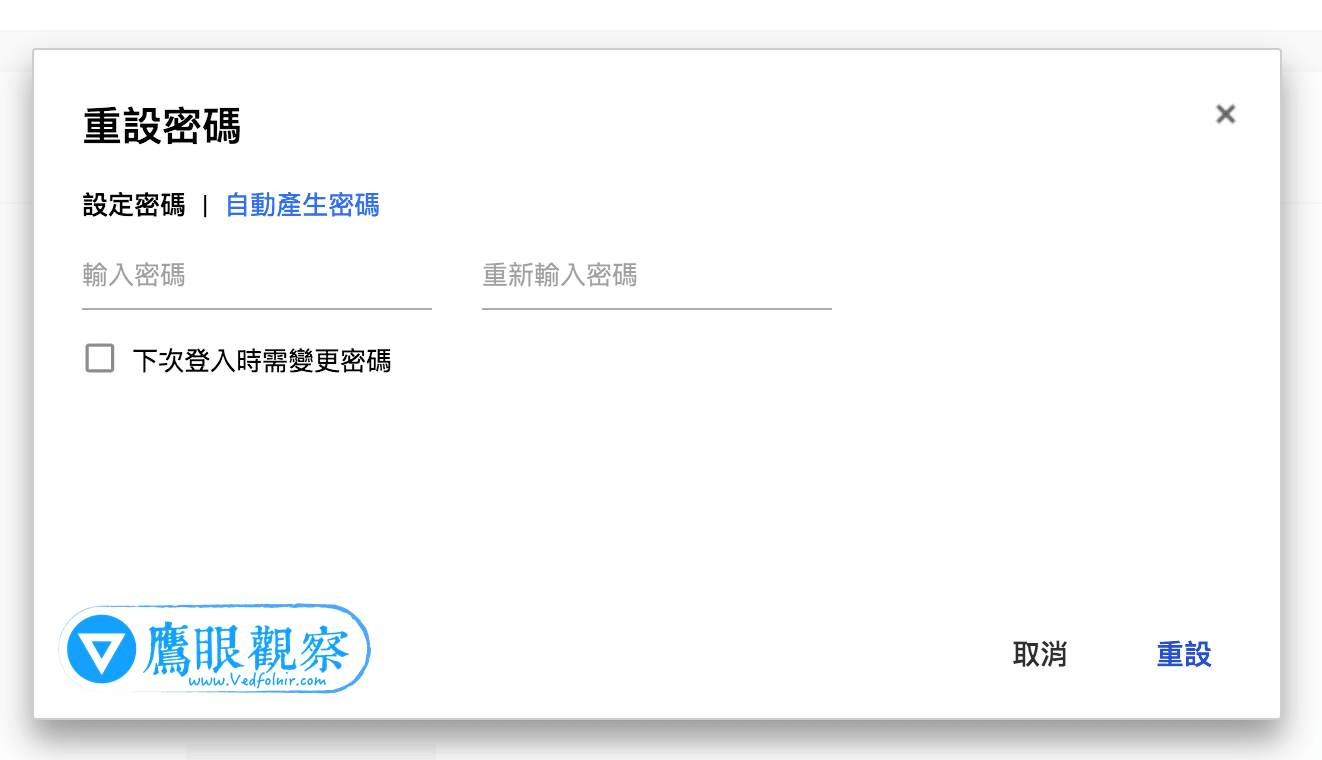 Google G Suite Password Reset.
While this mechanism was originally designed with good intentions—giving organizational administrators autonomous user management—in practice it can be far riskier than standard Content Management Systems (CMS). Most standard web applications only send a temporary password reset link directly to the end-user’s registered inbox. Google, however, permits domain super-admins to forcefully reset passwords directly and log in immediately. While highly convenient for enterprise IT, it represents an alarming security blind spot for end users who have no idea who the campus network admin actually is.
If you ever find yourself suddenly unable to log in to your university email or cloud drive, and then regain access after resetting it manually, you should be asking whether your account was compromised not just by an external hacker, but potentially hijacked by an internal administrator.
Campus network administrators typically fall into two categories: computer science faculty members holding administrative positions, or student system administrators (either recruited from computing clubs or hired as campus IT assistants).
Faculty administrators generally have a clearer understanding of legal liabilities, professional ethics, and stable employment, making them comparatively less likely to commit intentional violations (rogue actors notwithstanding).
On the other hand, student assistants are younger, often possess less legal awareness, and may be driven by sheer curiosity or personal impulses. For example, what happens when a student admin has unilateral access to the private files of someone they harbor a crush on?
Despite this built-in vulnerability, the free Google G Suite Education Edition remains a powerful tool given its generous storage and organizational features.
However, users must exercise strict caution: never store high-risk personal data inside an educational institution’s inbox or Google Drive. Sensitive items like passport scans, ID card copies, financial records, master password lists, and commercial documents should reside in an independent personal account or, better yet, kept entirely offline on local encrypted storage.
You can safely leverage the free education edition for large, non-sensitive files that consume significant disk space—though frankly, if privacy requires this level of paranoia, avoiding the platform altogether might be the wiser choice.
References & Notes
- G Suite (official website) is Google’s subscription-based suite of cloud computing, productivity, and collaboration tools. It includes popular web applications such as Gmail, Google Drive, Google Hangouts, Google Calendar, and Google Docs.
Support Independent Perspectives & In-Depth Insights
Every thoughtful analysis and candid critique comes from our dedication to truth and quality. We choose not to follow sensational algorithms or clickbait headlines.
Sustaining independent research requires reader support. Make a one-time or monthly contribution, securely processed by Google.
Payments secured by Google · Manage or cancel anytime in your Google Account




Comments