

When configuring a WordPress website, advanced themes and page builder plugins often include built-in integrations with the Google Fonts repository.
To enable dynamic font catalog synchronization and typographic previews, these plugins often ask you to provide a Google Fonts API Key, allowing the WordPress dashboard to interface with Google’s remote font catalog services.
To acquire a Google Fonts API Key, navigate to the official Google Fonts Developer API documentation page and click the Get a Key button.
A dialog will appear prompting you to select an existing Google Cloud project or create a new one, which automatically provisions a dedicated API key.
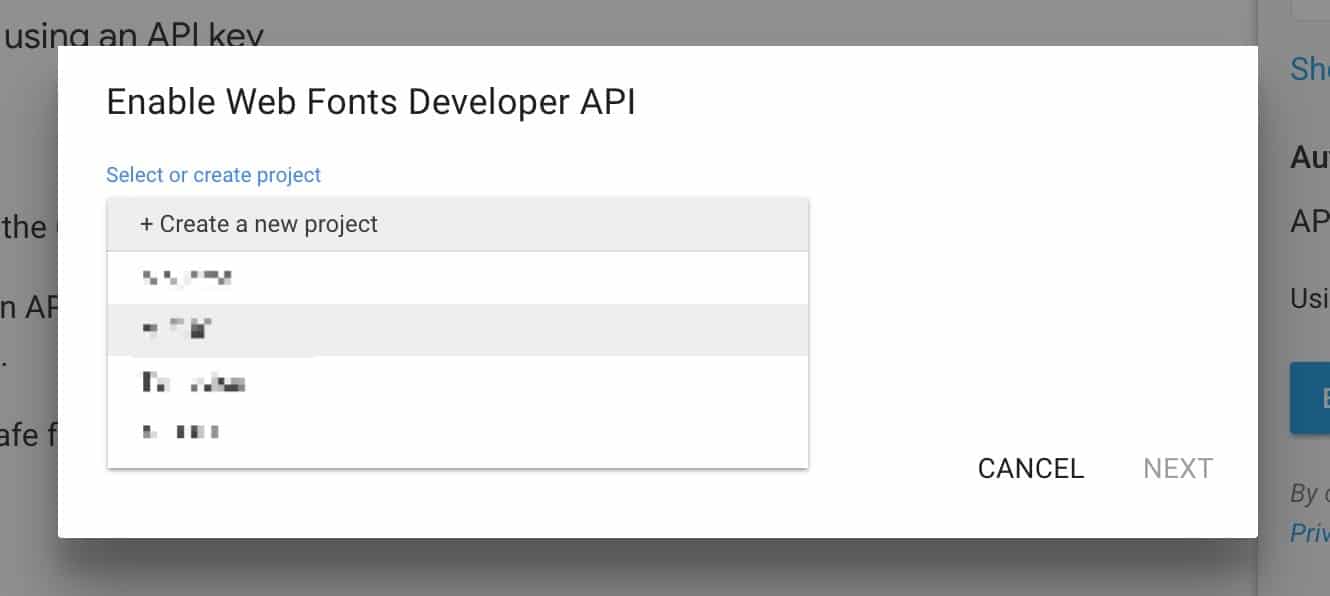 Enabling Google Web Fonts Developer API.
Alternatively, if you manage resources through the Google Cloud Platform (GCP) Console:
- Open the APIs & Services dashboard in GCP;
- In the left navigation sidebar, click Credentials;
- Click the + Create Credentials button at the top and select API Key;
- The console immediately generates a new API key string.
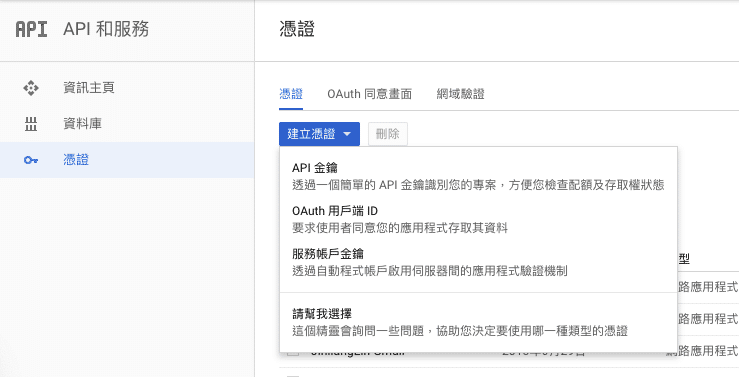 Creating API Key credentials in GCP Console.
Support Independent Perspectives & In-Depth Insights
Every thoughtful analysis and candid critique comes from our dedication to truth and quality. We choose not to follow sensational algorithms or clickbait headlines.
Sustaining independent research requires reader support. Make a one-time or monthly contribution, securely processed by Google.
Payments secured by Google · Manage or cancel anytime in your Google Account



Comments