

In a Facebook group’s “Edit Group Settings,” two major features are provided: “Pre-Approved Members” and “Automatically Approve Member Requests.” As long as the administrator sets the details in advance, the system will automatically approve users who meet the conditions to become group members, saving the management a lot of review and approval time.
FB Group Automatically Approve Member Requests (Condition-Based)
This feature lets you choose which conditions pending members must meet (see Figure 1 below) to be automatically approved to join your group. The Facebook system will also notify via message who has been approved, so administrators can review at any time and manually remove members.
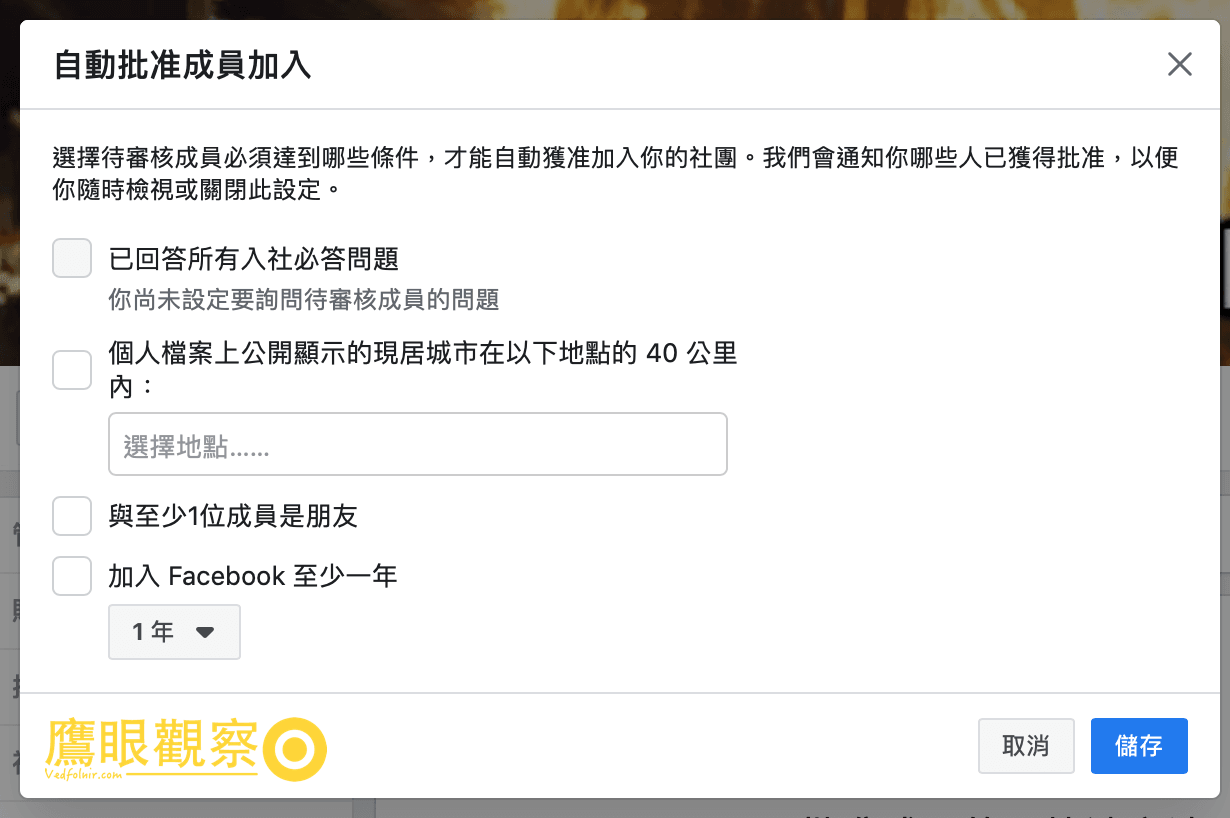
Figure 1, Automatically Approve Member Requests.
Currently Facebook provides four major conditions for users to choose and set, including:
- Has answered all required membership questions (you need to first set questions to ask pending members);
- The current city publicly shown on the profile is within 40 kilometers of the following locations;
- Is friends with at least one member of the group; and
- Has been on Facebook for at least one year.
How to choose among these four settings requires a detailed review of the group’s attributes to set a better choice.
For ordinary groups, I personally prefer to set “only” item 4, which can avoid many fake accounts newly added by scam groups.
However, we have a group that is loved by many young people. The younger generation coming and going across different platforms is already a characteristic, so if this option is forcibly set, basically many people cannot be automatically added.
In addition, professionally oriented groups are very suitable for setting the question-review method of item 1. As long as you ask some obscure questions within the professional field, it is easy to find out whether someone is one of your own.
FB Group Pre-Approved Members (Eligibility-Based)
This feature can, based on a user’s membership status in other groups or the eligibility of their email address (see Figure 2 below), let the Facebook system pre-approve their group join requests to save time.

Figure 2, Pre-Approved Members.
Currently Facebook provides two major eligibility options for users to choose and set, including:
- Manage groups: If a user applying to join is already a member of your other groups, pre-approve their join request;
- Upload attachment: Upload an email address list to pre-approve Facebook users using these email addresses.
I recommend definitely enabling the “Manage groups” option, because the list of other groups you manage is already a filtered batch of trusted users. These people applying to other groups naturally have a higher degree of trust and can be directly approved to join, so you will not have to review them again.
In addition, “Upload email list” is a relatively new feature. As long as the administrator fills in a “.csv” or “.tsv” format “email address list[1]” in advance (see the example in Figure 3 below), the Facebook system will, within the following 90 days, automatically filter users with these email addresses and Facebook accounts who can be approved to join as members.

Figure 3, Example email address list.
Well, actually these two major features could seemingly be merged into a single one. Perhaps for the sake of system operation simplicity, the two relatively special approval methods (conditions and eligibility) were separated into individual units.
References / Recommended Appendix
- Facebook Group Pre-Approved Members: Email address list template.
Support Independent Perspectives & In-Depth Insights
Every thoughtful analysis and candid critique comes from our dedication to truth and quality. We choose not to follow sensational algorithms or clickbait headlines.
Sustaining independent research requires reader support. Make a one-time or monthly contribution, securely processed by Google.
Payments secured by Google · Manage or cancel anytime in your Google Account




Comments