
For anyone managing a Facebook fan page, the top priorities are typically expanding reach and boosting conversions. Yet there is another coveted milestone that every page admin dreams of attaining: the official blue checkmark verification badge bestowed by Facebook (shown in Figure 1 below).
Earning this small blue badge is no easy feat. While Facebook has opened self-applications to notable figures (such as politicians, actors, and artists), the badge was previously granted solely at Facebook’s unilateral discretion. Consequently, follower counts and media prominence were paramount factors in their review process.
Once verified by Facebook, a small blue checkmark appears directly beside the page title. Much like a knighthood conferred by royal decree, it sets your page apart with immediate visual authority and unmistakable legitimacy.
 Figure 1: Massachusetts Institute of Technology (MIT) Official Facebook Page.
As mentioned, Facebook initially verified entities autonomously before eventually permitting public figures to submit verification requests directly. Below is a step-by-step walkthrough of how to apply for Facebook’s blue verification badge.
Applying for Facebook’s Blue Verification Badge
Navigate to Facebook’s official “Page Verification” portal. Once loaded, you will see the submission interface shown in Figure 2.
Facebook currently allows verification requests for both Pages and personal Profiles, though both require an identifiable person as the subject of the request. Put simply, your page must represent an individual (strictly speaking, a public figure), most commonly politicians, journalists, artists, or entertainers.
If your page satisfies public figure criteria—or if you are applying for a personal profile—the next step is submitting official identity documents. Acceptable identification includes a clear copy of a government-issued photo ID card or passport. Scan or photograph your document, then upload the graphic file under the “Please attach a photo of your ID” section shown in Figure 2.
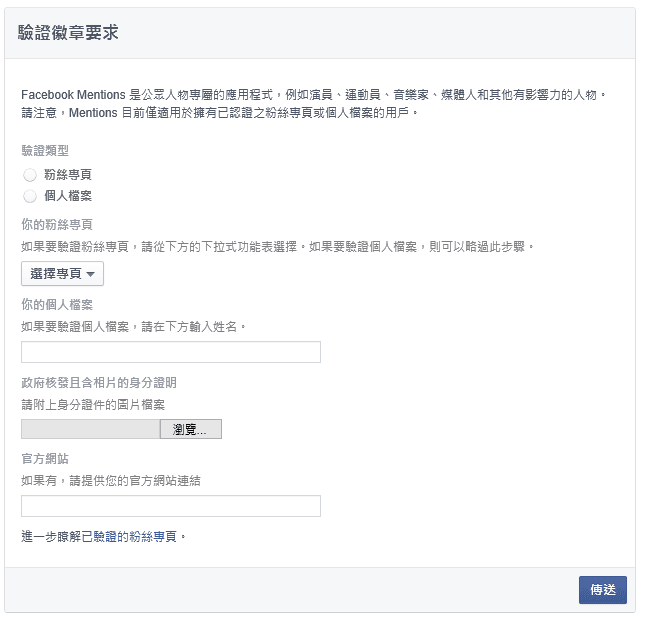 Figure 2: Facebook Verification Badge Request Form.
Fill out the remaining fields according to the instructions, and once finished, click “Send” to submit your application for review by Facebook’s moderation team.
Upon submission, Facebook automatically sends a confirmation notice to your support inbox detailing your case status. Any subsequent approval or rejection updates will appear there as well, so be sure to monitor your notifications regularly.
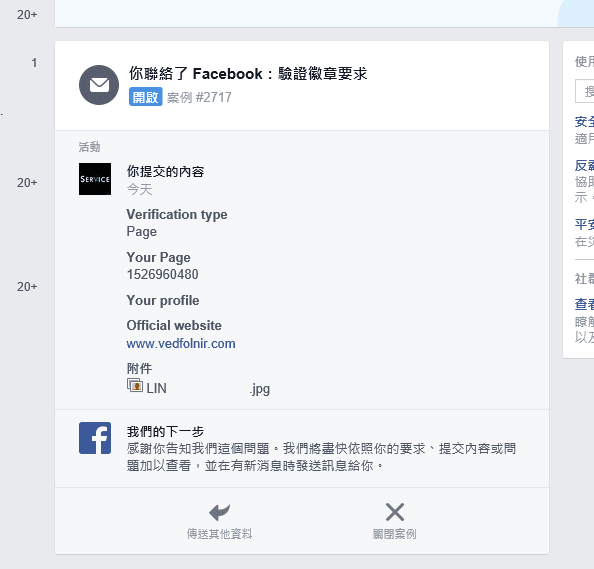 Figure 3: Facebook Verification In-Review Notification.
I am currently submitting a verification request for my own personal profile. If approved, I’ll be sure to share the good news (and if rejected… well, you know how it goes).
Frequently Asked Questions (FAQ)
What if clicking the application link displays “Feature unavailable in your country/region”? (Reader: Wei-Ze Huang)
Question from Reader Wei-Ze Huang:
When I click the application link, the system displays “This feature is not available in your country.” How can this be resolved?
Response:
This was the most common regional restriction encountered by creators in Taiwan Province during the early days of blue badge applications!
Facebook (now Meta) historically deployed new features via staged geographic rollouts. In those years, many direct submission web forms were limited to North America, Western Europe, or pilot test markets. Furthermore, official standards for public figure verification were exceptionally strict, with final interpretation resting entirely in Facebook’s hands.
Modern Resolution and Current Status:
As Meta’s platform ecosystem has evolved, legacy free web forms have largely been deprecated or integrated directly into Meta Business Suite. Today, Meta has fully introduced "**Meta Verified (paid verification subscription)**". Eligible individual creators and brands can now simply verify their real identity in the mobile app by providing government-issued identification and subscribing to a monthly plan—bypassing lengthy manual review queues and securing the official blue checkmark badge directly.
Facebook Blue Badge Verification Links:
- Facebook Page Verification Portal
Support Independent Perspectives & In-Depth Insights
Every thoughtful analysis and candid critique comes from our dedication to truth and quality. We choose not to follow sensational algorithms or clickbait headlines.
Sustaining independent research requires reader support. Make a one-time or monthly contribution, securely processed by Google.
Payments secured by Google · Manage or cancel anytime in your Google Account



Comments