
Compression software is like a rib in the body of computer applications—it belongs to the utilities category, rarely noticed in day-to-day work, yet completely indispensable when called upon. Every computer ought to have a compression/decompression tool; otherwise, getting around in this era of rapid online information exchange would be an uphill struggle.
In the past, storage media had very limited capacity, and internet connections were painfully slow (not to mention the era of dial-up modems). People naturally longed for formats with high compression ratios, willing to spend significant time compressing files before tucking them into small hard drives or transmitting them across sluggish networks.
In those days, higher compression efficiency equated directly to higher work efficiency.
However, with the rapid march of technology, modern computing has leaped forward. Hard drives routinely start at 1 TB, and internet providers bundle speeds starting from tens or hundreds of megabits. Rather than obsessing over squeezing out higher compression ratios—or fussing over a few megabytes or kilobytes like we did in our youth—it is far more worthwhile to spend that time brewing a fragrant cup of coffee.
In this day and age, compression efficiency definitely does not equal work efficiency 8-O.
It is worth noting that due to the underlying design of operating systems and filesystems, storing or transferring a single large file is consistently faster than handling countless fragmented files (even if the single file is slightly larger in total volume). Therefore, when transferring or archiving numerous interdependent loose files, you can simply use "store" (zero compression) mode to bundle the entire directory into an uncompressed archive container, maximizing transfer throughput. Of course, if you don’t mind the time spent packing, you can still compress them. While the total file size will shrink, compressing larger volumes of data will significantly slow down your processing speed. ;-)
Below, let’s briefly review several common file compression utilities throughout computing history, leading up to our top pick: 7-Zip.
The ZIP Era
WinZip was one of the earliest commercial compression utilities many of us encountered. Because it required paid registration, cracking it became a legendary rite of passage for early PC users. The downside was that early versions lacked RAR support (only added around version 11). Furthermore, as Microsoft Windows and other operating systems later incorporated native ZIP compression and extraction tools, WinZip gradually faded from everyday desktop setups.
The RAR Era
Among commercial archiving tools, the one that boasts the fastest updates, most comprehensive feature set, and best ongoing maintenance is without doubt WinRAR; its update logs can often be traced back to just days ago. Thanks to the early development of the RAR format, which featured high compression ratios and extensive features (like recovery records), WinRAR steadily chipped away at and overtook WinZip’s market position. Although it is paid shareware, it practically never required cracking: once the evaluation period expired, its core functionality remained fully intact, merely displaying occasional registration reminders upon startup—hardly a dealbreaker for most users. Another well-known archiving utility that emerged around the same time was WinACE, which focused on the ACE format. Like RAR, it aimed to remedy ZIP’s compression shortcomings. For a time, surprisingly many friends around me used it, making it a curious phenomenon back then, though few remember it today.
The 7-Zip Era
7-Zip is undoubtedly installed on countless PCs today. Despite its relatively young heritage—development only began in 1999—it has captured a massive share of the utility market. This is credit to its creator’s bold adoption of advanced compression algorithms (like LZMA/LZMA2), boosting compression ratios significantly while offering open-source versatility and comprehensive format support. Its native archive format is 7z. Interestingly, while the 7z format itself isn’t universally ubiquitous, 7-Zip is completely free and open-source, with a lightweight installer under 1 MB. Crucially, it seamlessly unpacks both ZIP and RAR formats without hassle. These virtues have propelled 7-Zip into an industry powerhouse. Today, 7-Zip supports both 32-bit and 64-bit operating systems.
7-Zip Interface and Context Menu
Once 7-Zip is installed on Windows, right-clicking any file or folder reveals the context menu shown below. The most frequently used options are "Extract to xxx" for extraction and "Add to xxx" for quick archiving.
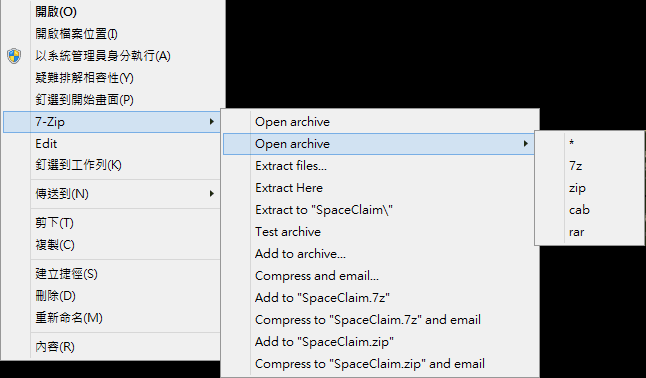 Figure 1: 7-Zip Context Menu on Windows
7-Zip Installers
7-Zip releases generally fall into stable and development channels. If stability and security are your top priorities, sticking with the official stable build is recommended. If you enjoy testing out the latest cutting-edge improvements, the experimental builds are worth a look:
- Latest Experimental: 9.33 alpha, Release date: 2014-06-15. [Official Website]
- Stable Release: Version 9.20, supporting 32-bit Windows OS, Release date: 2010-11-18. [Download Link]
- Stable Release: Version 9.20, supporting 64-bit Windows OS, Release date: 2010-11-18. [Download Link]
Support Independent Perspectives & In-Depth Insights
Every thoughtful analysis and candid critique comes from our dedication to truth and quality. We choose not to follow sensational algorithms or clickbait headlines.
Sustaining independent research requires reader support. Make a one-time or monthly contribution, securely processed by Google.
Payments secured by Google · Manage or cancel anytime in your Google Account




Comments