
If you use Apple devices such as iPhone or iPad, have you ever encountered a frustrating moment when trying to buy in-game items or purchase a useful app, only to have Apple display the error: “Your Purchase Could Not Be Completed”?
This situation most commonly arises when using a credit card for the very first time on an account, as Apple’s security system has not yet verified your billing credentials and temporarily restricts purchases. In other cases, if unusual device locations or unexpected purchasing patterns are detected, Apple may suspend transactions on the account, requiring contact with official customer support.
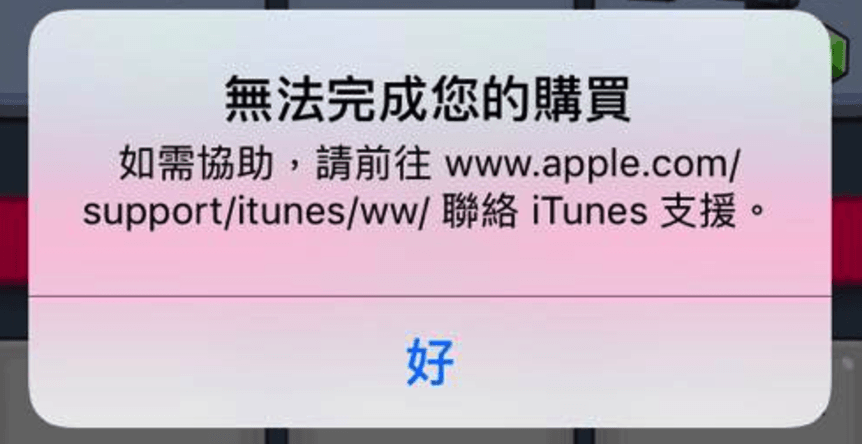
In fact, The Fixer encountered this exact issue when first trying to purchase an iOS app. Preoccupied with other tasks, I left it unresolved for a while, only to find that payments mysteriously went through on their own some time later.
However, relying on sheer luck does not always work.
My guess is that when “Your Purchase Could Not Be Completed” first pops up, waiting a short period for backend systems to clear verification data might suffice. But if you would rather not wait or if waiting produces no result, here are several troubleshooting steps recommended by Apple.
Generally, official Apple guidance suggests testing the following four steps one by one:
- Restart your iPhone or iPad.
- Sign out of your Apple ID and sign back in.
- In iOS Settings, navigate to “General” > “Reset” and tap “Reset Network Settings”.
- In iOS Settings under “General”, check “Restrictions” to ensure “In-App Purchases” is enabled, or verify whether “iTunes Parental Controls” are misconfigured.
Among these methods, steps 1, 3, and 4 are worth trying immediately. For step 2, simply log out of your Apple ID in the App Store settings and log back in to refresh authorization tokens.
Thanks to Liu Woody for clarifying that in some contexts “deregister/cancel” colloquially means “logging out and back in,” rather than permanently deleting an account.
If you have tried all the steps above and payment issues persist—or if you need to expedite verification—you can reach out directly to Apple Support for unlocking assistance. You can contact Apple via web support [1] or by calling the regional technical support hotlines listed below.
Additionally, keep in mind that frequently switching country regions or Apple IDs on the App Store / iTunes Store, placing massive rapid orders of in-game currency, or having insufficient funds/holds on your credit or debit cards can trigger this security alert. Always verify your payment methods are in good standing before consulting Apple Technical Support.
Apple Technical Support Hotlines
If you are in Taiwan, you can reach Apple Technical Support toll-free at 0800-095-988.
For other destinations across the Asia-Pacific region, refer to the numbers below (see reference [2] for additional worldwide listings):
- New Zealand: 0800-127-753
- Australia: (61) 1300-321-456
- Malaysia: 1800-803-638
- Mainland China: 400-666-8800
- Hong Kong: (852) 2112-0099
- Singapore: 800-186-1087
- Indonesia: 0800-102-7753
Further Reading
- Contact Apple Support Online.
- Apple Worldwide Directory of Support Phone Numbers.
Support Independent Perspectives & In-Depth Insights
Every thoughtful analysis and candid critique comes from our dedication to truth and quality. We choose not to follow sensational algorithms or clickbait headlines.
Sustaining independent research requires reader support. Make a one-time or monthly contribution, securely processed by Google.
Payments secured by Google · Manage or cancel anytime in your Google Account


Comments