
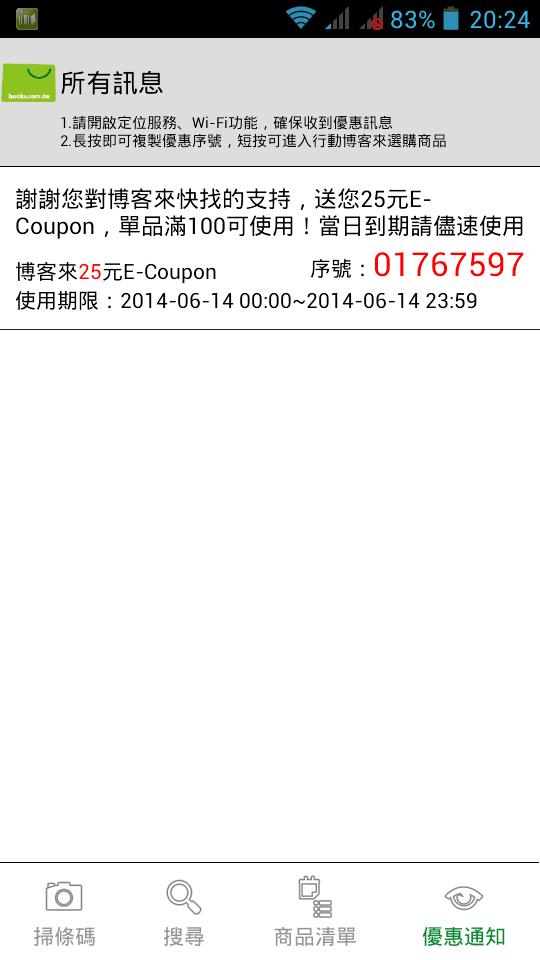
The latest discount campaign from Books.com.tw online bookstore: simply install the official app “Books Quick Finder” on your smartphone or tablet, and you will receive a NT$25 Books.com.tw E-Coupon discount voucher.
Even better, for users installing the app, the discount coupons provided aren’t just limited to a single redemption code!
The Books Quick Finder app supports devices across Google Android (smartphones and tablets) and Apple iOS (iPhone, iPad, and iPod touch).
Event Links:
- Books.com.tw Online Bookstore
- Dedicated App for Android Phone/Tablet
- Dedicated App for iPhone / iPad
How to Participate:
Step 1: From the event links above, find the version matching your mobile OS. Tap through to Google Play or Apple App Store to install the “Books Quick Finder” mobile app (see Figure 1).
Step 2: After installation completes, enable GPS location services (inner voice: not entirely sure if GPS is mandatory, but might as well enable it; Android users can refer to Figure 3).
Step 3: Restart your device.
Step 4: Launch the Books Quick Finder app and navigate to the “Promotions / Notices” tab (see Figure 2). All E-Coupon notifications will appear on this page.
Terms and Conditions:
- This campaign has a limited duration: the redemption window via the mobile app runs from June 6, 2014, through June 19, 2014, lasting 14 days in total (inner voice: claim them while you can; if they expire, you can always uninstall the app).
- E-Coupons claimed daily must be redeemed on the same day before 23:59.
- Orders using credit card installment plans and purchases made on Books Ticket are excluded from E-Coupon discounts.
Further reading: Books.com.tw 2018 E-Coupon Codes (Single-item vouchers and latest promotions).
Support Independent Perspectives & In-Depth Insights
Every thoughtful analysis and candid critique comes from our dedication to truth and quality. We choose not to follow sensational algorithms or clickbait headlines.
Sustaining independent research requires reader support. Make a one-time or monthly contribution, securely processed by Google.
Payments secured by Google · Manage or cancel anytime in your Google Account



Comments