

If you are a webmaster hosting your website on Bluehost, please pay close attention to the following warning—because even I almost fell into this trap.
Even if your website is not hosted on Bluehost servers, or if you are currently considering them, please take this article as a reference. It might just save your day.
At 1:58 AM today, our dedicated Vedfolnir Gmail inbox received an email with the subject line “Account Notice : Error № 6576”. The content read as follows:
Dear Valued Bluehost Customer Vedfolnir.
Your account contains more than 4982 directories and may pose a potential performance risk to the server. Please reduce the number of directories for your account to prevent possible account deactivation.
In order to prevent your account from being locked out we recommend that you create special tmp directory.
Or use the link below: https://my.bluehost.com/main.asp?to=8e0384779e58ce2af40eb365b318cc32
Thank you, Bluehost Toll Free: (888) 401-4678 Outside US: 1 (801) 765-9400
For Bluehost users, this type of notification is quite familiar. It is typically sent to warn that a site contains too many directories, which could degrade server performance and slow down the site. Accounts that persistently fail to resolve the issue can even be suspended (which ranks as perhaps the second most annoying thing next to running out of money to pay hosting fees).
Similar legitimate notifications warn of having over 50,000 files, or enduring prolonged high CPU loads (CPU Throttling).
These alerts represent real terms from Bluehost’s acceptable use policies. And because this phishing email mimicked real notices so accurately, even I almost fell for the scammers’ trick.
At first, receiving this message actually gave me a slight sense of relief, thinking I had discovered one straightforward way to resolve our slow site loading times—just delete some folders.
Unfortunately, not only was the speed issue unresolved, but I nearly stepped right into a Russian phishing trap. While it relies on relatively rudimentary tricks, the presentation was so well-crafted—again, it looked overwhelmingly genuine.
Even though Gmail features decent security checks against viruses and backdoors, agile hackers always find creative ways around them.
If you are someone who scrutinizes every detail, you would notice that while the display name claimed to be Bluehost.com, the actual sender’s mail was relayed from a mail server at [email protected]. When I initially scanned the email on my phone, the small screen omitted sufficient header info, and I completely missed that detail.
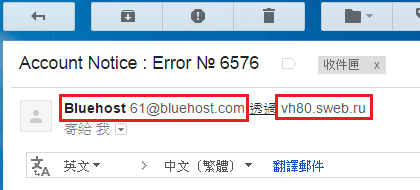 Figure 1: Fraudulent warning email alleging excessive Bluehost directories.
Please repeat after me: “Whenever something is tied to .RU, 99.9% of the time, nothing good comes from it.”
The most dangerous part of this email is the embedded link that appears identical to an official Bluehost URL:
https://my.bluehost.com/main.asp?to=8e0384779e58ce2af40eb365b318cc32
On the surface, it not only specifies HTTPS (Hypertext Transfer Protocol Secure), but the link text also explicitly spells out Bluehost. Carelessly clicking on such a link is an easy mistake to make.
However, that visible URL was merely anchor text. The real destination underneath was (Note: modified to prevent accidental visits):
http://volxgogradgiprobiosintez.xx / images / gdhsbbzfug.html?gdhsbbzfug&=8e0384779e58ce2af40eb365b318cc32
Opening the URL led to a web page whose immediate visual appearance is shown in Figure 2 below:
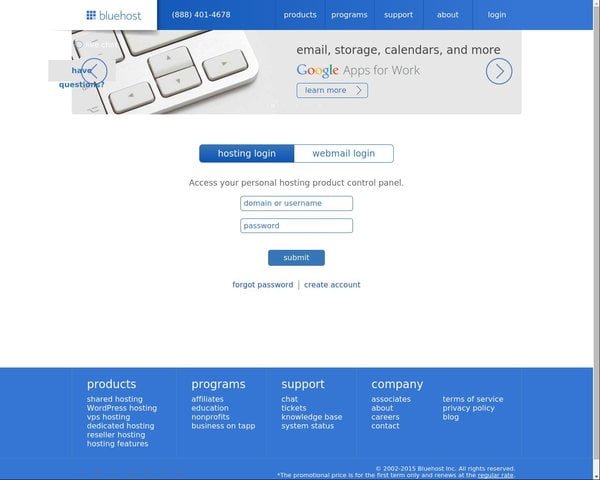 Figure 2: Phishing Bluehost server login interface.
To any Bluehost user, this landing page looks instantly familiar. It is visually identical to the official Bluehost portal homepage, complete with input fields prompting you to enter your username and password.
If you didn’t notice the forged email headers, didn’t spot the Russian .ru domain, didn’t realize the login page was a clone, and happened to use a simple username and password, you might easily input your credentials directly. The consequence? The login credentials to all your hard work stolen away by malicious hackers.
To wrap up, here is a crucial cybersecurity reminder: always exercise extra caution and maintain full awareness of every action you take online—especially if you are a tech founder or entrepreneur.
A single moment of administrative negligence can reduce years of painstaking work to ashes. For example, a couple of years ago, a prominent tech startup suffered a breach where customer databases were entirely wiped out (without off-site backups), and the company collapsed shortly thereafter.
Update (2015.05.25): Today I received another similar email. This time they dialed it up: while the previous email claimed 4,982 directories, this upgraded version claimed 9,172 directories, and the scammers even spun an elaborate backstory. (Internal monologue: Hey, you guys are definitely targeting me now!)
References
- Bluehost’s cPanel provides tools to inspect server disk usage; see Bluehost Disk Usage.
- Setting strong passwords to protect online privacy and security.
Support Independent Perspectives & In-Depth Insights
Every thoughtful analysis and candid critique comes from our dedication to truth and quality. We choose not to follow sensational algorithms or clickbait headlines.
Sustaining independent research requires reader support. Make a one-time or monthly contribution, securely processed by Google.
Payments secured by Google · Manage or cancel anytime in your Google Account



Comments