
The Apple AirPort Time Capsule served as a popular hybrid solution combining an 802.11ac Wi-Fi router with an integrated 2TB/3TB network-attached hard drive, providing automated Time Machine backups and local private cloud storage.
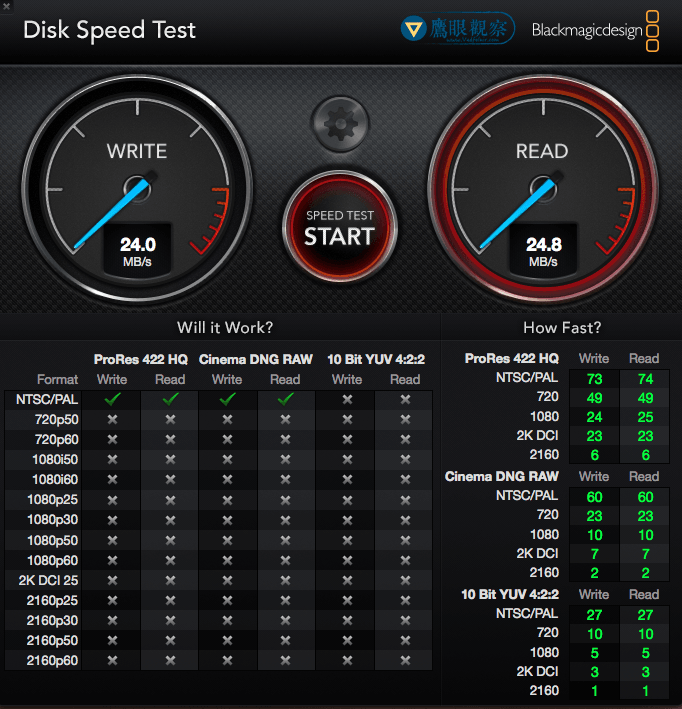
In this benchmark, we measured the actual file transfer throughput of the internal drive alongside an external 3.5-inch hard drive connected via the rear USB port, testing over both 2.4GHz and 5GHz Wi-Fi bands using Blackmagic Disk Speed Test on a MacBook Pro.
Benchmark Results
1. Internal 2TB SATA Drive Performance
- 2.4GHz Wi-Fi Band:
- Write Speed: 10.9 MB/s
- Read Speed: 8.2 MB/s
- 5GHz Wi-Fi Band:
- Write Speed: 23.8 MB/s
- Read Speed: 24.2 MB/s
Connecting over 5GHz more than doubled real-world transfer throughput compared to congested 2.4GHz channels.
2. External USB Hard Drive via Rear Port
A Western Digital 2TB 5400RPM Blue drive mounted inside an external enclosure was attached directly to the Time Capsule’s USB-A port:
- 2.4GHz Wi-Fi Band:
- Write Speed: 11.4 MB/s
- Read Speed: 9.3 MB/s
- 5GHz Wi-Fi Band:
- Write Speed: 18.1 MB/s
- Read Speed: 15.3 MB/s
While initial burst writes over 5GHz touched 24.8 MB/s, sustained transfers rapidly dropped and fluctuated between 17 and 18 MB/s due to USB controller overhead.

Technical Observations
- USB 2.0 Bottleneck: The AirPort Time Capsule relies on legacy USB 2.0 hardware for its external storage expansion port, capping real-world transfers far below modern USB 3.0 or Gigabit Ethernet speeds.
- Network Routing for Bulk Migrations: Attempting large multi-terabyte data transfers across wireless Time Capsule storage creates immense latency overhead. For bulk initial backups or multi-terabyte migrations, directly attaching drives to your Mac remains vastly superior.
Support Independent Perspectives & In-Depth Insights
Every thoughtful analysis and candid critique comes from our dedication to truth and quality. We choose not to follow sensational algorithms or clickbait headlines.
Sustaining independent research requires reader support. Make a one-time or monthly contribution, securely processed by Google.
Payments secured by Google · Manage or cancel anytime in your Google Account




Comments