

For veteran domestic internet users in the Republic of China, Chunghwa Telecom’s DNS addresses—168.95.1.1 and 168.95.192.1—are practically etched into muscle memory.
When Google later rolled out its Public DNS servers, 8.8.8.8 and 8.8.4.4, network enthusiasts widely recommended them. They delivered noticeable speedups, particularly when loading international websites.
However, both Chunghwa Telecom’s HiNet DNS (168.95.1.1) and Google Public DNS (8.8.8.8) have faced security and privacy criticisms. Beyond traditional DNS vulnerabilities that expose queries to tampering, the architectural nature of DNS attracts intense scrutiny: every website you visit can be cataloged when queries pass through upstream resolvers. Moreover, user browsing telemetry carries substantial commercial value for digital ad targeting.
To address these concerns, leading CDN provider Cloudflare partnered with APNIC (Asia-Pacific Network Information Centre) to launch the 1.1.1.1 public DNS resolver. Built on enhanced security, lightning-fast resolution speeds (measuring up to three times faster than Google DNS in benchmarks), and strict privacy commitments, it stands out as one of the most advanced free DNS services available.
What makes 1.1.1.1 particularly compelling is Cloudflare’s core commitment: “We don’t want to know what you do on the Internet—it’s none of our business.”
1.1.1.1 DNS Configuration Addresses
Cloudflare provides four primary DNS IP addresses. The first two are standard IPv4 addresses that are remarkably easy to remember; the third and fourth are designated for IPv6 networks:
1.1.1.11.0.0.12606:4700:4700::11112606:4700:4700::1001
Whether inside your Wi-Fi router (such as an Apple AirPort base station shown below) or directly in your computer or smartphone network settings, simply enter the IP addresses into your primary and secondary DNS fields.
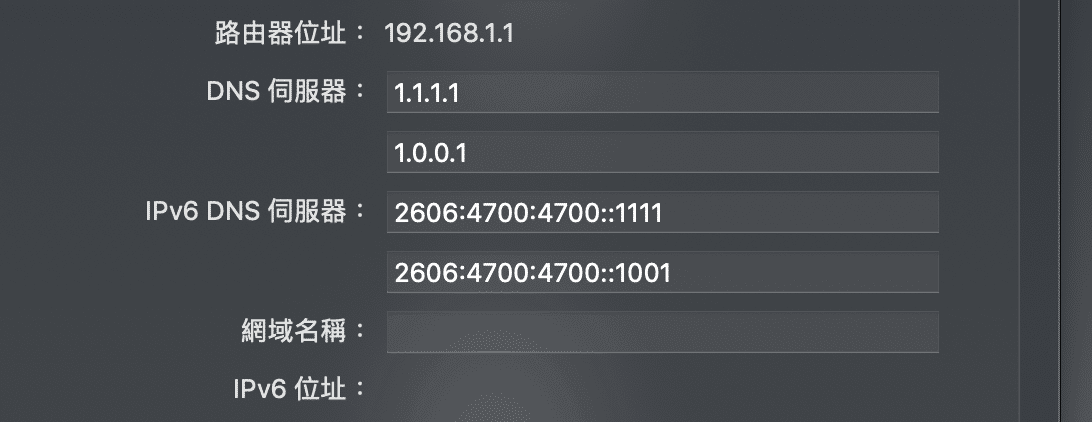 Apple Airport Internet DNS Server and IPv6 DNS Server Record
Keep in mind that 1.1.1.1 is not an infallible silver bullet. For optimal redundancy on IPv4, consider configuring 1.1.1.1 as your primary resolver and Google’s 8.8.8.8 as your secondary fallback. Additionally, when traveling in mainland China, local routing peculiarities and the Great Firewall may mean domestic ISP resolvers occasionally provide more predictable connectivity.
Speed Comparison: HiNet, Google, and 1.1.1.1
Under a Chunghwa Telecom broadband connection, I benchmarked round-trip delay times across six DNS IP addresses:
168.95.1.1: Average latency of 14.978 ms168.95.192.1: Average latency of 17.4495 ms8.8.8.8: Average latency of 13.507 ms8.8.4.4: Average latency of 16.2665 ms1.1.1.1: Average latency of 14.158 ms1.0.0.1: Average latency of 17.668 ms
Because testing took place during peak evening hours (9:00 PM), overall latencies were slightly elevated. Interestingly, HiNet’s domestic DNS was not noticeably faster than overseas-engineered Anycast resolvers.
For baseline reference, direct pings to Google Taiwan and MIT yielded:
- Google (
google.com.tw): Average 15.305 ms - Massachusetts Institute of Technology (
mit.edu): Average 51.879 ms
Purging DNS Cache on Demand
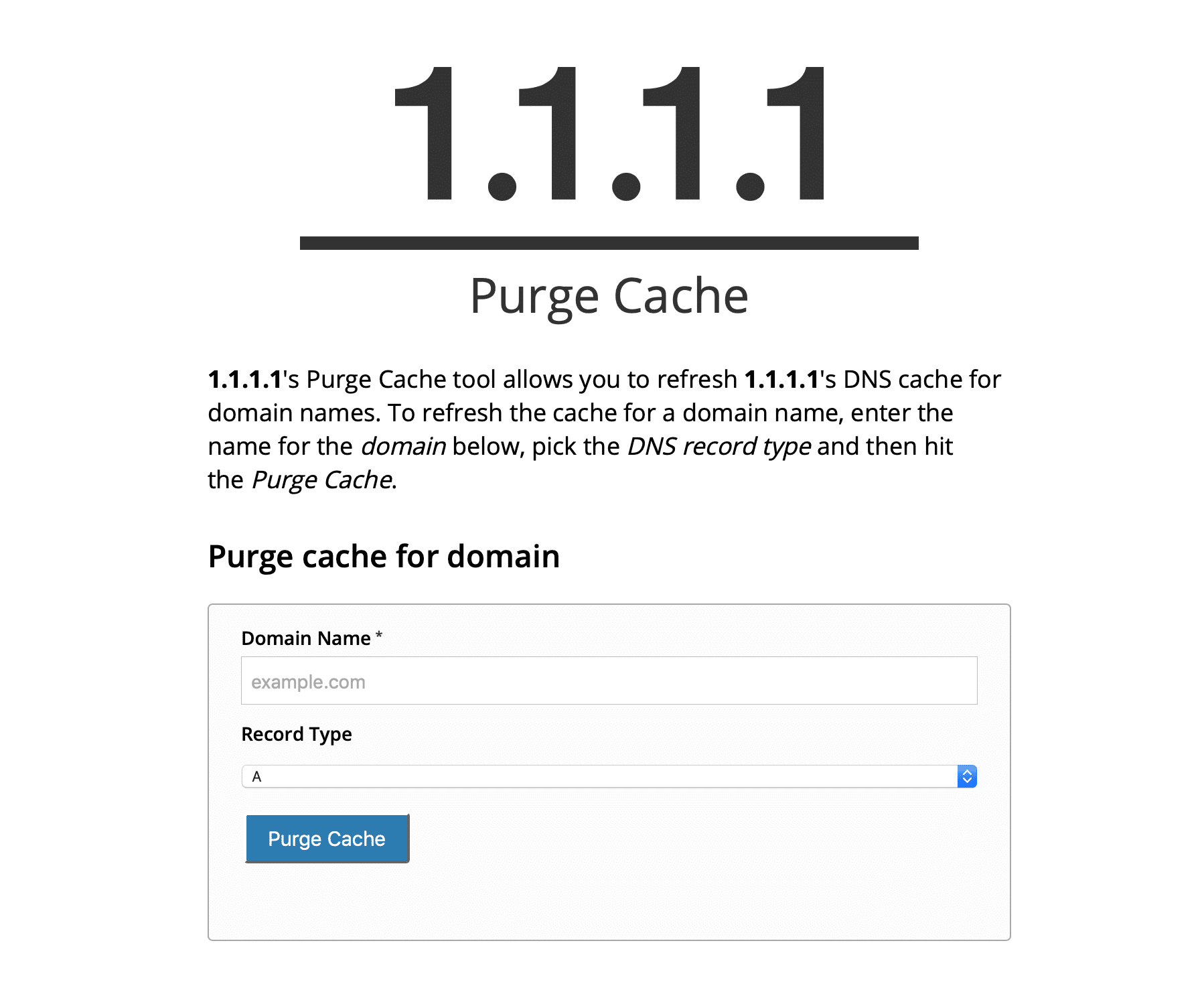 DNS Record Purge Cache on 1111
Another standout feature of 1.1.1.1 is its dedicated cache-clearing tool (Purge Cache). When migrating server IPs or deploying a new domain, this feature eliminates the agonizing wait for stale caches to expire across the web.
As shown above, visiting the official 1.1.1.1 Purge Cache tool allows you to input a domain name and choose a record type (A, CNAME, MX, etc.) to instantly invalidate cached records across Cloudflare’s global edge network.
What Exactly Is DNS?
DNS stands for Domain Name System. It functions as the internet’s decentralized phonebook, translating human-friendly domain names into machine-readable IP addresses. Almost every online interaction begins with a DNS lookup: clicking a link, opening an app, or sending an email prompts your operating system to query a resolver.
When picking a DNS resolver, speed and cryptographic integrity are paramount. Unprotected resolvers expose users to DNS spoofing and cache poisoning attacks. In earlier geopolitical disputes between the Republic of China and the Philippines, for example, hackers targeted vulnerable governmental DNS infrastructures. Both Google Public DNS and Cloudflare’s 1.1.1.1 offer robust defenses that far surpass generic ISP resolvers.
If you ever notice Facebook, Instagram, or certain websites loading sluggishly or failing to resolve entirely, there is a strong chance your current DNS server is timing out. Try disconnecting from Wi-Fi to test over cellular data. If pages load instantly over mobile networks, switching your local router or device DNS settings to 1.1.1.1 will likely resolve the issue.
Support Independent Perspectives & In-Depth Insights
Every thoughtful analysis and candid critique comes from our dedication to truth and quality. We choose not to follow sensational algorithms or clickbait headlines.
Sustaining independent research requires reader support. Make a one-time or monthly contribution, securely processed by Google.
Payments secured by Google · Manage or cancel anytime in your Google Account


Comments