
Translation pens (also known as pen-type scanning translators) have appeared on the market on and off from over a decade ago to the present. Whether they were overshadowed by digital translators in the past or are now being flattened by smartphones, translation pens as a product category arguably deserve a place on the list of the hundred worst technologies.
However, for the many parents concerned about their children’s English learning, you’ve probably recently noticed a flood of ads on Facebook for various multilingual translation pens (also called scanning translators), single-language Japanese or English learning translation pens, interpreter devices, and other foreign-language translation products, all touting impressive-sounding phrases like “language learning miracle tool,” “boost your child’s competitiveness,” and “enhance foreign-language competitiveness.”
Moreover, these scanning translation pens (abbreviated as scanning translators) and interpreter translation devices (abbreviated as interpreter devices) are not cheap—ranging from around a thousand to nearly ten thousand NT dollars—yet at their core these products are all rebranded Chinese products (Made in P.R.O.C.).
Taking an Interpreter Device Abroad for Travel?
Let me say this upfront: if the purpose is traveling abroad and you plan to carry an interpreter device to communicate with people, then I can barely accept that reason. After all, having money to burn and buying random things is a kind of happiness.
But the Google Translate app built into smartphones already provides excellent translation functionality, so there’s absolutely no need to waste money carrying an extra translation tool that duplicates the same effect. Especially for our family’s Mizuc, who is extremely particular about travel luggage weight, carrying even 100 extra grams of burden is a sin.
Well, actually, the translation core built into the interpreter devices and translation pens you spend extra money on is basically identical to the translation software on your phone (the four common translation cores are Google and Microsoft from the US, plus Baidu and iFlytek from mainland China, which are optimized for Chinese, including regional dialects).
I’m puzzled: why do so many people who already own a powerful smartphone insist on wasting money buying interpreter devices and translation pens? It’s simply an insult to the word “smart” in smartphone.
I once heard a friend who wanted to buy an interpreter device say, “An interpreter device can translate offline without connecting to the internet, saving on data costs.”
Well, looking at the results, interpreter devices can indeed translate offline, but so can the translation software on your phone (as shown in Figure 1 below, we can pre-download language packs in the app). Conversely, to get good translation results, both smartphones and interpreter devices need to connect to the internet.
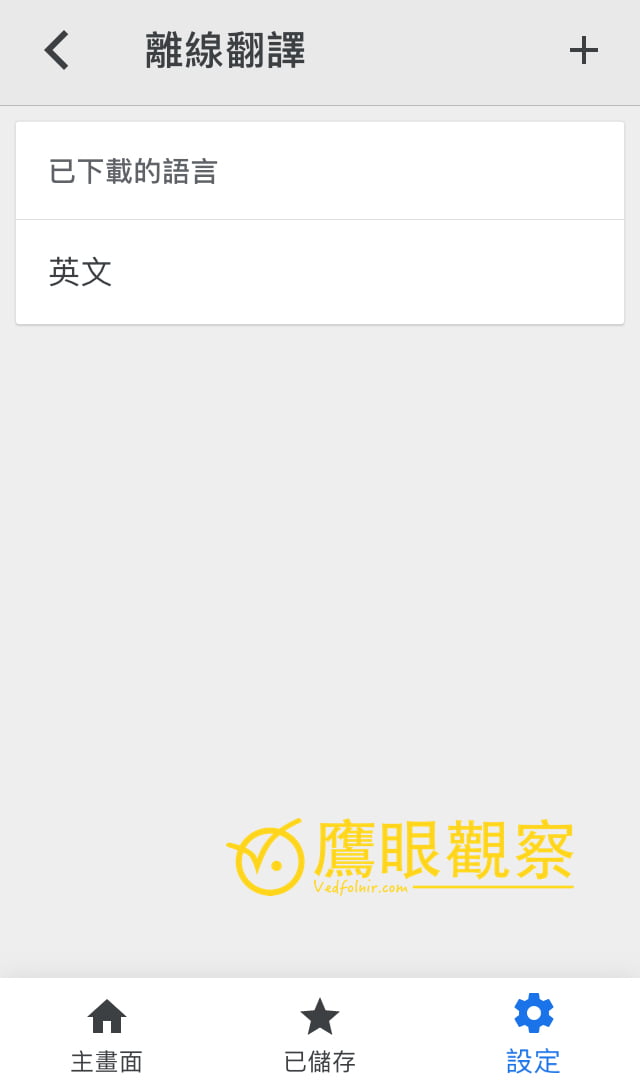
Figure 1: The downloaded language list for Google Translate’s offline translation.
Even the dozens of multilingual real-time two-way interpreter devices that Japanese merchants specially developed for the Tokyo Olympics have recognition accuracy similar to phones, and likewise require WiFi shared from your phone to provide the best translation service.
So since you need your phone connected to the internet to provide good two-way translation quality anyway, there’s absolutely no need to stack devices like building extra floors and carry an extra interpreter device that wastes your phone’s battery 🔋—this is the perfect example of spending money to make yourself suffer.
The Language Learning Effect of Translation Pens (Scanning Translators) and Interpreter Devices
Moving from translation tools to learning English, Japanese, Spanish, or other foreign languages, the learning effect can be roughly ranked as follows (from best to worst):
- Paper dictionaries;
- Digital translators (currently dominated in Taiwan by the long-established “Wu Di series products”);
- Desktop computers and laptops (web-based translation tools or translation software);
- Smartphones and tablets (translation apps);
- Scanning translation pens (abbreviated as scanning translators) / interpreter devices.
A professor friend who self-taught multiple foreign languages once said his learning method was very monotonous (but we’ve seen excellent results from him): buy a dictionary, then memorize vocabulary every day, crossing out the words he’d memorized with a marker.
Well, unless you’re a language-learning genius, there’s no shortcut other than putting in hard work to expand the vocabulary in your brain. (The image-based language learning methods commonly seen in radio and TV ads are another money-wasting trap teaching material—we’ll discuss that another time.)
Even if you really don’t like flipping through dictionaries, simply typing English queries into a smartphone, computer, or traditional digital translator with your fingers is definitely more effective for brain memory than using only a scanning translation pen (scanning translator), and the key point is that scanning pens don’t really save you much time.
Although using a scanning translator (scanning pen) seems convenient—just pick it up and scan any unfamiliar word to get the translated text—the reality is not so simple.
Looking first at the purely physical level: finding a translation pen, turning it on, locating the unfamiliar word on paper, gripping the device steadily with your fingers, carefully scanning the word, scanning multiple times if you miss or the position is hard to scan, and adjusting your visual focus to the tiny screen of the translation pen to see the result—all these bits and pieces add up to a considerable amount of time.
In contrast, your phone is often right by your side (maybe you’re holding it right now). Just turn on the power, open the translation app, and type in the letters of the unfamiliar word to get the translation result—definitely much faster than a translation pen.
Finally, let’s discuss why using scanning translation pens (scanning translators) and interpreter devices makes language learning worse.
First, using such lazy tools prevents you from forming effective memory anchors—you simply translate and forget. In that case, you might as well throw the entire article into Google Translate for full-text translation—why waste money buying a useless translation pen?
Second is the point I value most: translation
Support Independent Perspectives & In-Depth Insights
Every thoughtful analysis and candid critique comes from our dedication to truth and quality. We choose not to follow sensational algorithms or clickbait headlines.
Sustaining independent research requires reader support. Make a one-time or monthly contribution, securely processed by Google.
Payments secured by Google · Manage or cancel anytime in your Google Account

Comments