

When deploying a website, a common headache is changing hosting servers and IP addresses only for DNS server records to fail to update in sync, leaving the domain name unlinked to the new server IP.
In this scenario, two problems arise: web visitors cannot load your website properly, and you may be blocked from issuing free SSL security certificates or integrating external web APIs because your domain is flagged as anomalous.
As shown below, using specialized diagnostic tools (such as DNSChecker) to inspect your domain’s DNS status reveals whether it resolves successfully across global DNS servers.
In my test, my website returned “Not Resolved” at server nodes in Canoga Park, California and Mountain View, California in the United States (the latter is the headquarters of Google and forms the backbone for many web services, making it a critical issue).
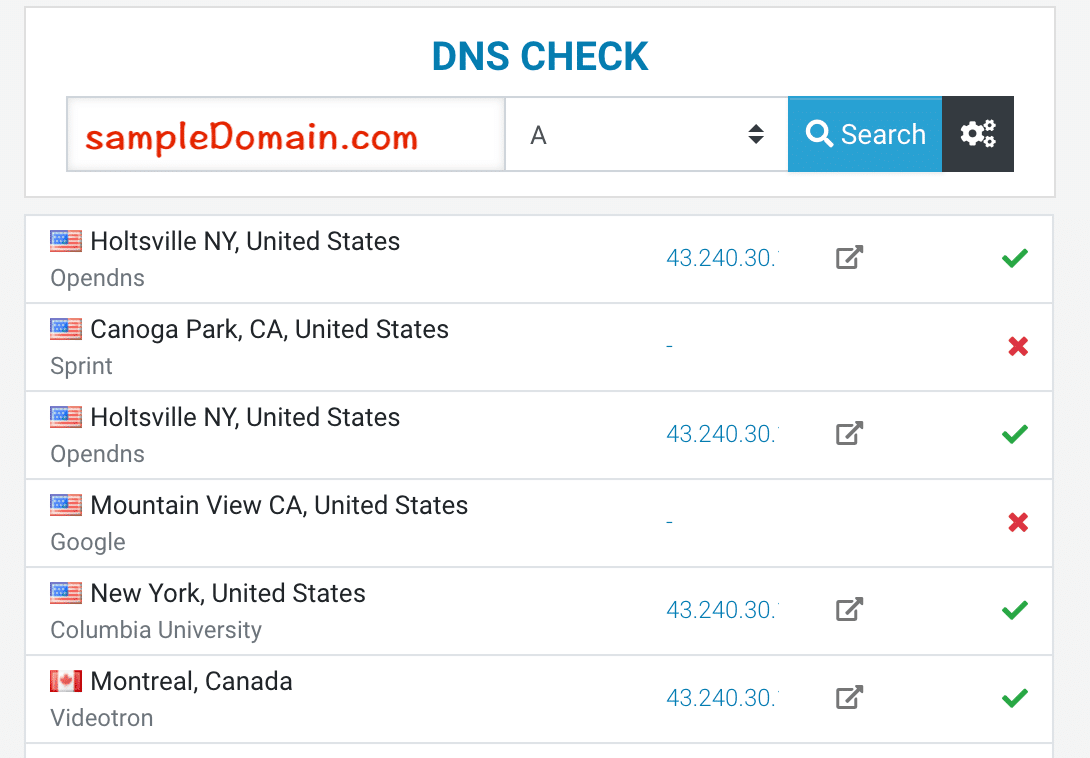
DNS Resolution Check Status
Generally, DNS propagation is handled automatically by recursive servers worldwide, taking at most 24 to 48 hours. However, methods exist to accelerate global DNS updates—especially useful when public DNS services like Google DNS return stale or unresolved errors.
Major public DNS providers offer self-service cache purging tools for developers:
- Google Public DNS calls it “Flush Cache”.
- Cloudflare 1.1.1.1 calls it “Purge Cache”.
- OpenDNS provides “CacheCheck”.
By flushing outdated domain and IP mapping cache records across these primary recursive resolvers, you trigger immediate re-resolution and accelerate global propagation. If your site experiences persistent DNS delays after migration, give manual cache purging a try!
Related Reading
Support Independent Perspectives & In-Depth Insights
Every thoughtful analysis and candid critique comes from our dedication to truth and quality. We choose not to follow sensational algorithms or clickbait headlines.
Sustaining independent research requires reader support. Make a one-time or monthly contribution, securely processed by Google.
Payments secured by Google · Manage or cancel anytime in your Google Account




Comments