

CyberPanel is an open-source web hosting control panel that uses OpenLiteSpeed Web Server (LSWS for short) as its web server.
CyberPanel provides a simple and easy-to-use web interface that lets users conveniently manage their web hosting and websites, and offers many useful features and tools.
If you use CyberPanel for your website and find that OpenLiteSpeed cannot start its service, this will cause your website to be unable to open and go offline.
Please refer to Figure 1 below. No matter how you restart the OpenLiteSpeed service, even if a success message appears, it still will not start automatically.
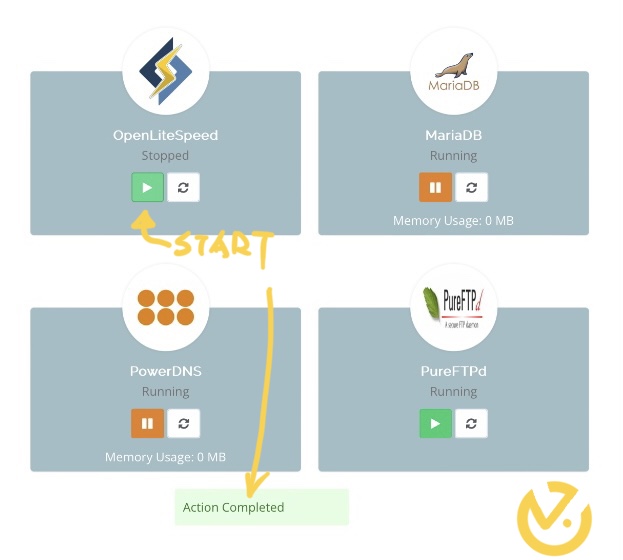
Figure 1, CyberPanel service status.
Solution: Reinstall LSWS.
Please refer to the following two lines of commands. Just first move to the misc directory under LSWS and run the reinstall command, and it should solve the problem of LSWS not responding.
cd /us/local/lsws/admin/misc ./rc-inst.sh
Note: The misc directory has different locations in different applications (for example: openlitespeed/admin/misc), so you may need to find it yourself.
After a successful installation, the system will prompt the success message “[OK] Ishttpd.service has been successfully installed!”.
Support Independent Perspectives & In-Depth Insights
Every thoughtful analysis and candid critique comes from our dedication to truth and quality. We choose not to follow sensational algorithms or clickbait headlines.
Sustaining independent research requires reader support. Make a one-time or monthly contribution, securely processed by Google.
Payments secured by Google · Manage or cancel anytime in your Google Account



Comments