

The Vedfolnir team has recently been weighing whether to take the next step and give our infrastructure a hardware upgrade. Upgrading essentially translates to investing more funds into our web hosting provider. Yet two nagging questions have remained on my mind: does our website architecture truly need an upgrade (and if so, by how much will performance genuinely improve), and if we do upgrade, which tier should we choose?
The first question isn’t easily solved through code profiling alone, and Bluehost’s Shared Web Hosting Service lacks granular resource diagnostics. Even though there are numerous website speed benchmarking tools online, it remains difficult to verify whether an upgrade will yield noticeable, real-world gains.
This presents two major challenges. First, a site owner must pay to upgrade before making real-world comparisons, but downgrading is rarely seamless, creating hesitation. Second, speed benchmarking nodes are typically located on overseas servers; their recorded speeds reflect latency from their remote probe locations rather than where the site owner or their primary target audience actually resides, significantly diminishing the practical value of the test metrics. For example, if a test node happens to reside in the exact same datacenter or host server as our site, test response times will predictably look blazing fast within milliseconds.
Furthermore, while shared hosting providers boast “unlimited” resources, it’s often similar to cable broadband advertisements claiming unthrottled bandwidth—a marketing exaggeration. This raises an obvious question: what is the true, practical capacity of shared hosting today?
Searching online yields very few concrete benchmarks. However, based on my firsthand operating experience, for the majority of standalone bloggers, Bluehost’s second-tier Shared Plus plan offers an exceptional price-to-performance ratio (see Figure 1 below).
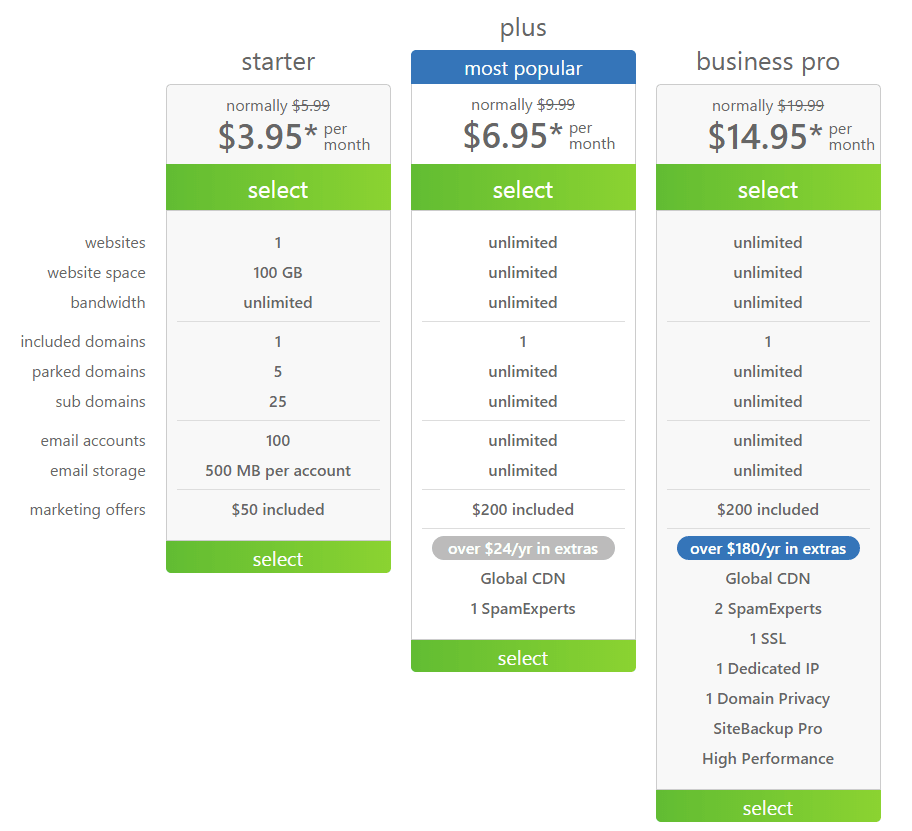 Figure 1: Shared Hosting tier breakdown.
In practice, even with more than 50 concurrent online visitors, responsiveness holds up well with minimal latency. However, this may simply mean our site’s peak traffic happens to coincide with the off-peak hours of “neighbors” co-located on the same physical server. If server-mate traffic peaks align, system sluggishness is inevitable, and I still occasionally observe transient slowdowns.
Setting aside those reservations and focusing strictly on the upgrade roadmap (or guidance for newcomers choosing hosting resources), four distinct paths exist beyond Shared Plus:
Bluehost Upgrade & New Hosting Tier Breakdown
- Shared Business Pro: The highest tier of shared web hosting, offering supposedly higher-performance resources. Its core differentiators include a dedicated IP address, PositiveSSL certificate service, and domain privacy protection.
- Virtual Private Server (VPS Hosting): Partitions a physical server’s resources into isolated virtual machines (typically around ten). Each container functions as an independent server with dedicated resource quotas. For instance, the Standard plan provides 2 CPU cores, 2 GB RAM, 30 GB storage, and 1 TB bandwidth.
- Dedicated Server: The most expensive tier, providing a completely standalone physical machine suited for enterprise operations or high-velocity startups.
- Optimized Hosting for WordPress (OHWP): Long considered a premier hosting partner by the WordPress community, Bluehost introduced VPS instances specifically tuned for WordPress. As shown in Figure 2, this product line offers four tiers: Blogger (100 million monthly visits), Professional (300 million monthly visits), Business (600 million monthly visits), and Enterprise (unlimited monthly visits). The entry-level Blogger plan includes 2 GB RAM, 60 GB storage, 1 TB bandwidth, 1 dedicated IP, and 1 free domain—closely mirroring a standard VPS instance. In essence, Bluehost markets these as specialized WordPress VPS plans.
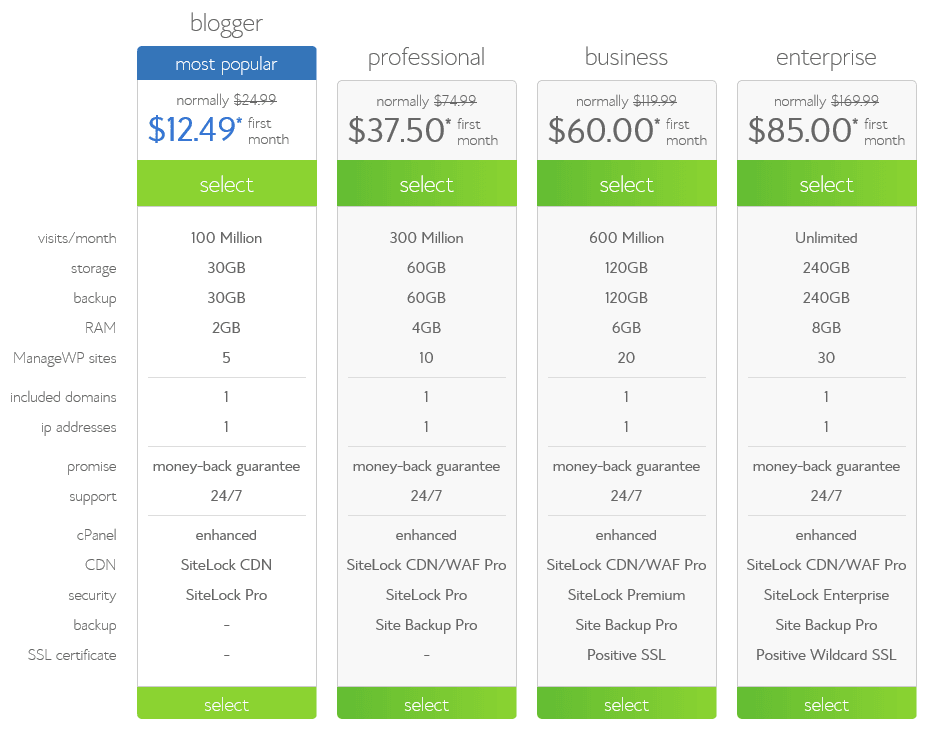 Figure 2: Optimized Hosting for WordPress tier breakdown.
Among these four choices, setting Dedicated Servers aside, Shared Business Pro, Optimized Hosting for WordPress, and VPS Hosting all represent viable candidates for bloggers and web developers. VPS is suited for medium-to-large websites with corresponding budgets, serving as the underlying architecture for numerous large-scale media sites. As your site expands, this is the natural next destination.
However, for sites maintaining between 200,000 and 500,000 monthly visitors, I recommend deciding between Shared Business Pro and Optimized Hosting for WordPress (Blogger). Both hover in a comparable price range of roughly $20 USD per month, making them direct competitors in cost and scope.
Their main distinction is that Business Pro bundles Domain Privacy Protection and an SSL Certificate, which would cost around $70 USD annually if purchased separately, giving Business Pro a clear cost-efficiency advantage.
Conversely, Optimized Hosting for WordPress provides transparent performance metrics and offers four progressive tiers that scale alongside your site’s audience. (Because its pricing and specs closely resemble VPS, the primary value is an isolated environment dedicated solely to WordPress, eliminating noisy neighbors running heavy custom applications.)
In addition, Business Pro remains shared web hosting, accommodating unlimited databases and websites. For early-stage startups experimenting with multiple projects and prototypes, this provides greater flexibility for diverse deployments.
Meanwhile, Optimized Hosting for WordPress is purpose-built for WordPress, making it the superior choice for professional bloggers dedicated strictly to content publishing. Furthermore, outbound emails from this plan can be routed natively through your custom domain name (e.g., [email protected]), ensuring a professional brand experience compared to default shared server mail headers.
Looking at drawbacks: Business Pro is still shared hosting at its core, meaning server performance ceilings remain somewhat opaque. Growing websites may quickly hit resource throttles as features multiply, requiring another disruptive migration rather than a simple hardware slider bump. Furthermore, while shared hosting touts unlimited traffic and websites, it strictly enforces inode (file count) caps! Exceeding 50,000 files or 2,000 directories will quickly trigger system warnings, throttling, or mandatory upgrade demands.
Optimized Hosting for WordPress functions as a double-edged sword: while tailored for WordPress, it is restricted to WordPress, preventing the installation of alternative CMS or forum scripts like Joomla or phpBB. In addition, its fixed SSD storage limits prevent using the server as a catch-all repository for large media assets the way shared plans often permit.
Finally, note that OHWP bundles the SiteLock CDN/WAF service, which can conflict with previously configured Cloudflare setups. If you have already integrated Cloudflare, choose one or the other to prevent unexpected routing errors (Bluehost recommends SiteLock CDN/WAF for its integrated application firewall capabilities).
Conclusion
We have reviewed Shared Business Pro, VPS Hosting, Dedicated Servers, and Optimized Hosting for WordPress. Identifying the ideal option ultimately comes down to analyzing your application’s actual resource bottlenecks.
- For small-to-medium personal blogs, Shared Plus Hosting offers unbeatable value for money[2].
- For the next step up, weigh Business Pro against OHWP. If you prioritize streamlined scaling for a dedicated content platform, OHWP is your path forward. If you prefer versatile, budget-friendly flexibility with multiple experimental sites, Business Pro is the logical fit.
- As traffic scales further, step up to VPS Hosting, followed by Dedicated Servers.
Web hosting is truly an endless rabbit hole for your wallet (the ultimate takeaway).
Further Reading
- Official Provider: Bluehost Official Website.
- Web analyst Ryan Jacob observed that while Business Pro boasts superior paper specs to Shared Plus, Shared Plus users tend to be casual, low-overhead site owners. Consequently, available real-world performance on Shared Plus may not necessarily trail Business Pro. Conversely, users willing to pay extra for Pro plans are often tech-savvy operators running resource-heavy workloads, potentially competing more aggressively for shared host resources.
Support Independent Perspectives & In-Depth Insights
Every thoughtful analysis and candid critique comes from our dedication to truth and quality. We choose not to follow sensational algorithms or clickbait headlines.
Sustaining independent research requires reader support. Make a one-time or monthly contribution, securely processed by Google.
Payments secured by Google · Manage or cancel anytime in your Google Account



Comments